

Documentation Index

Fetch the complete documentation index at: https://docs.omni.co/llms.txt

Use this file to discover all available pages before exploring further.

The code for these examples can be used in a Markdown column to combine a user’s details—like their name, email, and an avatar—into a single table column. For each example, select the column you want to format in the table visualization, set Display as to Markdown, and add the Markdown template and CSS. The fields are referenced using Mustache syntax; replace them with your own fields.

Name and email

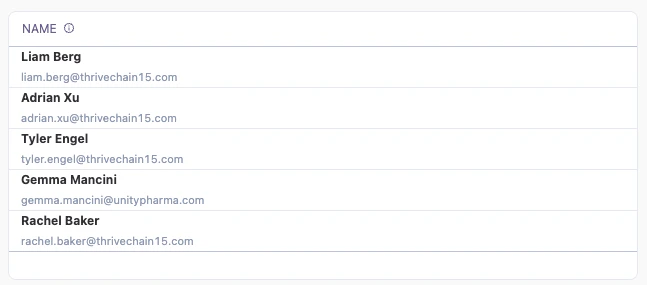
This style stacks a bold name over a smaller, muted email in a single column. A table column showing each person's name in bold with their email address in smaller gray text below
Setup

This example references the name and email fields from the saas__users_detailed view. Because the email is rendered inside the name column, you can hide the original email column so it doesn’t appear twice in the table.
ColNameDescription or formulaPurpose
ANameUser’s name fieldShown as the bold primary text
BEmailUser’s email fieldShown as the muted subtext

Example code

Markdown template:
**{{saas__users_detailed.name.value}}**
<br>
<div style="color:#94a3b8;font-size:11px;">{{saas__users_detailed.email.value}}</div>
CSS styles: No custom CSS is required for this example, so you can leave the CSS style field empty.

Avatar with initials

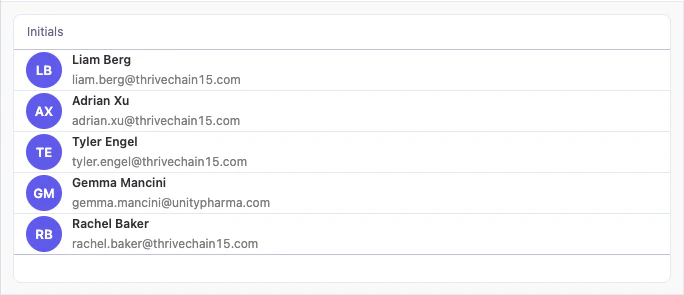
This style adds a circular avatar showing each user’s initials next to their name and email. A table column showing a colored circular avatar with each user's initials, next to their name in bold and email in smaller gray text
Setup

This example adds a calculation that extracts the user’s initials from their name—the first letter of the first name and the first letter of the last name, where column A is the name field. Set the initials calculation column to Display as Markdown, then hide the original name and email columns so only the combined profile renders. The Markdown template references the initials calculation as {{calc_1.value}}. If your calculation has a different name, update the reference to match.
ColNameDescription or formulaPurpose
ANameUser’s name fieldBold primary text; source for the initials
BEmailUser’s email fieldMuted subtext
CInitials (calc_1)=LEFT(A5, 1) & MID(A5, (FIND(" ", A5) + 1), 1)First and last initial shown in the avatar

Example code

Markdown template:
<div style="display:flex; align-items:center; gap:10px; white-space:nowrap;">
  <div class="avatar-circle" style="display:flex; align-items:center; justify-content:center;">
    {{calc_1.value}}
  </div>
  <span style="display:flex; flex-direction:column;">
    <div class="avatar-name">{{saas__users_detailed.name.value}}</div>
    <div class="avatar-email">{{saas__users_detailed.email.value}}</div>
  </span>
</div>
CSS styles:
<style>
  .avatar-row {
    display: flex;
    align-items: center;
    gap: 10px;
    white-space: nowrap;
  }

  .avatar-circle {
    width: 36px;
    height: 36px;
    min-width: 36px;
    border-radius: 50%;
    background: #6366f1;
    color: white;
    font-size: 13px;
    font-weight: 600;
    display: flex;
    align-items: center;
    justify-content: center;
    flex-shrink: 0;
  }

  .avatar-text {
    display: flex;
    flex-direction: column;
    line-height: 1.3;
  }

  .avatar-name {
    font-weight: 600;
  }

  .avatar-email {
    font-size: 12px;
    color: #888;
  }
</style>