

iframe custom visualizations
One way to create a custom visualization is to leverage an iframe tag in a Markdown tiles. The data in results + postMessages will render your custom iframes and provide a ton of flexibility. For example:<iframe src="https://example.html"></iframe>
Vega-Lite visualizations
Many of Omni’s charts are backed by Vega-Lite, which is a JSON-based spec for visualizations. You can directly edit a chart’s code to customize it beyond what Omni provides out of the box. If you are unfamiliar with Vega-Lite, check out the Vega-Lite documentation before perusing the example gallery.Accessing the advanced editor
Before opening the advanced editor, note that:
- The existing visualization will break. To experiment with the advanced editor, create a copy of the query so you don’t lose your work.
- Drill functionality will be unavailable
-
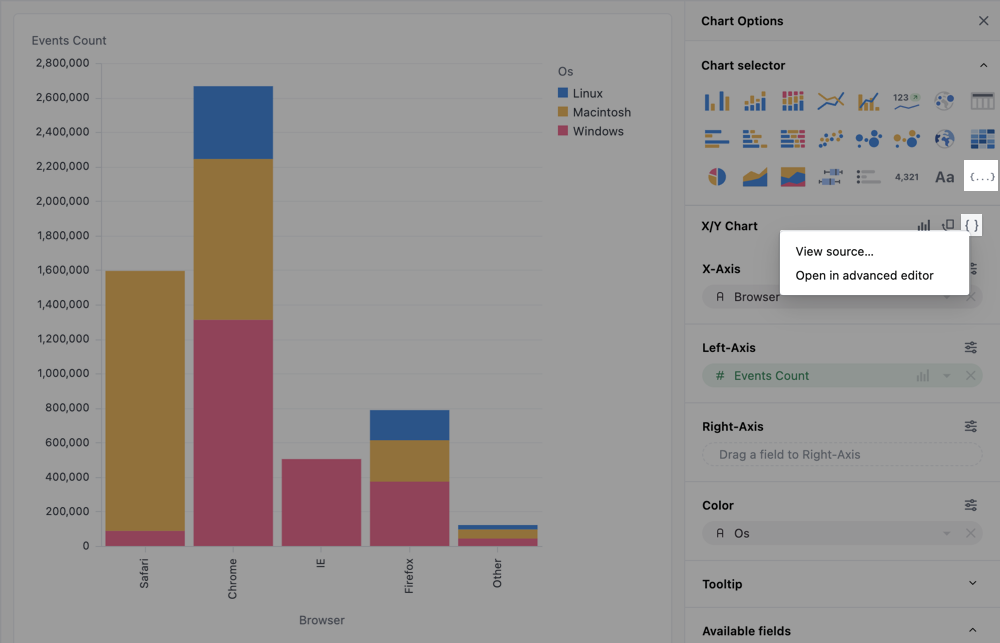
In the Chart selector - Click the
{ ... }icon to select the Vega-Lite code option. This will open the advanced editor, but without any pre-populated Vega code. This can be useful to start from scratch, such as with an example from Vega or one from the example gallery on this page. -
In the chart editor - For any chart powered by Vega-Lite, there will be a
{ }icon in the chart editor. Clicking it will open a menu with the following options:- View source - Opens a dialog with the Vega-Lite JSON
- Convert to a Vega-Lite code chart… - Copies the current chart code and opens it in the Advanced editor
Referencing data in the advanced editor
To use data from the results query, you’ll need to reference the field by its view and field name as they are defined in the model. This will look likeview_name\\.field_name in the editor.
The double forward-slashes (\\) are included because periods and brackets must be escaped. For example:
| Omni object | Vega object |
|---|---|
users.id | users\\.id |
users.age | users\\.age |
users.created_at | users\\.created_at |
users.created_at[date] | users\\.created_at\\[date\\] |
users.created_at[month] | users\\.created_at\\[month\\] |
id | id |
id would only occur from a raw SQL query as Omni will alias with the view.
Saving and resetting changes
Custom visualizations must be manually saved. While the visualization will update as you edit, the code is not auto-saved. Periodically click the Save button to save your changes. To remove all edits made to the code, click Reset. This will revert the code to its original version.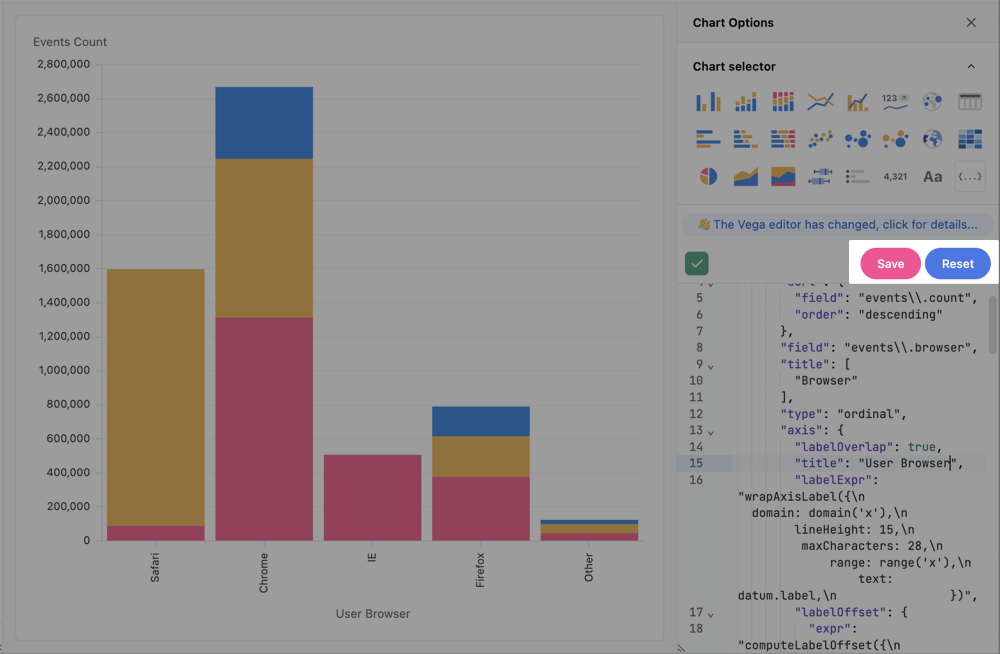
Examples
In addition to custom Vega-Lite visualizations, you can also build custom visualizations using HTML, CSS and Markdown. Check out the Markdown visualization examples for some inspiration.
US state map
Omni recommends using the native map visualization for this visualization.
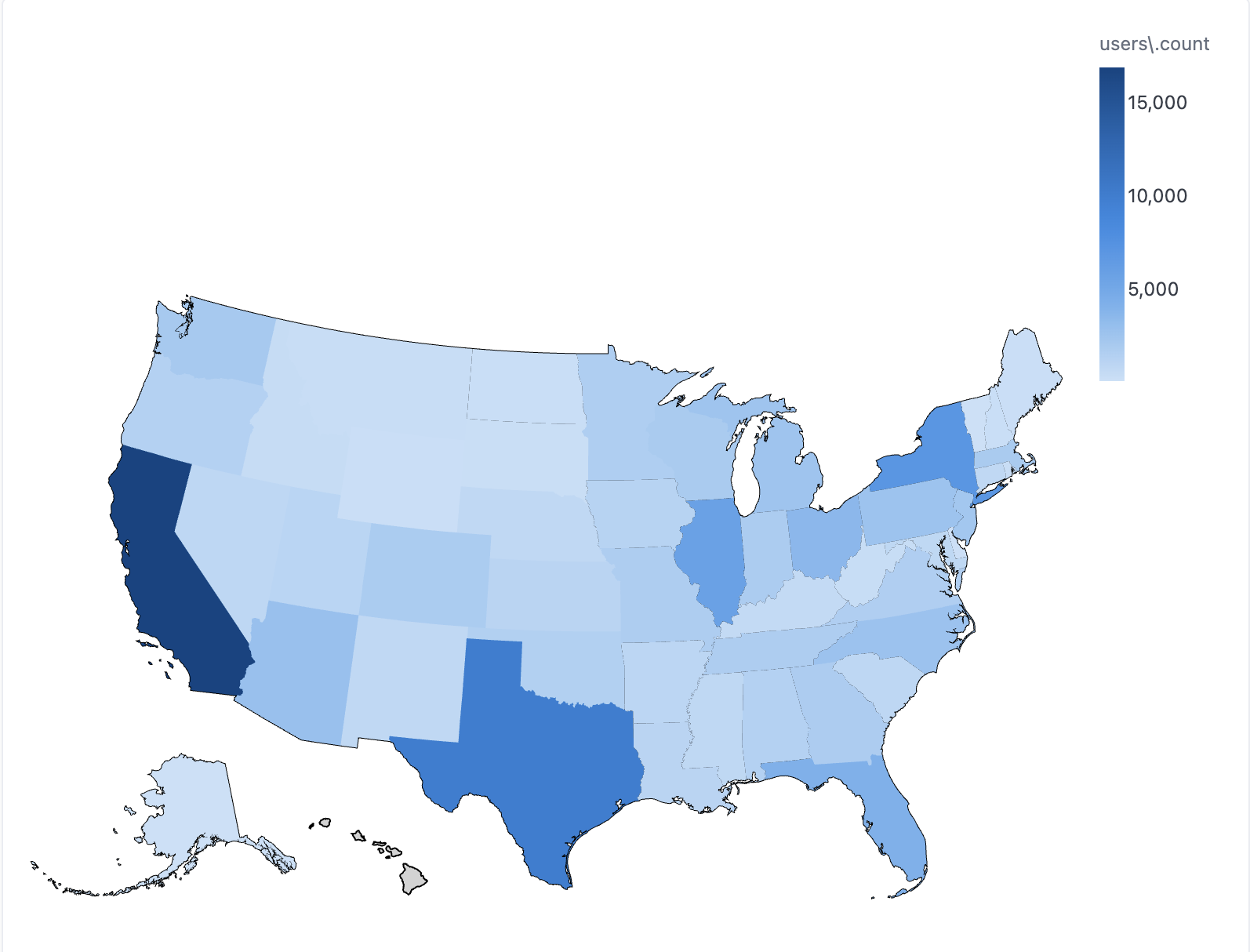
users.state- Full-length state names are required for this visualization. To remove the legend, add"legend":nullwithincolor{...users.user_count
Visualization code
{
  "layer": [
    {
      "data": {
        "url": "https://cdn.jsdelivr.net/npm/us-atlas@3/states-10m.json",
        "format": {
          "type": "topojson",
          "feature": "states"
        }
      },
      "mark": {
        "fill": "lightgray",
        "type": "geoshape",
        "stroke": "black"
      }
    },
    {
      "mark": "geoshape",
      "width": "container",
      "height": "container",
      "encoding": {
        "href": {
          "type": "nominal",
          "field": "url"
        },
        "color": {
          "type": "quantitative",
          "field": "COLOR"
        },
        "shape": {
          "type": "geojson",
          "field": "geo"
        },
        "tooltip": [
          {
            "field": "STATE",
            "title": "State"
          },
          {
            "type": "quantitative",
            "field": "COLOR",
            "title": "User Count"
          }
        ]
      }
    }
  ],
  "width": "container",
  "height": "container",
  "transform": [
    {
      "as": "STATE",
      "calculate": "datum['your_view.your_state']"
    },
    {
      "as": "COLOR",
      "calculate": "datum['your_view.your_measure']"
    },
    {
      "as": "geo",
      "from": {
        "key": "properties.name",
        "data": {
          "url": "https://cdn.jsdelivr.net/npm/us-atlas@3/states-10m.json",
          "format": {
            "type": "topojson",
            "feature": "states"
          }
        }
      },
      "lookup": "STATE"
    },
    {
      "as": "url",
      "calculate": "'https://sandbox.proto.exploreomni.com/w/0a494c7e-3d8a-4f31-aa53-cb8d1e62f4fa/drill?ephemeral=DyXjRBEJ%2CRveZe1I6%2CZUK24UVr%2CHehug3WH%2CbuG0igrs%2CcNuuSY8a%2CnOHD__EL%2C3Dgpwy5c%2C0ta1FE8v%2CSsbC6Jdf&field=users.count&filters=%7B%7D&miniUuid=ZUK24UVr&row=%7B%22users.state%22%3A%22' + datum['users\\.state'] + '%22%2C%22state_id.state_id%22%3A%221%22%2C%22users.count%22%3A%221625%22%7D' "
    }
  ],
  "projection": {
    "type": "albersUsa"
  }
}
US map with latitude and longitude
Omni recommends using the native map visualization for this visualization.

users.zipusers.zip_first_digitusers.latitude_averageusers.longitude_averageusers.user_count
Visualization code
{
  "layer": [
    {
      "data": {
        "url": "https://vega.github.io/editor/data/us-10m.json",
        "format": {
          "type": "topojson",
          "feature": "states"
        }
      },
      "mark": {
        "fill": "lightgray",
        "type": "geoshape",
        "stroke": "white"
      }
    },
    {
      "transform": [
        {
          "as": "LATITUDE",
          "calculate": "datum['users\\.latitude_average']"
        },
        {
          "as": "LONGITUDE",
          "calculate": "datum['users\\.longitude_average']"
        },
        {
          "as": "COLOR",
          "calculate": "datum['calc_1']"
        }
      ],
      "mark": {
        "type": "circle",
        "tooltip": true
      },
      "encoding": {
        "size": {
          "value": 5
        },
        "color": {
          "type": "nominal",
          "field": "COLOR",
          "scale": {
            "scheme": "magma"
          },
          "legend": null
        },
        "latitude": {
          "type": "quantitative",
          "field": "LATITUDE"
        },
        "longitude": {
          "type": "quantitative",
          "field": "LONGITUDE"
        }
      }
    }
  ],
  "width": "container",
  "height": "container",
  "projection": {
    "type": "albersUsa"
  }
}
US map - zip code choropleth
Omni recommends using the native map visualization for this visualization.
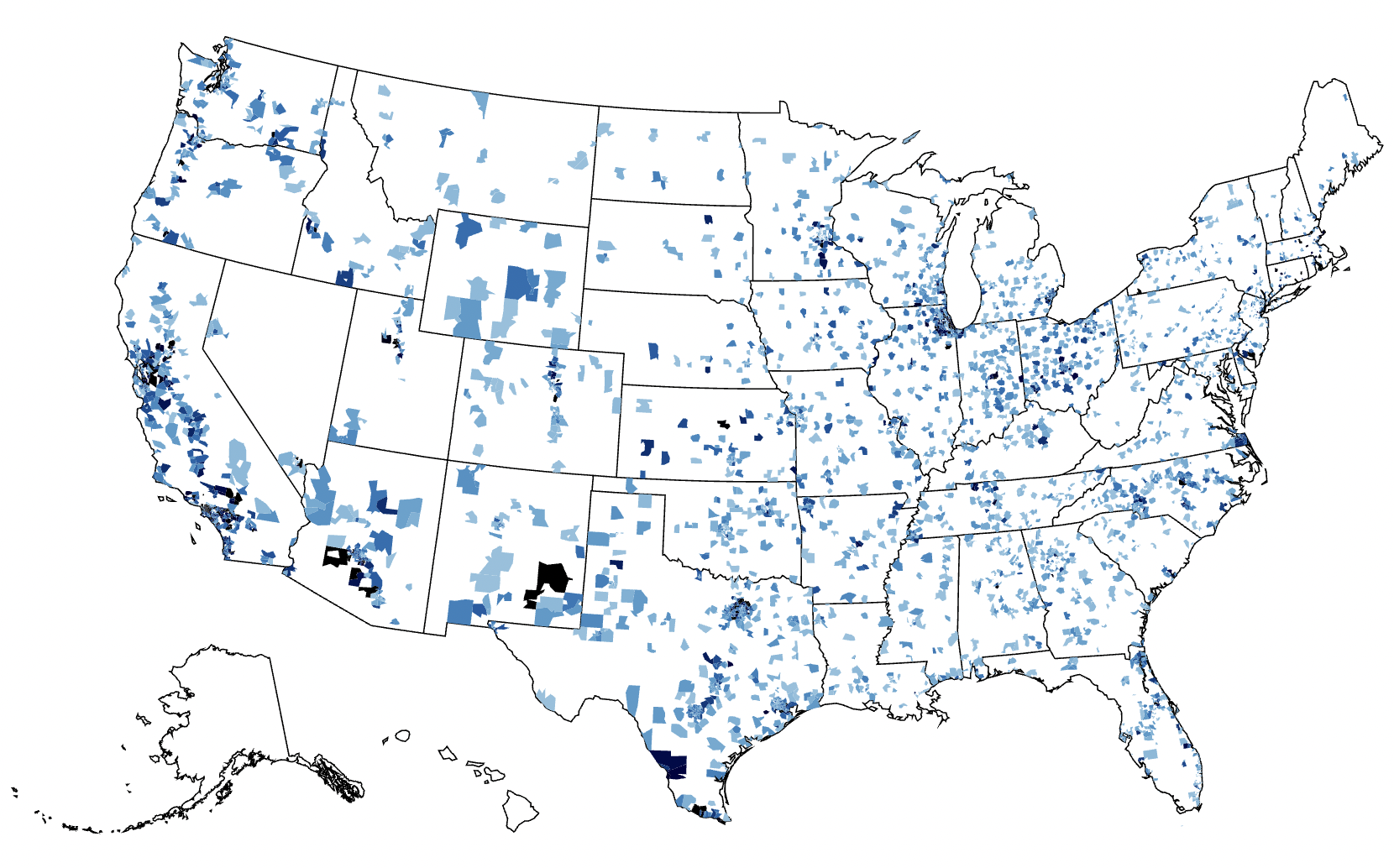
users.zipusers.user_count
Visualization code
{
  "layer": [
    {
      "data": {
        "url": "https://vega.github.io/editor/data/us-10m.json",
        "format": {
          "type": "topojson",
          "feature": "states"
        }
      },
      "mark": {
        "fill": "white",
        "type": "geoshape",
        "stroke": "black"
      }
    },
    {
      "mark": "geoshape",
      "width": "container",
      "height": "container",
      "encoding": {
        "color": {
          "type": "quantitative",
          "field": "users\\.count",
          "scale": {
            "domain": [
              0,
              20
            ],
            "scheme": "blues"
          },
          "legend": null
        },
        "shape": {
          "type": "geojson",
          "field": "geo"
        },
        "tooltip": [
          {
            "field": "ZIP"
          },
          {
            "type": "quantitative",
            "field": "COLOR",
            "title": "Users Count"
          }
        ]
      }
    }
  ],
  "transform": [
    {
      "as": "ZIP",
      "calculate": "datum['users.zip']"
    },
    {
      "as": "COLOR",
      "calculate": "datum['users.count']"
    },
    {
      "as": "geo",
      "from": {
        "key": "properties.zip",
        "data": {
          "url": "https://gist.githubusercontent.com/jefffriesen/6892860/raw/e1f82336dde8de0539a7bac7b8bc60a23d0ad788/zips_us_topo.json",
          "format": {
            "type": "topojson",
            "feature": "zip_codes_for_the_usa"
          }
        }
      },
      "lookup": "ZIP"
    }
  ],
  "projection": {
    "type": "albersUsa"
  }
}
US map with labeled points
Omni recommends using the native map visualization for standard geographic plotting. However, if you need to add labels directly to your map marks, you will need to use a custom Vega-Lite visualization to do so.
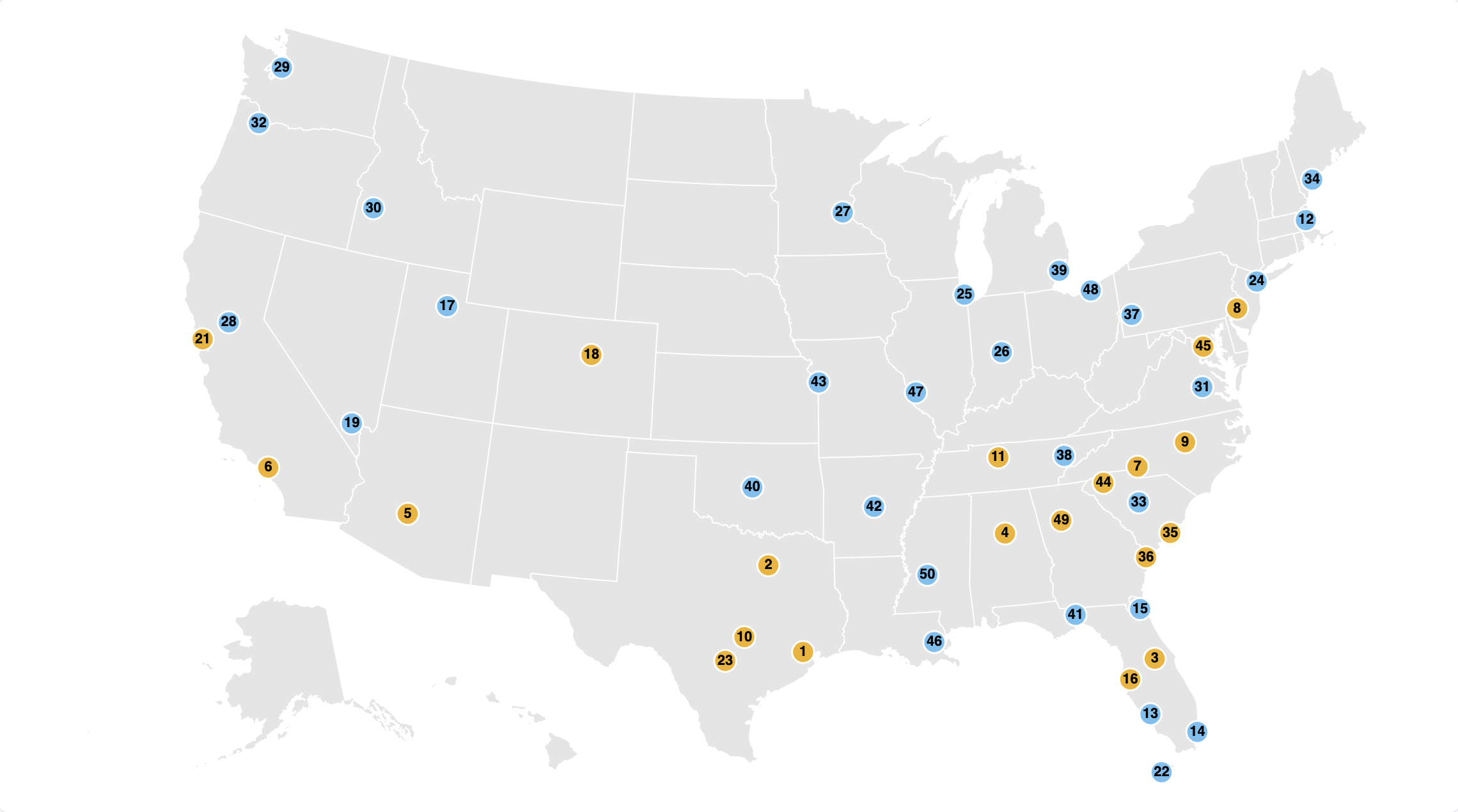
albersUsa projection to automatically arrange the states appropriately.
Query fields:
-
view_name.latitude- The latitude coordinate of the point. -
view_name.longitude- The longitude coordinate (must be a negative number for the albersUsa projection). -
view_name.rank- The text value to display inside the map marker. -
view_name.category- The categorical field used to assign colors to the points. -
view_name.city- Additional detail for the hover tooltip. -
view_name.state- Additional detail for the hover tooltip.
Visualization code
{
  "$schema": "https://vega.github.io/schema/vega-lite/v6.json",
  "data": { "name": "query" },
  "width": "container",
  "height": "container",
  "projection": { "type": "albersUsa" },
  "layer": [
    {
      "data": {
        "url": "https://cdn.jsdelivr.net/npm/us-atlas@3/states-10m.json",
        "format": { "type": "topojson", "feature": "states" }
      },
      "mark": { "type": "geoshape", "fill": "#e5e5e5", "stroke": "white", "strokeWidth": 1 }
    },
    {
      "transform": [
        { "calculate": "toNumber(datum['view_name.latitude'])", "as": "LATITUDE" },
        { "calculate": "toNumber(datum['view_name.longitude'])", "as": "LONGITUDE" },
        { "calculate": "datum['view_name.city']", "as": "CITY" },
        { "calculate": "datum['view_name.state']", "as": "STATE" },
        { "calculate": "datum['view_name.rank']", "as": "RANK" },
        { "calculate": "datum['view_name.category']", "as": "COLOR_CAT" },
        { "filter": "isValid(datum.LATITUDE) && isValid(datum.LONGITUDE)" }
      ],
      "encoding": {
        "longitude": { "field": "LONGITUDE", "type": "quantitative" },
        "latitude": { "field": "LATITUDE", "type": "quantitative" },
        "tooltip": [
          { "field": "RANK", "type": "nominal", "title": "Rank" },
          { "field": "CITY", "type": "nominal", "title": "City" },
          { "field": "STATE", "type": "nominal", "title": "State" }
        ]
      },
      "layer": [
        {
          "mark": { "type": "circle", "size": 300, "stroke": "white", "strokeWidth": 1.5, "opacity": 1 },
          "encoding": {
            "color": {
              "field": "COLOR_CAT",
              "type": "nominal",
              "scale": {
                "range": ["#F2B21B", "#6EC1F2"]
              },
              "legend": null
            }
          }
        },
        {
          "mark": { "type": "text", "baseline": "middle", "align": "center", "fontWeight": "bold", "fontSize": 11 },
          "encoding": {
            "text": { "field": "RANK", "type": "nominal" },
            "color": { "value": "black" }
          }
        }
      ]
    }
  ],
  "config": { "view": { "stroke": null } }
}
US state map - zip code choropleth
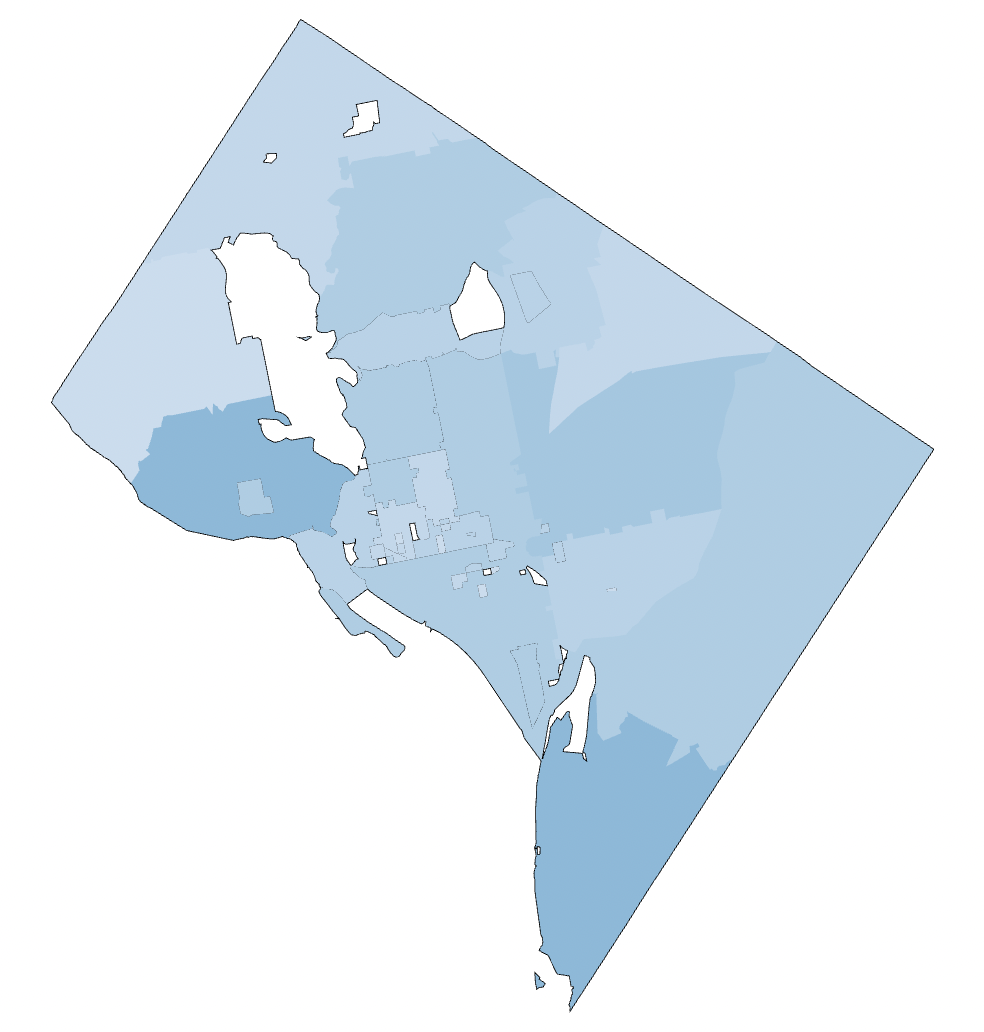
users.zipusers.user_count
Visualization code
{
  "layer": [
    {
      "data": {
        "url": "https://raw.githubusercontent.com/OpenDataDE/State-zip-code-GeoJSON/master/dc_district_of_columbia_zip_codes_geo.min.json",
        "format": {
          "property": "features"
        }
      },
      "mark": {
        "fill": "white",
        "type": "geoshape",
        "stroke": "black"
      }
    },
    {
      "mark": "geoshape",
      "width": "container",
      "height": "container",
      "encoding": {
        "color": {
          "type": "quantitative",
          "field": "users\\.count",
          "scale": {
            "domain": [
              0,
              20
            ],
            "scheme": "blues"
          },
          "legend": null
        },
        "shape": {
          "type": "geojson",
          "field": "geo"
        },
        "tooltip": [
          {
            "field": "users\\.zip"
          },
          {
            "type": "quantitative",
            "field": "users\\.count",
            "title": "Users Count"
          }
        ]
      }
    }
  ],
  "transform": [
    {
      "as": "geo",
      "from": {
        "key": "properties.ZCTA5CE10",
        "data": {
          "url": "https://raw.githubusercontent.com/OpenDataDE/State-zip-code-GeoJSON/master/dc_district_of_columbia_zip_codes_geo.min.json",
          "format": {
            "property": "features"
          }
        }
      },
      "lookup": "users\\.zip"
    }
  ],
  "projection": {
    "type": "albersUsa"
  }
}
Radial chart
A radial chart layers in exploding pie slices using the square root of the value.
products.categoryorder_items.sale_price_sum
Visualization code
{
  "layer": [
    {
      "mark": {
        "type": "arc",
        "stroke": "#fff",
        "innerRadius": 30
      }
    },
    {
      "mark": {
        "dx": 4,
        "type": "text",
        "align": "center",
        "radiusOffset": 30
      },
      "encoding": {
        "text": {
          "type": "nominal",
          "field": "COLOR"
        }
      }
    }
  ],
  "height": "container",
  "width": "container",
  "encoding": {
    "color": {
      "type": "nominal",
      "field": "SIZE",
      "legend": null
    },
    "theta": {
      "type": "quantitative",
      "field": "SIZE",
      "stack": true
    },
    "radius": {
      "field": "SIZE",
      "scale": {
        "type": "sqrt",
        "zero": true,
        "rangeMin": 20
      }
    },
    "tooltip": [
      {
        "type": "nominal",
        "field": "COLOR",
        "title": "Category"
      },
      {
        "type": "quantitative",
        "field": "SIZE",
        "title": "Sales",
        "format": ",.2f"
      }
    ]
  },
  "transform": [
    {
      "as": "COLOR",
      "calculate": "datum['products.category']"
    },
    {
      "as": "SIZE",
      "calculate": "datum['order_items.sale_price_sum']"
    }
  ]
}
Cross-filtered chart pair
This visualization aggregates the top visualization over the highlight selection. Two charts are built from the results table, stacked, and then wired together. Note: This visualization also uses pixel sizing, which isn’t ideal for use on dashboards wherecontainer should be used for sizing.
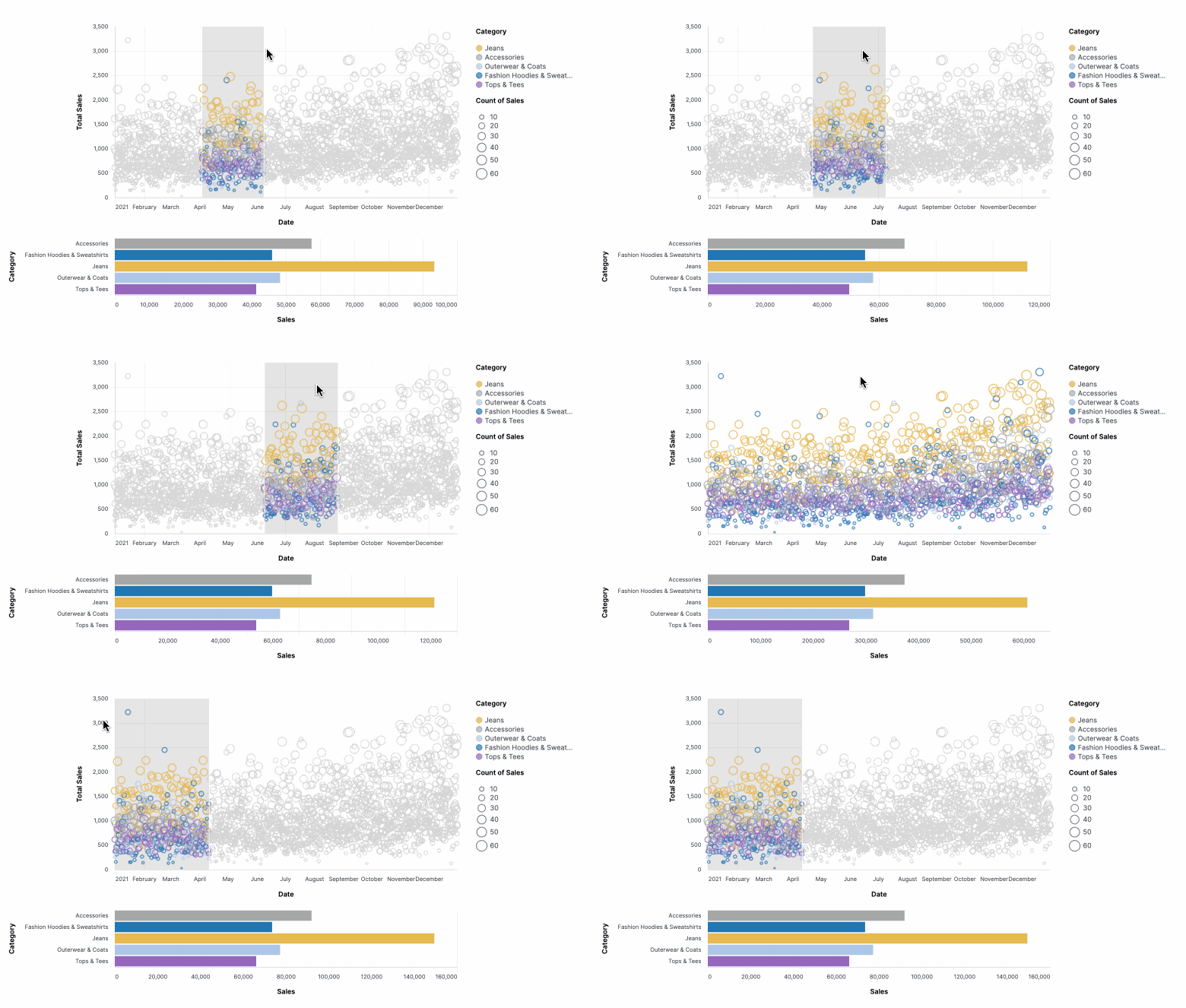
order_items.created_at[date]- Filtered to2021, the x-axisproducts.category- Filtered to five products, forming the color facetsorder_items.sale_price_sum- The y-axisorder_items.count- The bubble size
Visualization code
{
  "vconcat": [
    {
      "mark": "point",
      "width": 600,
      "height": 300,
      "params": [
        {
          "name": "brush",
          "select": {
            "type": "interval",
            "encodings": [
              "x"
            ]
          }
        }
      ],
      "encoding": {
        "x": {
          "type": "temporal",
          "field": "X_AXIS",
          "title": "Date"
        },
        "y": {
          "type": "quantitative",
          "field": "TOP_Y",
          "title": "Total Sales"
        },
        "size": {
          "type": "quantitative",
          "field": "BOTTOM_Y",
          "title": "Count of Sales"
        },
        "color": {
          "value": "lightgray",
          "condition": {
            "type": "nominal",
            "field": "COLOR",
            "param": "brush",
            "title": "Category"
          }
        }
      },
      "transform": [
        {
          "as": "X_AXIS",
          "calculate": "datum['order_items.created_at[date]']"
        },
        {
          "as": "TOP_Y",
          "calculate": "datum['order_items.sale_price_sum']"
        },
        {
          "as": "BOTTOM_Y",
          "calculate": "datum['order_items.order_count']"
        },
        {
          "as": "COLOR",
          "calculate": "datum['products.category']"
        },
        {
          "filter": {
            "param": "click"
          }
        }
      ]
    },
    {
      "mark": "bar",
      "width": 600,
      "params": [
        {
          "name": "click",
          "select": {
            "type": "point",
            "encodings": [
              "color"
            ]
          }
        }
      ],
      "encoding": {
        "x": {
          "field": "TOP_Y",
          "title": "Sales",
          "aggregate": "sum"
        },
        "y": {
          "field": "COLOR",
          "title": "Category"
        },
        "color": {
          "value": "lightgray",
          "condition": {
            "field": "COLOR",
            "param": "click"
          }
        }
      },
      "transform": [
        {
          "as": "X_AXIS",
          "calculate": "datum['order_items.created_at[date]']"
        },
        {
          "as": "TOP_Y",
          "calculate": "datum['order_items.sale_price_sum']"
        },
        {
          "as": "BOTTOM_Y",
          "calculate": "datum['order_items.order_count']"
        },
        {
          "as": "COLOR",
          "calculate": "datum['products.category']"
        },
        {
          "filter": {
            "param": "brush"
          }
        }
      ]
    }
  ]
}
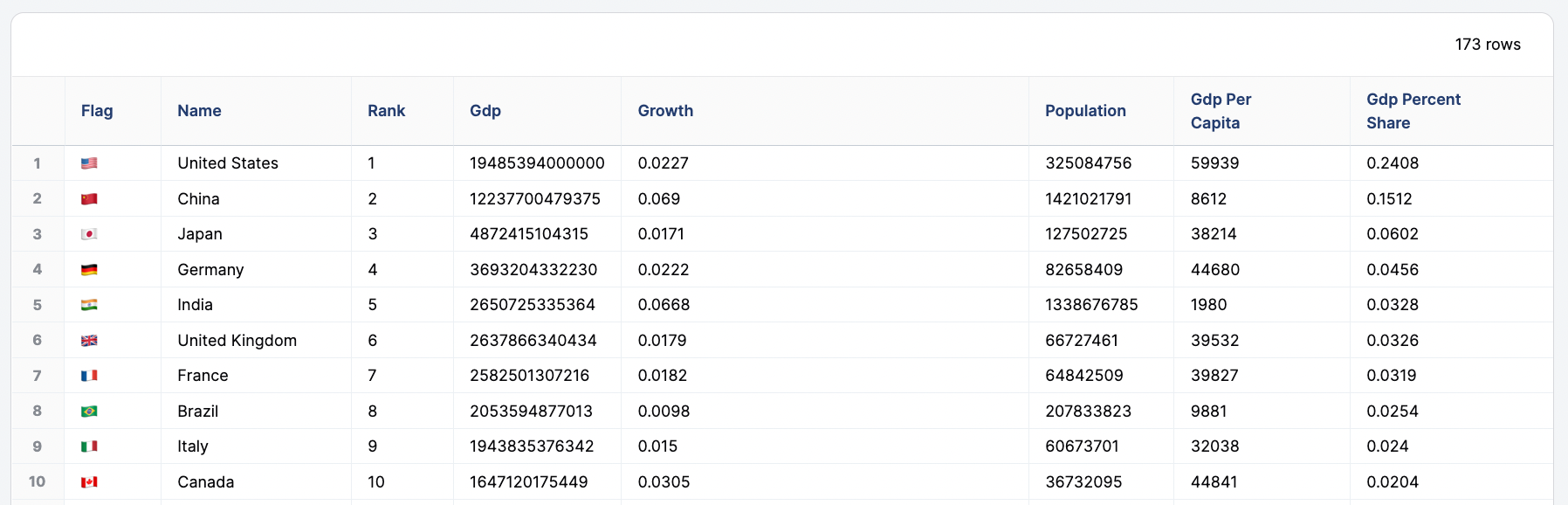
Flag marks scatterplot
This visualization won’t render if used in a delivery or alert.

flag- Flag emojiname- Country namerankgdpgrowthpopulationgdp_per_capitagdp_percent_share
Visualization code
{
  "mark": {
    "type": "text",
    "fontSize": 30
  },
  "width": "container",
  "height": "container",
  "transform": [
    {
      "as": "COUNTRY",
      "calculate": "datum['users.country']"
    },
    {
      "as": "X_AXIS",
      "calculate": "datum['users.count']"
    },
    {
      "as": "Y_AXIS",
      "calculate": "datum['order_items.sale_price_sum']"
    },
    {
      "as": "ICON",
      "calculate": "datum['calc_1']"
    }
  ],
  "encoding": {
    "x": {
      "type": "quantitative",
      "field": "X_AXIS",
      "scale": {
        "type": "log"
      }
    },
    "y": {
      "axis": {
        "labelOverlap": true
      },
      "type": "quantitative",
      "field": "Y_AXIS",
      "scale": {
        "type": "log"
      }
    },
    "text": {
      "type": "nominal",
      "field": "ICON"
    },
    "tooltip": [
      {
        "sort": null,
        "type": "nominal",
        "field": "ICON"
      },
      {
        "sort": null,
        "type": "nominal",
        "field": "name",
        "title": "COUNTRY"
      },
      {
        "sort": null,
        "type": "quantitative",
        "field": "X_AXIS"
      },
      {
        "type": "quantitative",
        "field": "Y_AXIS"
      }
    ]
  }
}
Waterfall
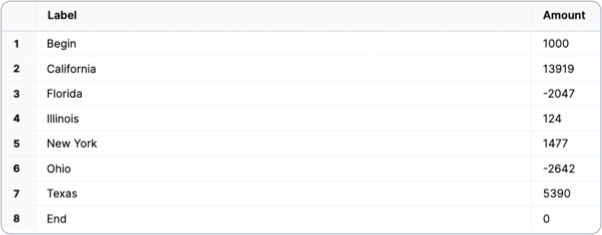
This waterfall chart requires both a custom visualization spec and some query munging. In this example, a change occurs state-by-state, at which point special bars are appended for the starting and ending values. Note: The Vega spec contains a lot of calculation. This is intended to demonstrate the ability to extend the dataset to enhance the visualization.
labelvalue
Unioned queries
The underlying data is brought together by using a SQLUNION clause.
(
  SELECT 'Begin' AS "label",
          1000 AS "amount"
   FROM users
   LIMIT 1
)
UNION ALL
(
   SELECT "users.state",
          "amount"
   FROM orders
)
UNION ALL
(
  SELECT 'End',
          0
   FROM users
   LIMIT 1
)
- Begin row: Start value. Must be named
'Begin'for label; this can be replaced with the first value from the dataset in the future. - Waterfall data set: Build with the UI and drop in the SQL, or use the Advanced Editor to write SQL. When updating to your own query data, remember to reference data with the
view_name\\.field_namesyntax. - End row: Value must be
0. Must be named'End'; this can be replaced in the future since it’s all implied.
Visualization code
{
  "layer": [
    {
      "mark": {
        "size": 45,
        "type": "bar"
      },
      "encoding": {
        "y": {
          "type": "quantitative",
          "field": "previous_sum",
          "title": "Amount"
        },
        "y2": {
          "field": "sum"
        },
        "color": {
          "value": "#93c4aa",
          "condition": [
            {
              "test": "datum.LABEL === 'Begin' || datum.LABEL === 'End'",
              "value": "#f7e0b6"
            },
            {
              "test": "datum.sum < datum.previous_sum",
              "value": "#f78a64"
            }
          ]
        }
      }
    },
    {
      "mark": {
        "type": "rule",
        "color": "#404040",
        "opacity": 1,
        "xOffset": -22.5,
        "x2Offset": 22.5,
        "strokeWidth": 2
      },
      "encoding": {
        "y": {
          "type": "quantitative",
          "field": "sum"
        },
        "x2": {
          "field": "lead"
        }
      }
    },
    {
      "mark": {
        "dy": -4,
        "type": "text",
        "baseline": "bottom"
      },
      "encoding": {
        "y": {
          "type": "quantitative",
          "field": "sum_inc"
        },
        "text": {
          "type": "nominal",
          "field": "sum_inc",
          "format": "bigusdcurrency_2",
          "formatType": "omniNumberFormat"
        },
        "opacity": {
          "condition": {
            "test": "datum['sum_inc'] == 0",
            "value": "0"
          }
        }
      }
    },
    {
      "mark": {
        "dy": 4,
        "type": "text",
        "baseline": "top"
      },
      "encoding": {
        "y": {
          "type": "quantitative",
          "field": "sum_dec"
        },
        "text": {
          "type": "nominal",
          "field": "sum_dec",
          "format": "bigusdcurrency_2",
          "formatType": "omniNumberFormat"
        },
        "opacity": {
          "condition": {
            "test": "datum['sum_dec'] == 0",
            "value": "0"
          }
        }
      }
    },
    {
      "mark": {
        "type": "text",
        "baseline": "middle",
        "fontWeight": "bold"
      },
      "encoding": {
        "y": {
          "type": "quantitative",
          "field": "center"
        },
        "text": {
          "type": "nominal",
          "field": "AMOUNT",
          "format": "bigusdcurrency_2",
          "formatType": "omniNumberFormat"
        },
        "color": {
          "value": "white",
          "condition": [
            {
              "test": "datum.LABEL === 'Begin' || datum.LABEL === 'End'",
              "value": "#725a30"
            }
          ]
        },
        "opacity": {
          "condition": {
            "test": "datum['amount_percent'] < 0.07",
            "value": "0"
          }
        }
      }
    }
  ],
  "width": "container",
  "config": {
    "text": {
      "color": "#404040",
      "fontWeight": "bold"
    }
  },
  "height": "container",
  "encoding": {
    "x": {
      "axis": {
        "title": "Months",
        "labelAngle": 0
      },
      "sort": null,
      "type": "ordinal",
      "field": "LABEL"
    }
  },
  "transform": [
    {
      "as": "LABEL",
      "calculate": "datum['label']"
    },
    {
      "as": "AMOUNT",
      "calculate": "datum['amount']"
    },
    {
      "window": [
        {
          "as": "sum",
          "op": "sum",
          "field": "AMOUNT"
        }
      ]
    },
    {
      "window": [
        {
          "as": "lead",
          "op": "lead",
          "field": "LABEL"
        }
      ]
    },
    {
      "joinaggregate": [
        {
          "as": "total",
          "op": "sum",
          "field": "AMOUNT"
        }
      ]
    },
    {
      "as": "lead",
      "calculate": "datum.lead === null ? datum.LABEL : datum.lead"
    },
    {
      "as": "previous_sum",
      "calculate": "datum.LABEL === 'End' ? 0 : datum.sum - datum.AMOUNT"
    },
    {
      "as": "amount",
      "calculate": "datum.LABEL === 'End' ? datum.sum : datum.AMOUNT"
    },
    {
      "as": "text_amount",
      "calculate": "(datum.LABEL !== 'Begin' && datum.LABEL !== 'End' && datum.AMOUNT > 0 ? '+' : '') + datum.AMOUNT"
    },
    {
      "as": "amount_percent",
      "calculate": "abs(datum.AMOUNT) / datum.total"
    },
    {
      "as": "center",
      "calculate": "(datum.sum + datum.previous_sum) / 2"
    },
    {
      "as": "sum_dec",
      "calculate": "datum.sum < datum.previous_sum ? datum.sum : ''"
    },
    {
      "as": "sum_inc",
      "calculate": "datum.sum > datum.previous_sum ? datum.sum : ''"
    }
  ]
}
Tapered funnel
A tapered funnel is used to measure a funnel using several filtered measures. This chart calculates overall dropoff and step-by-step dropoff. You can add or remove stages by editing thefold section and then the subsequent steps, removing the backticks: users\\.count then "measurename": "users.count".
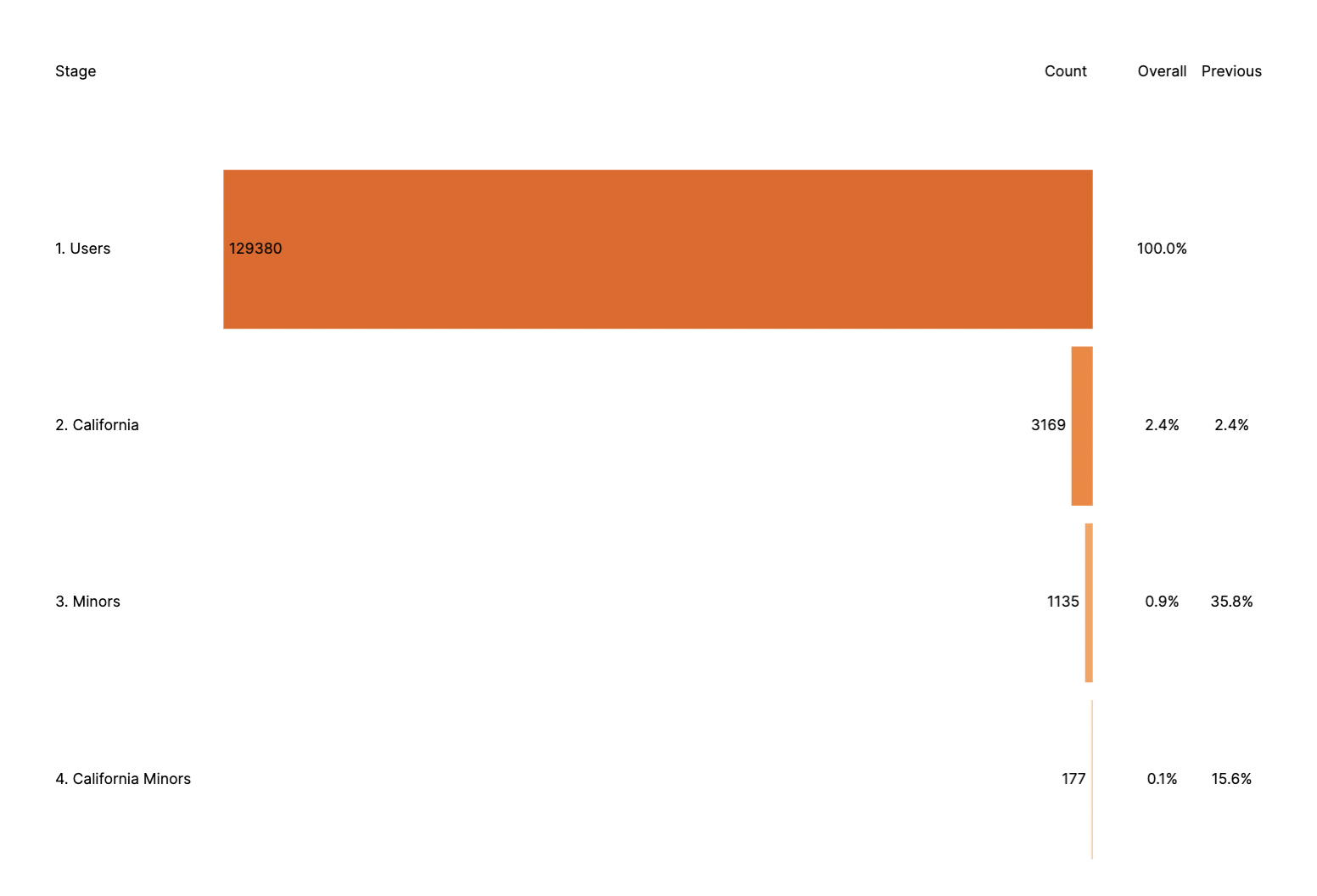
users.countusers.count_california_seniorsusers.count_minorsusers.count_california_minors
Visualization code
{
  "layer": [
    {
      "mark": {
        "type": "bar",
        "color": "transparent"
      },
      "encoding": {
        "x": {
          "axis": "",
          "type": "quantitative",
          "field": "stagePos"
        }
      }
    },
    {
      "mark": {
        "type": "bar",
        "tooltip": true
      },
      "encoding": {
        "x": {
          "axis": "",
          "type": "quantitative",
          "field": "negCount"
        },
        "color": {
          "field": "stage",
          "scale": {
            "scheme": {
              "name": "oranges",
              "extent": [
                0.8,
                0
              ]
            }
          },
          "legend": null
        },
        "tooltip": [
          {
            "type": "nominal",
            "field": "stage",
            "title": "Stage"
          },
          {
            "type": "quantitative",
            "field": "count",
            "title": "Count"
          }
        ]
      }
    },
    {
      "mark": {
        "dx": {
          "expr": "datum.labelLeft ? -4 : 4"
        },
        "type": "text",
        "align": {
          "expr": "datum.labelLeft ? 'right' : 'left'"
        }
      },
      "encoding": {
        "x": {
          "axis": "",
          "type": "quantitative",
          "field": "negCount"
        },
        "text": {
          "field": "count"
        }
      }
    },
    {
      "mark": {
        "dx": 4,
        "type": "text",
        "align": "left"
      },
      "encoding": {
        "x": {
          "axis": "",
          "type": "quantitative",
          "field": "stagePos"
        },
        "text": {
          "field": "stage"
        }
      }
    },
    {
      "mark": {
        "type": "text",
        "align": "center"
      },
      "encoding": {
        "x": {
          "axis": "",
          "type": "quantitative",
          "field": "cumulativePos"
        },
        "text": {
          "field": "cumulativePct",
          "format": ".1%"
        }
      }
    },
    {
      "mark": {
        "type": "text",
        "align": "center"
      },
      "encoding": {
        "x": {
          "axis": "",
          "type": "quantitative",
          "field": "conversionPos"
        },
        "text": {
          "field": "conversionPct",
          "format": ".1%"
        }
      },
      "transform": [
        {
          "filter": "isValid(datum.previousCount)"
        }
      ]
    },
    {
      "mark": {
        "dx": {
          "expr": "datum.dx"
        },
        "type": "text",
        "align": {
          "expr": "datum.align"
        }
      },
      "encoding": {
        "x": {
          "axis": "",
          "type": "quantitative",
          "field": "pos"
        },
        "y": {
          "axis": null,
          "type": "nominal",
          "datum": "0. Titles"
        },
        "text": {
          "field": "caption"
        }
      },
      "transform": [
        {
          "filter": "!isValid(datum.previousCount)"
        },
        {
          "as": "zero",
          "calculate": "0"
        },
        {
          "as": [
            "column",
            "pos"
          ],
          "fold": [
            "stagePos",
            "zero",
            "cumulativePos",
            "conversionPos"
          ]
        },
        {
          "from": {
            "key": "column",
            "data": {
              "values": [
                {
                  "dx": 4,
                  "align": "left",
                  "column": "stagePos",
                  "caption": "Stage"
                },
                {
                  "dx": -4,
                  "align": "right",
                  "column": "zero",
                  "caption": "Count"
                },
                {
                  "dx": 0,
                  "align": "center",
                  "column": "cumulativePos",
                  "caption": "Overall"
                },
                {
                  "dx": 0,
                  "align": "center",
                  "column": "conversionPos",
                  "caption": "Previous"
                }
              ]
            },
            "fields": [
              "caption",
              "align",
              "dx"
            ]
          },
          "lookup": "column"
        }
      ]
    }
  ],
  "width": "container",
  "height": "container",
  "encoding": {
    "y": {
      "axis": "",
      "type": "nominal",
      "field": "stage"
    }
  },
  "transform": [
    {
      "as": [
        "measurename",
        "count"
      ],
      "fold": [
        "users\\.count",
        "users\\.count_california_seniors",
        "users\\.count_minors",
        "users\\.count_california_minors"
      ]
    },
    {
      "from": {
        "key": "measurename",
        "data": {
          "values": [
            {
              "stage": "1. Users",
              "measurename": "users.count"
            },
            {
              "stage": "2. California ",
              "measurename": "users.count_california_seniors"
            },
            {
              "stage": "3. Minors",
              "measurename": "users.count_minors"
            },
            {
              "stage": "4. California Minors",
              "measurename": "users.count_california_minors"
            }
          ]
        },
        "fields": [
          "stage"
        ]
      },
      "lookup": "measurename"
    },
    {
      "joinaggregate": [
        {
          "as": "maxCount",
          "op": "max",
          "field": "count"
        }
      ]
    },
    {
      "sort": [
        {
          "field": "stage",
          "order": "ascending"
        }
      ],
      "window": [
        {
          "as": "previousCount",
          "op": "lag",
          "field": "count"
        }
      ]
    },
    {
      "as": "cumulativePct",
      "calculate": "datum.count / datum.maxCount"
    },
    {
      "as": "conversionPct",
      "calculate": "datum.count / datum.previousCount"
    },
    {
      "as": "countPos",
      "calculate": "datum.maxCount * 0.5"
    },
    {
      "as": "cumulativePos",
      "calculate": "datum.maxCount * 0.08"
    },
    {
      "as": "conversionPos",
      "calculate": "datum.maxCount * 0.16"
    },
    {
      "as": "stagePos",
      "calculate": "datum.maxCount * -1.2"
    },
    {
      "as": "negCount",
      "calculate": "-datum.count"
    },
    {
      "as": "labelLeft",
      "calculate": "datum.count < 0.1 * datum.maxCount"
    }
  ]
}
Centered funnel

Funnel with currency

Visualization code
{
  "layer": [
    {
      "mark": "bar",
      "encoding": {
        "x": {
          "axis": false,
          "type": "quantitative",
          "field": "AMOUNT",
          "stack": "center"
        },
        "color": {
          "type": "nominal",
          "field": "COLOR",
          "legend": null
        }
      }
    },
    {
      "layer": [
        {
          "mark": {
            "dx": 0,
            "type": "text",
            "align": "right"
          },
          "encoding": {
            "text": {
              "type": "quantitative",
              "field": "AMOUNT",
              "format": "USDCURRENCY",
              "formatType": "omniNumberFormat"
            }
          }
        },
        {
          "mark": {
            "dx": 10,
            "type": "text",
            "align": "left"
          },
          "encoding": {
            "text": {
              "type": "quantitative",
              "field": "PERCENT",
              "format": "PERCENT",
              "formatType": "omniNumberFormat",
              "condition": {
                "test": "datum['PERCENT'] > 1",
                "value": "N/A"
              }
            }
          }
        }
      ]
    }
  ],
  "transform": [
    {
      "as": "COLOR",
      "calculate": "datum['events.event_type']"
    },
    {
      "as": "AMOUNT",
      "calculate": "datum['events.count']"
    },
    {
      "window": [
        {
          "field": "AMOUNT",
          "op": "lag",
          "as": "PREVIOUS_AMOUNT"
        }
      ]
    },
    {
      "as": "PERCENT",
      "calculate": "datum.AMOUNT/datum.PREVIOUS_AMOUNT"
    }
  ],
  "width": "container",
  "height": "container",
  "encoding": {
    "y": {
      "axis": {
        "title": false
      },
      "sort": null,
      "type": "nominal",
      "field": "events\\.event_type"
    }
  }
}
Funnel with a dimension and a measure
Visualization code
{
  "layer": [
    {
      "mark": "bar",
      "encoding": {
        "x": {
          "axis": false,
          "type": "quantitative",
          "field": "events\\.count",
          "stack": "center"
        },
        "color": {
          "type": "nominal",
          "field": "events\\.event_type",
          "legend": null
        }
      }
    },
    {
      "layer": [
        {
          "mark": {
            "dx": 0,
            "type": "text",
            "align": "right"
          },
          "encoding": {
            "text": {
              "type": "quantitative",
              "field": "events\\.count",
              "formatType": "omniNumberFormat"
            }
          }
        },
        {
          "mark": {
            "dx": 10,
            "type": "text",
            "align": "left"
          },
          "encoding": {
            "text": {
              "type": "nominal",
              "field": "phase"
            }
          },
          "transform": [
            {
              "as": "phase",
              "calculate": "datum.calc_1 + '%'"
            }
          ]
        }
      ]
    }
  ],
  "width": "container",
  "height": "container",
  "encoding": {
    "y": {
      "axis": {
        "title": false
      },
      "sort": null,
      "type": "nominal",
      "field": "events\\.event_type"
    }
  }
}
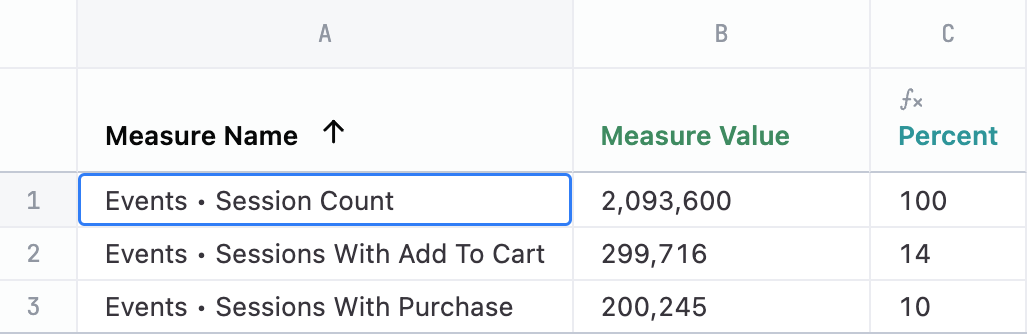
Funnel with three measures
Visualization code
{
  "layer": [
    {
      "mark": "bar",
      "encoding": {
        "x": {
          "axis": false,
          "type": "quantitative",
          "field": "measure_value",
          "stack": "center"
        },
        "color": {
          "type": "nominal",
          "field": "measure_name",
          "legend": null
        }
      }
    },
    {
      "layer": [
        {
          "mark": {
            "dx": 0,
            "type": "text",
            "align": "right"
          },
          "encoding": {
            "text": {
              "type": "quantitative",
              "field": "measure_value",
              "formatType": "omniNumberFormat"
            }
          }
        },
        {
          "mark": {
            "dx": 10,
            "type": "text",
            "align": "left"
          },
          "encoding": {
            "text": {
              "type": "nominal",
              "field": "phase"
            }
          },
          "transform": [
            {
              "as": "phase",
              "calculate": "datum.calc_1 + '%'"
            }
          ]
        }
      ]
    }
  ],
  "width": "container",
  "height": "container",
  "encoding": {
    "y": {
      "axis": {
        "title": false
      },
      "sort": null,
      "type": "nominal",
      "field": "measure_name"
    }
  }
}
Gantt (timeline) chart
This chart takes advantage ofx, x2 in Vega to create a start and end point for bars along a timeline for each user. It also includes config to improve the axis labels. Color could be included in an additional facet, using one more dimension to group different users together.
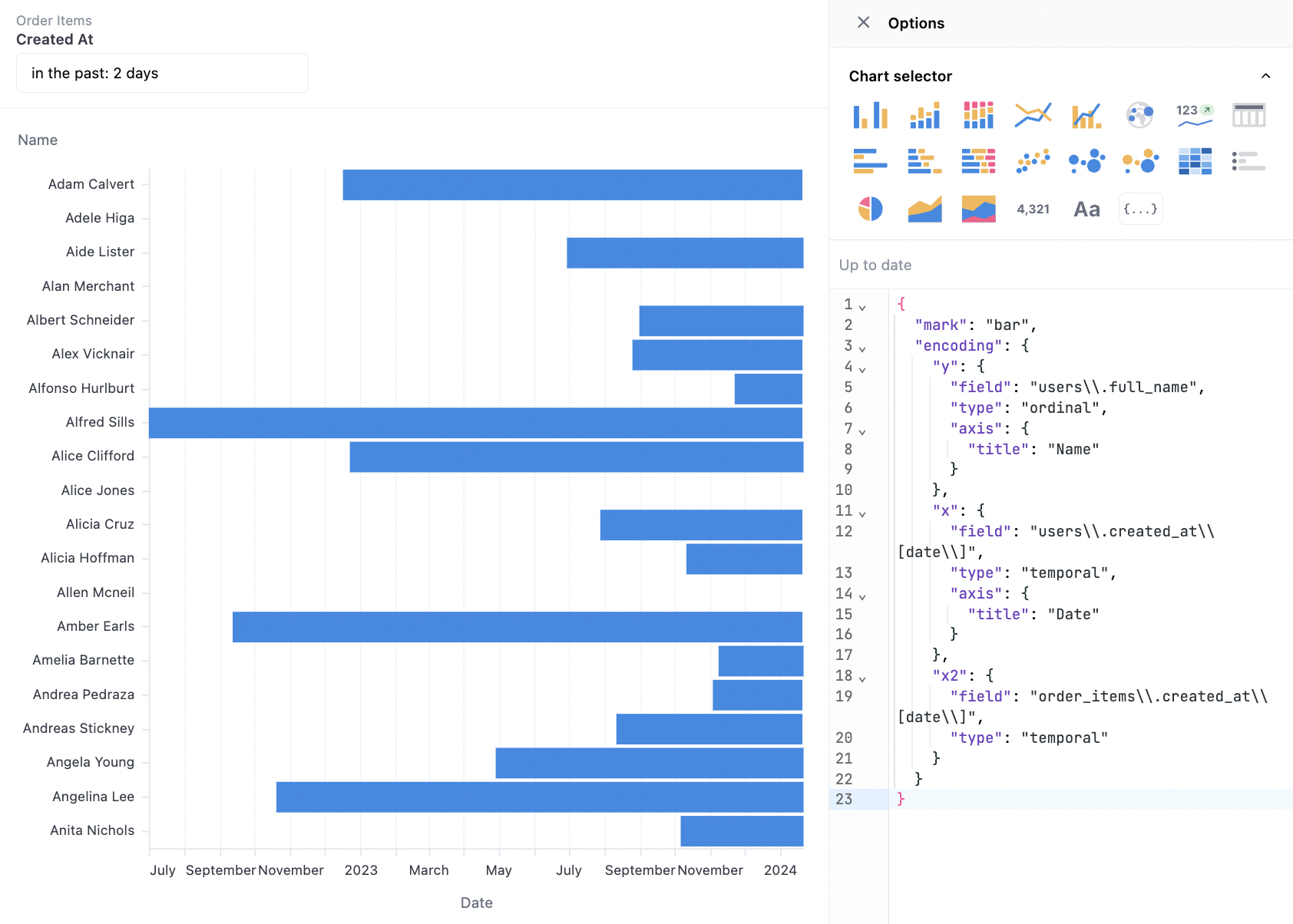
users.full_nameusers.created_at[date]order_items.created_at[date]
Visualization code
{
  "mark": "bar",
  "encoding": {
    "y": {
      "field": "DIM",
      "type": "ordinal",
      "axis": {
        "title": "Name"
      }
    },
    "x": {
      "field": "START",
      "type": "temporal",
      "axis": {
        "title": "Date"
      }
    },
    "x2": {
      "field": "END",
      "type": "temporal"
    }
  },
  "transform": [
    {
      "as": "DIM",
      "calculate": "datum['users.full_name']"
    },
    {
      "as": "START",
      "calculate": "datum['users.created_at[date]']"
    },
    {
      "as": "END",
      "calculate": "datum['order_items.created_at[date]']"
    }
  ]
}
Isotope (stacked icons)
Unlike other charts, this chart requires the full granularity in the dataset to create the stacked icons. The core technique is to map the repeated values into icons and then stack them. Note: In this example,users.id is included in order to create one entry per row.
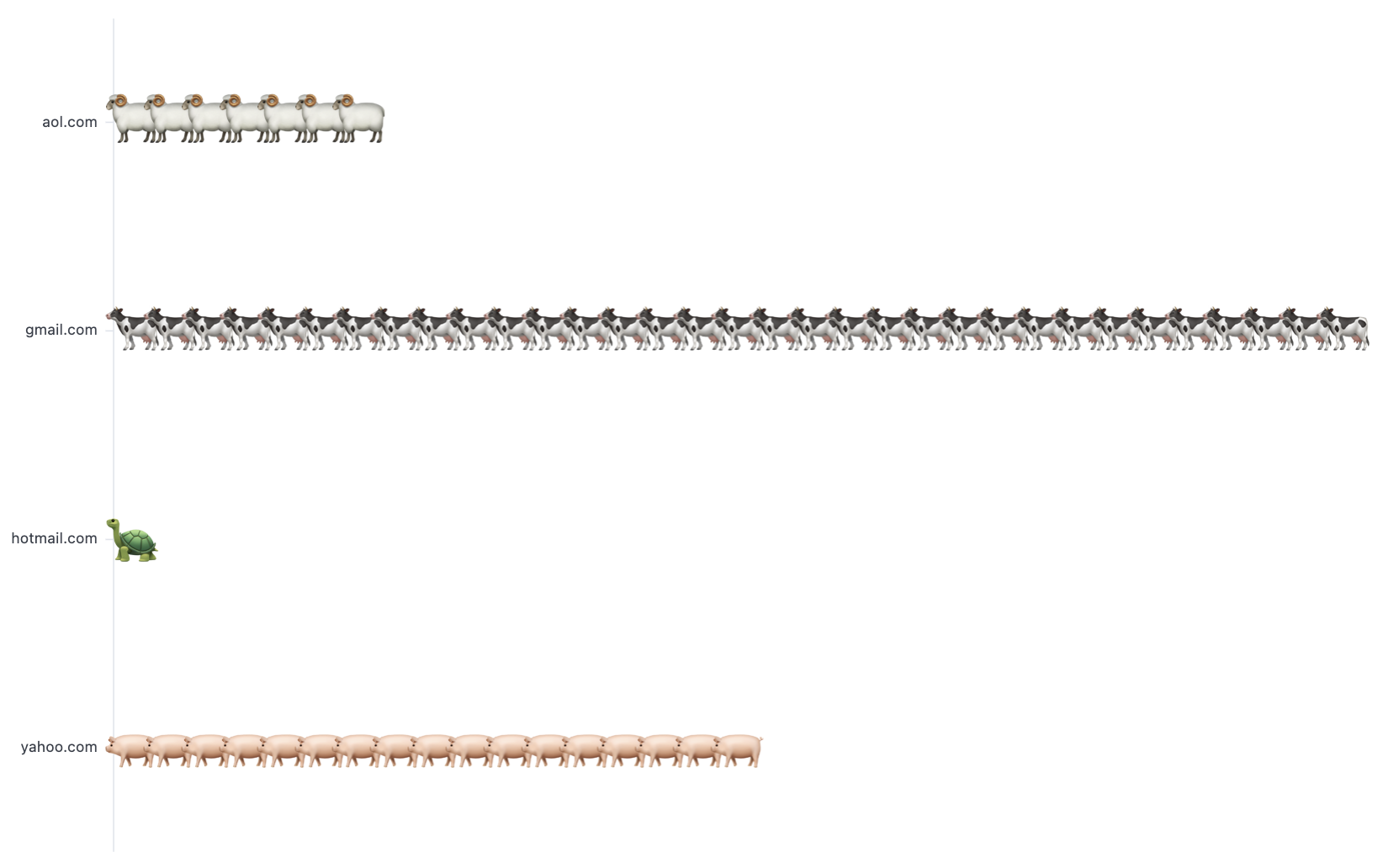
users.email_domainusers.id
Visualization code
{
  "mark": {
    "type": "text",
    "baseline": "middle"
  },
  "width": "container",
  "config": {
    "view": {
      "stroke": ""
    }
  },
  "height": "container",
  "encoding": {
    "x": {
      "axis": null,
      "type": "ordinal",
      "field": "rank"
    },
    "y": {
      "type": "nominal",
      "field": "DIM",
      "title": null
    },
    "size": {
      "value": 40
    },
    "text": {
      "type": "nominal",
      "field": "emoji"
    }
  },
  "transform": [
    {
      "as": "DIM",
      "calculate": "datum['users\\.traffic_source']"
    },
    {
      "as": "COUNTER",
      "calculate": "datum['users.id']"
    },
    {
      "as": "emoji",
      "calculate": "{'Search': '\ud83d\udc04', 'Display': '\ud83d\udc0f', 'Organic': '\ud83d\udc16', 'Facebook': '\ud83d\udc22', 'Email': '\ud83d\udc22'}[datum.DIM]]"
    },
    {
      "window": [
        {
          "as": "rank",
          "op": "rank"
        }
      ],
      "groupby": [
        "DIM"
      ]
    }
  ]
}
Gauge
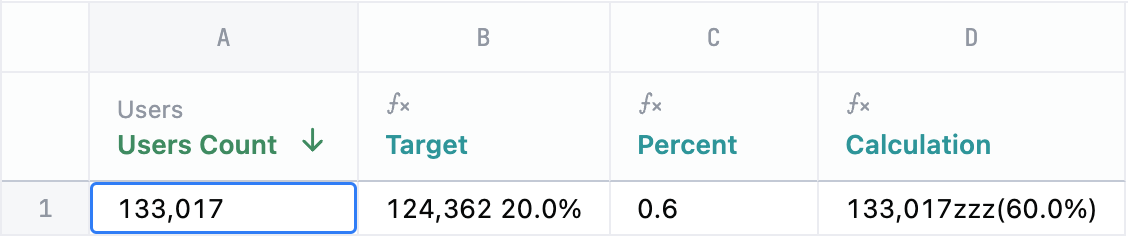
A gauge chart resembles a speedometer or dial and is typically used to display a single value within a predefined range. This visualization is useful for evaluating progress against a goal.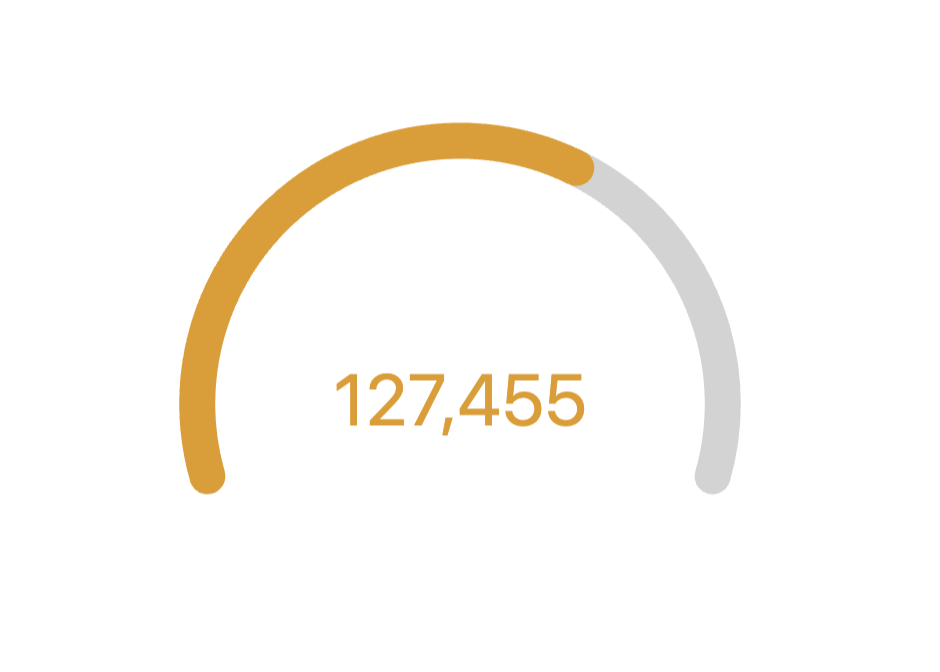
Visualization code
{
  "layer": [
    {
      "mark": {
        "type": "arc",
        "color": "lightgrey",
        "theta": {
          "expr": "datum['_arc_start_radians']"
        },
        "radius": {
          "expr": "ring1_outer"
        },
        "theta2": {
          "expr": "datum['_arc_end_radians']"
        },
        "radius2": {
          "expr": "ring1_inner"
        },
        "cornerRadius": 10
      }
    },
    {
      "mark": {
        "type": "arc",
        "theta": {
          "expr": "datum['_ring_start_radians']"
        },
        "radius": {
          "expr": "ring1_outer"
        },
        "theta2": {
          "expr": "datum['_ring_end_radians']"
        },
        "radius2": {
          "expr": "ring1_inner"
        },
        "cornerRadius": 10
      },
      "name": "RING",
      "encoding": {
        "color": {
          "value": "#307E31",
          "condition": [
            {
              "test": "datum['ratio'] < 0.33",
              "value": "#880808"
            },
            {
              "test": "datum['ratio'] < 0.66",
              "value": "#E49B0F"
            }
          ]
        }
      }
    },
    {
      "mark": {
        "type": "text",
        "fontSize": 40
      },
      "encoding": {
        "text": {
          "field": "users\\.count",
          "format": "number",
          "formatType": "omniNumberFormat"
        },
        "color": {
          "value": "#307E31",
          "condition": [
            {
              "test": "datum['ratio'] < 0.33",
              "value": "#880808"
            },
            {
              "test": "datum['ratio'] < 0.66",
              "value": "#E49B0F"
            }
          ]
        }
      }
    }
  ],
  "width": "container",
  "config": {
    "concat": {
      "spacing": 0
    },
    "autosize": {
      "type": "fit",
      "resize": true,
      "contains": "padding"
    }
  },
  "height": "container",
  "params": [
    {
      "name": "ring_max",
      "value": 160
    },
    {
      "name": "ring_width",
      "value": 20
    },
    {
      "name": "ring_gap",
      "value": 5
    },
    {
      "name": "label_color",
      "value": "#000000"
    },
    {
      "name": "ring_background_opacity",
      "value": 0.3
    },
    {
      "name": "ring0_percent",
      "value": 100
    },
    {
      "expr": "ring_max+2",
      "name": "ring0_outer"
    },
    {
      "expr": "ring_max+1",
      "name": "ring0_inner"
    },
    {
      "expr": "ring0_inner-ring_gap",
      "name": "ring1_outer"
    },
    {
      "expr": "ring1_outer-ring_width",
      "name": "ring1_inner"
    },
    {
      "expr": "(ring1_outer+ring1_inner)/2",
      "name": "ring1_middle"
    },
    {
      "expr": "220",
      "name": "arc_size"
    }
  ],
  "transform": [
    {
      "as": "ratio",
      "calculate": "datum['users\\.count'] / ( datum['calc_1'] )"
    },
    {
      "as": "_arc_start_degrees",
      "calculate": "360 - ( arc_size / 2 )"
    },
    {
      "as": "_arc_end_degrees",
      "calculate": "0 + ( arc_size / 2 )"
    },
    {
      "as": "_arc_start_radians",
      "calculate": "2 * 3.14 * ( datum['_arc_start_degrees'] - 360 ) / 360"
    },
    {
      "as": "_arc_end_radians",
      "calculate": "2 * 3.14 * datum['_arc_end_degrees'] / 360"
    },
    {
      "as": "_arc_total_radians",
      "calculate": "datum['_arc_end_radians'] - datum['_arc_start_radians']"
    },
    {
      "as": "_ring_start_radians",
      "calculate": "datum['_arc_start_radians']"
    },
    {
      "as": "_ring_end_radians",
      "calculate": "datum['_arc_start_radians'] + ( datum['_arc_total_radians'] * datum['ratio'] )"
    }
  ]
}
Sunburst chart
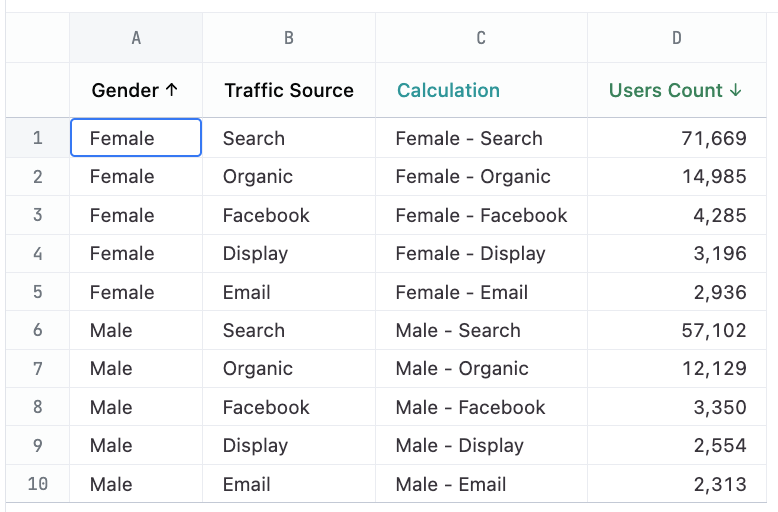
Sunburst charts display hierarchical data in an easy-to-read way. Each ring represents a level in the hierarchy, and the size of each section conveys its proportion in comparison to the whole. In this example, the inner slices are colored by order.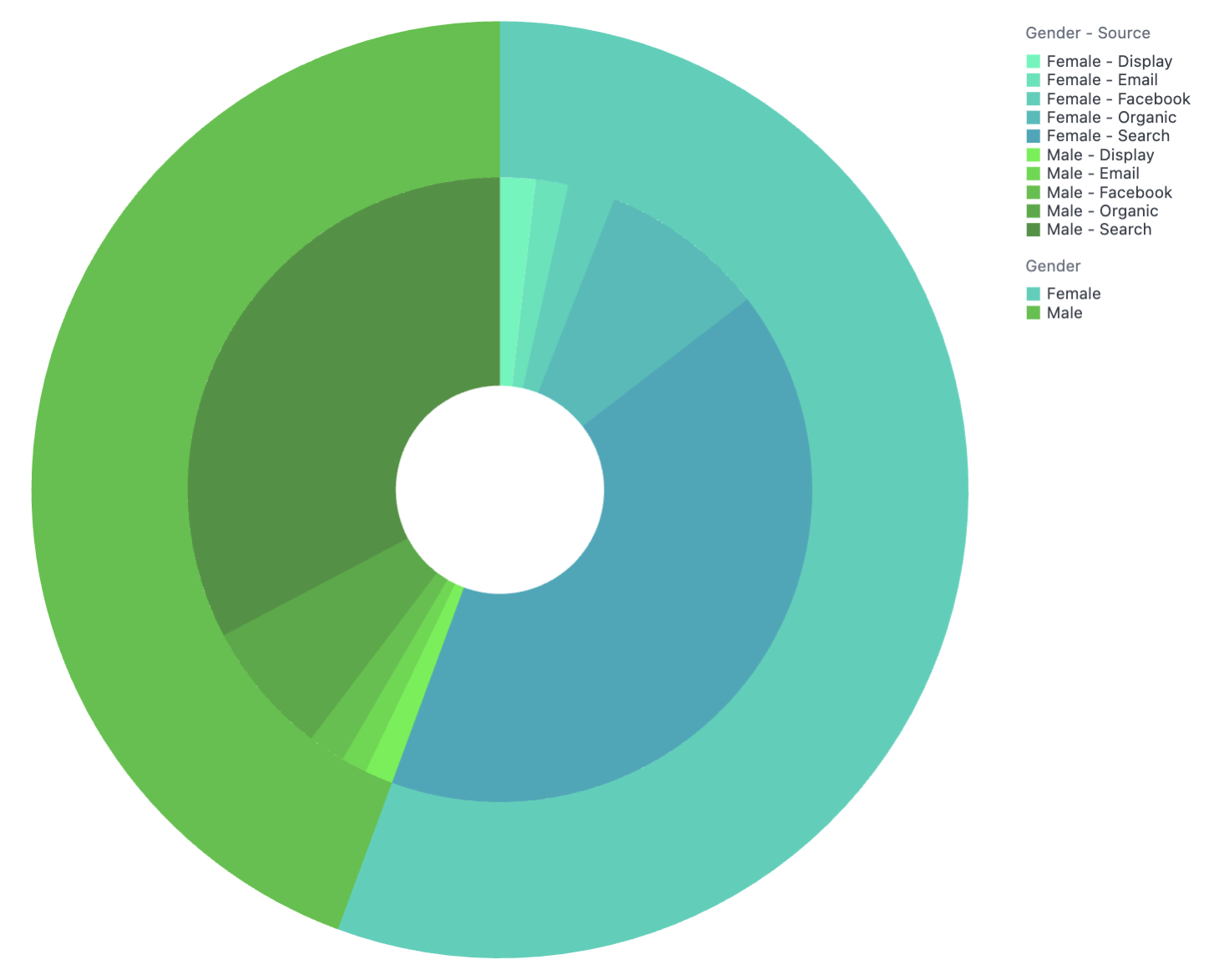
users.genderusers.traffic_sourceusers.count
Visualization code
{
  "layer": [
    {
      "mark": {
        "type": "arc",
        "tooltip": true,
        "innerRadius": {
          "expr": "min(width, height)/9"
        },
        "outerRadius": {
          "expr": "min(width, height)/3"
        }
      },
      "encoding": {
        "color": {
          "sort": "ascending",
          "type": "ordinal",
          "field": "OUT_IN",
          "scale": {
            "range": [
              "#1DF9B9",
              "#1DE5B9",
              "#1DD1B9",
              "#1DBDB9",
              "#1DA9B9",
              "#3DF23B",
              "#3DDA3B",
              "#3DC23B",
              "#3DAA3B",
              "#3D923B"
            ]
          },
          "title": "Inner Grouping"
        },
        "order": {
          "sort": "ascending",
          "field": "OUT_IN"
        },
        "theta": {
          "type": "quantitative",
          "field": "SIZE",
          "stack": true
        },
        "tooltip": [
          {
            "type": "nominal",
            "field": "OUTSIDE",
            "title": [
              "Outer Grouping"
            ]
          },
          {
            "type": "nominal",
            "field": "INSIDE",
            "title": [
              "Inner Grouping"
            ]
          },
          {
            "type": "quantitative",
            "field": "SIZE",
            "title": [
              "Count"
            ],
            "format": "NUMBER",
            "formatType": "omniNumberFormat"
          }
        ]
      }
    },
    {
      "mark": {
        "type": "arc",
        "tooltip": true,
        "innerRadius": {
          "expr": "min(width, height)/3"
        }
      },
      "encoding": {
        "color": {
          "sort": "ascending",
          "type": "ordinal",
          "field": "OUTSIDE",
          "scale": {
            "range": [
              "#1DD1B9",
              "#3DC23B"
            ]
          },
          "title": "Outer Grouping"
        },
        "order": {
          "sort": "ascending",
          "field": "OUTSIDE"
        },
        "theta": {
          "sort": "ascending",
          "type": "quantitative",
          "field": "total_users",
          "stack": true,
          "title": [
            "Users Count"
          ]
        },
        "tooltip": [
          {
            "type": "nominal",
            "field": "OUTSIDE",
            "title": [
              "Outer Grouping"
            ]
          },
          {
            "type": "quantitative",
            "field": "total_users",
            "title": [
              "Count"
            ],
            "format": "NUMBER",
            "formatType": "omniNumberFormat"
          }
        ]
      },
      "transform": [
        {
          "groupby": [
            "OUTSIDE"
          ],
          "aggregate": [
            {
              "as": "total_users",
              "op": "sum",
              "field": "SIZE"
            }
          ]
        }
      ]
    }
  ],
  "transform": [
    {
      "as": "OUTSIDE",
      "calculate": "datum['users.gender']"
    },
    {
      "as": "INSIDE",
      "calculate": "datum['users.traffic_source']"
    },
    {
      "as": "OUT_IN",
      "calculate": "datum.OUTSIDE + '-' + datum.INSIDE"
    },
    {
      "as": "SIZE",
      "calculate": "datum['users.count']"
    }
  ],
  "resolve": {
    "scale": {
      "color": "independent"
    },
    "legend": {
      "color": "independent"
    }
  }
}
Trellis / Small Multiples / Faceted Charts
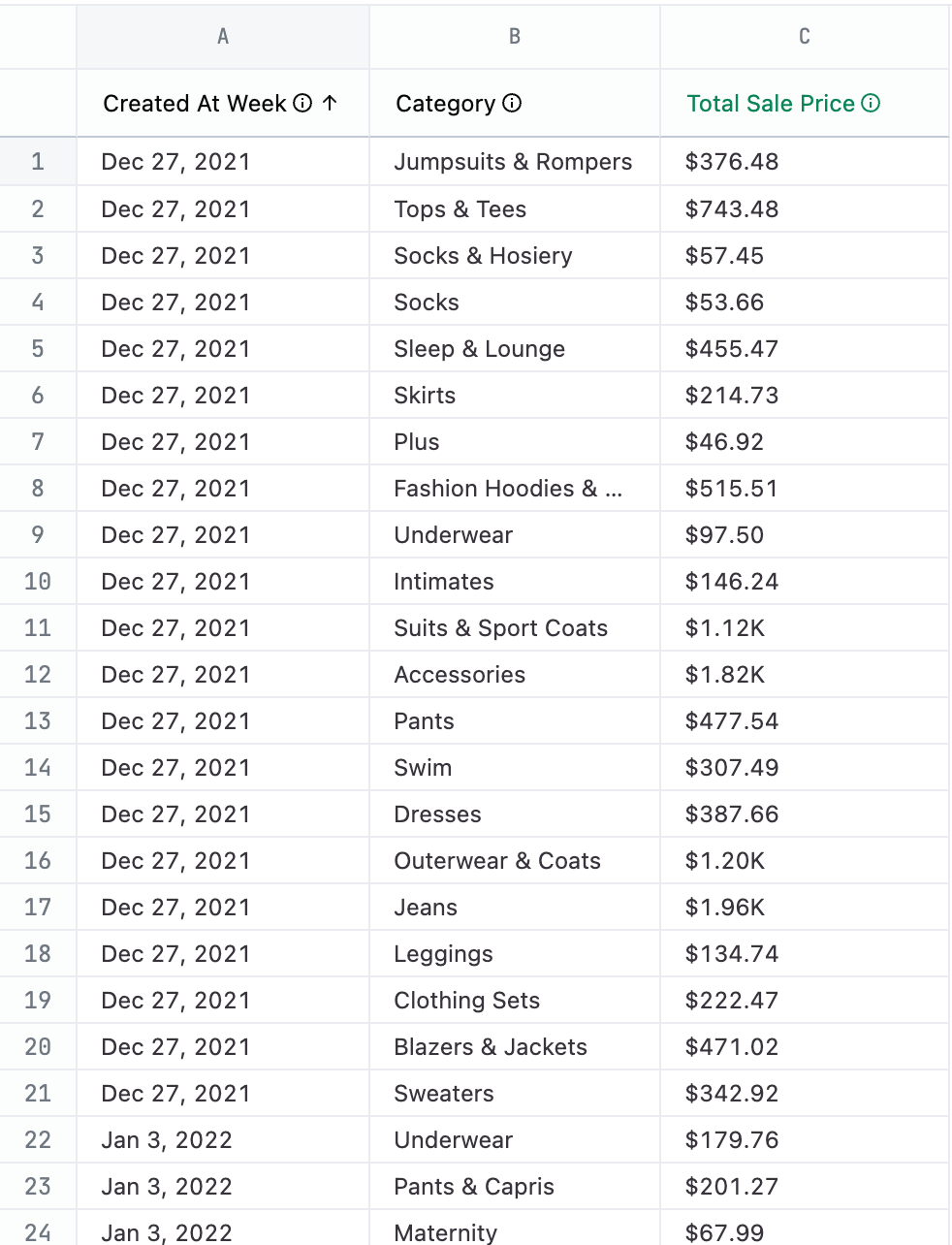
Trellis charts allow you to show a grid of smaller charts, one for each category.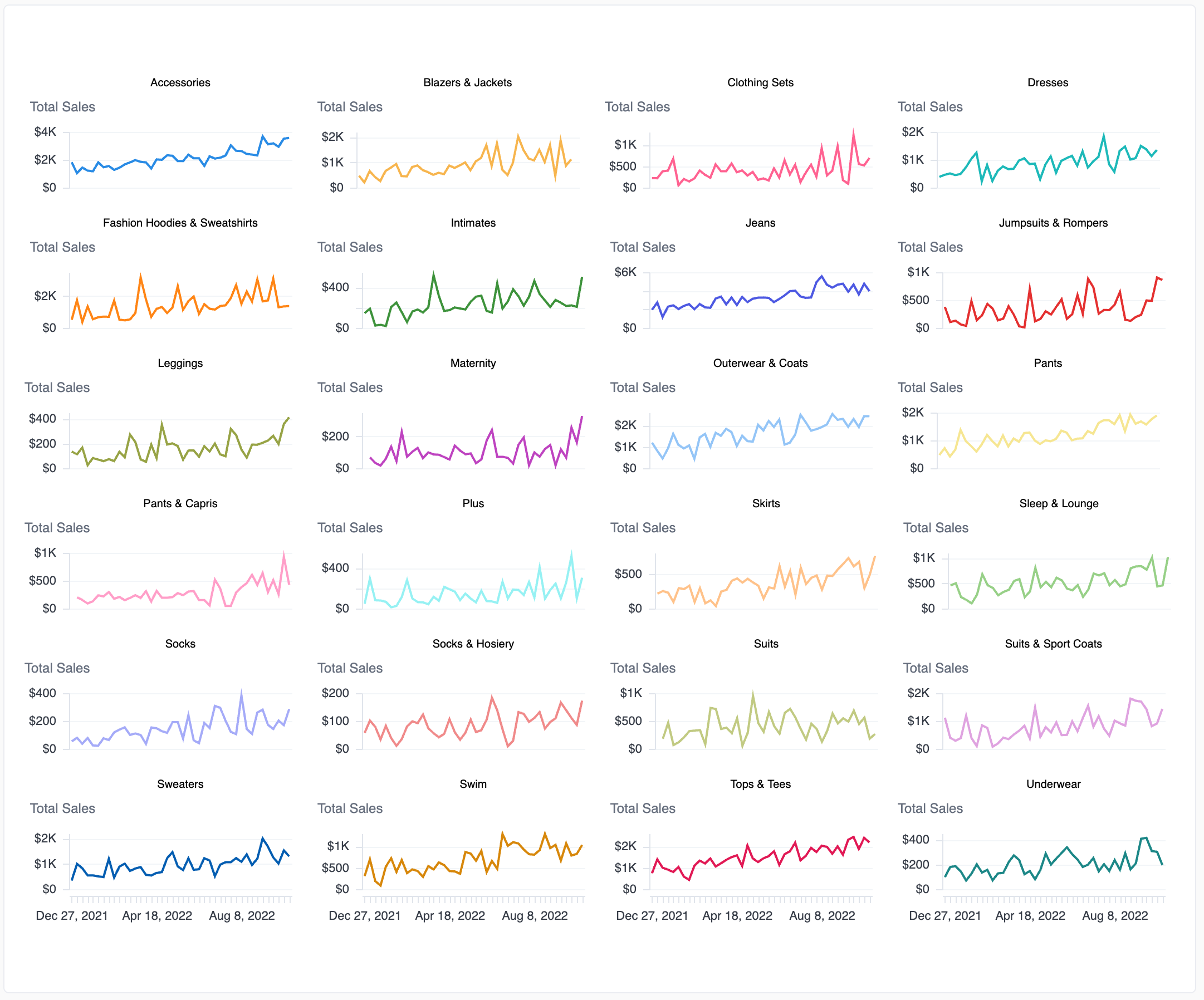
DIMto be the x-axis value in your queryAMOUNTas the y-axis value in your queryFACETto be the grouping fieldCOLORfor the mark color
Visualization code
{
  "mark": {
    "type": "line",
    "tooltip": true
  },
  "width": 200,
  "height": 50,
  "resolve": {
    "scale": {
      "x": "shared",
      "y": "independent"
    }
  },
  "encoding": {
    "x": {
      "axis": {
        "title": null,
        "format": "%b %-d, %Y",
        "formatType": "omniTimestampFormat",
        "labelOverlap": true
      },
      "sort": "ascending",
      "type": "ordinal",
      "field": "DIM",
      "title": "Date",
      "timeUnit": "utcyearmonthdate"
    },
    "y": {
      "axis": {
        "format": "bigusdcurrency_0",
        "orient": "left",
        "formatType": "omniNumberFormat",
        "labelOverlap": true
      },
      "type": "quantitative",
      "field": "AMOUNT",
      "title": "Total Sales",
      "format": "bigusdcurrency_2",
      "formatType": "omniNumberFormat"
    },
    "color": {
      "field": "COLOR",
      "title": "Category",
      "legend": null
    },
    "facet": {
      "sort": "ascending",
      "type": "ordinal",
      "field": "FACET",
      "title": null,
      "columns": 4
    }
  },
  "transform": [
    {
      "as": "DIM",
      "calculate": "datum['omni_dbt_ecomm__order_items.created_at[week]']"
    },
    {
      "as": "AMOUNT",
      "calculate": "datum['omni_dbt_ecomm__order_items.total_sale_price']"
    },
    {
      "as": "FACET",
      "calculate": "datum['omni_dbt_ecomm__products.category']"
    },
    {
      "as": "COLOR",
      "calculate": "datum['omni_dbt_ecomm__products.category']"
    }
  ]
}
Word cloud
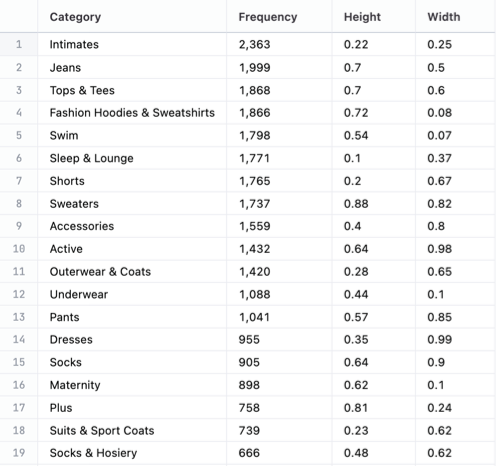
Word clouds are an eye-catching way to visualize text data by showing the most common words in a dataset. The more frequently a word appears, the bigger and bolder it is, which makes it easy to spot key themes at a glance.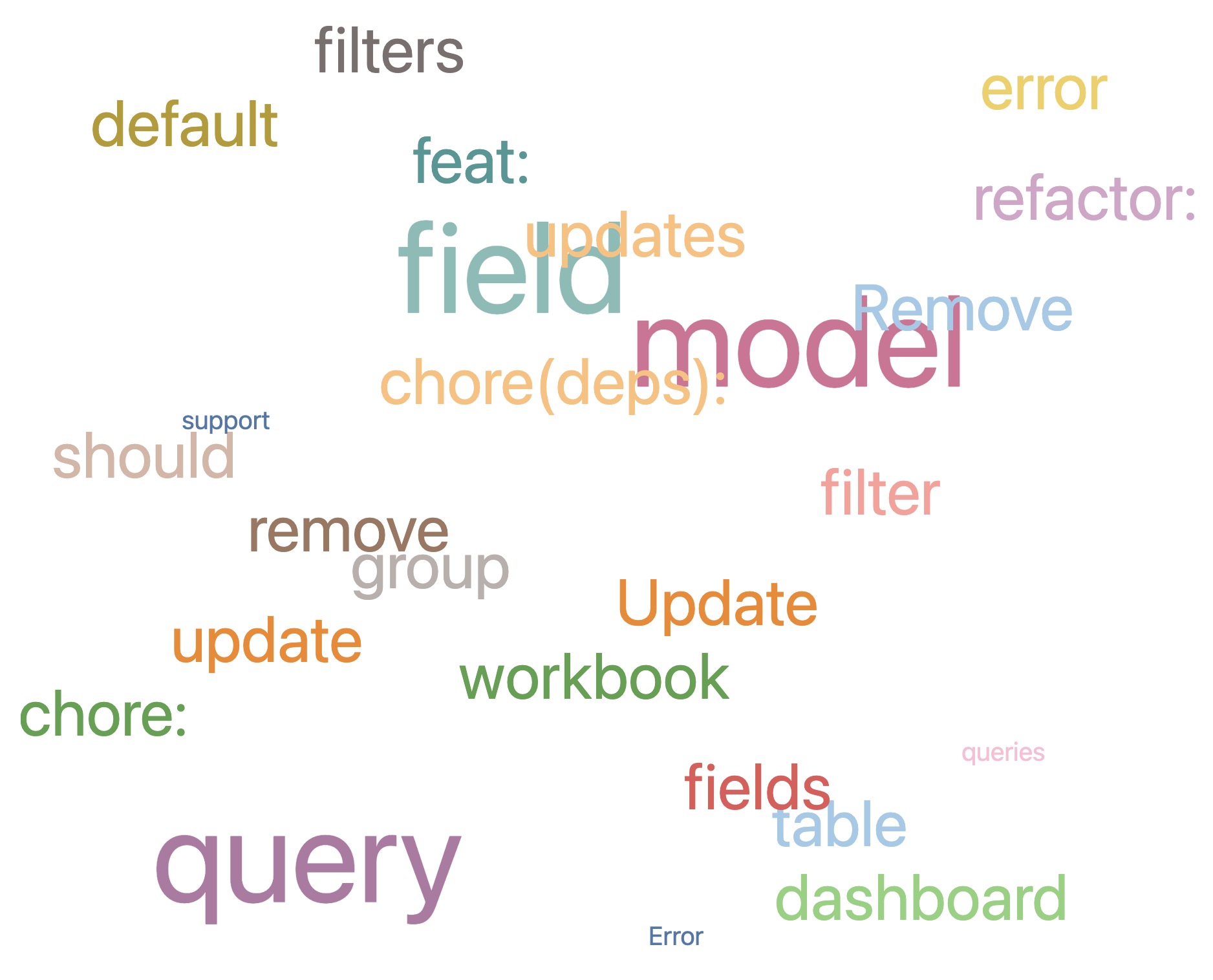
fieldvalues should match the values in the table- Adjust the
rangeto fit your query - Adjust the
domainto fit your query
Example query
SELECT category,
       COUNT(*) AS frequency,
       RANDOM() * (0.9 - 0.1) + 0.1 AS height,
       RANDOM() AS width
FROM productsGROUP BY 1ORDER BY 2 DESC
LIMIT 25;
Visualization code
{
  "mark": "text",
  "width": "container",
  "height": "container",
  "transform": [
    {
      "as": "DIM",
      "calculate": "datum['category']"
    },
    {
      "as": "SIZE",
      "calculate": "datum['frequency']"
    },
    {
      "as": "COLOR",
      "calculate": "datum['department']"
    },
    {
      "as": "X",
      "calculate": "random() * (0.9 - 0.1) + 0.1"
    },
    {
      "as": "Y",
      "calculate": "random()"
    }
  ],
  "encoding": {
    "x": {
      "axis": null,
      "field": "X"
    },
    "y": {
      "axis": null,
      "field": "Y"
    },
    "size": {
      "field": "SIZE",
      "legend": null
    },
    "text": {
      "field": "DIM"
    },
    "color": {
      "field": "COLOR",
      "scale": {
        "scheme": "tableau20"
      },
      "legend": null
    }
  }
}
Scatter Plot with Color Quadrants
Being able to show a scatter plot of values in and showing where they land within specific designated quadrants and above certain thresholds with the easy deliantion of different colors, makes it easily to see where each value lands at a glance.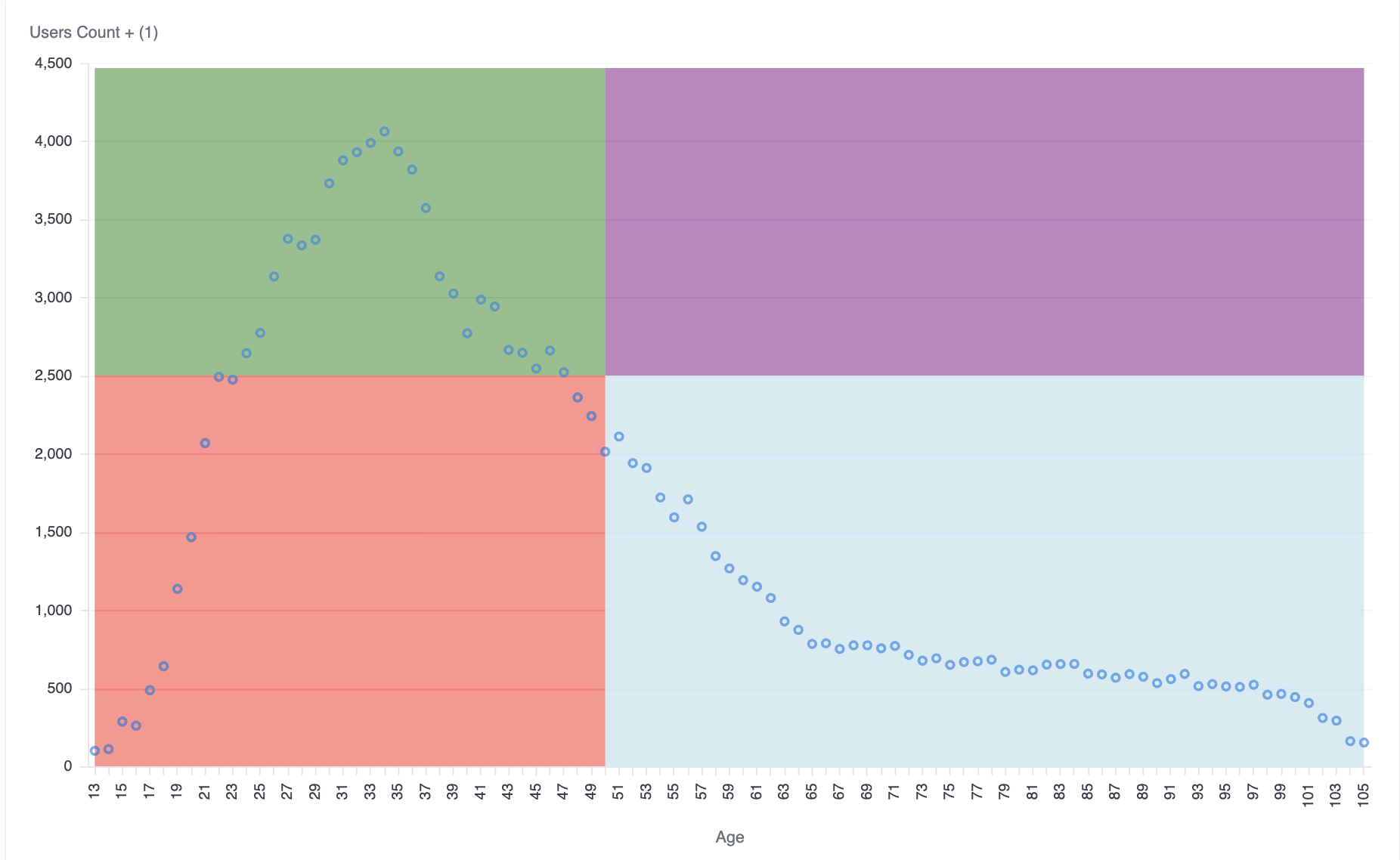
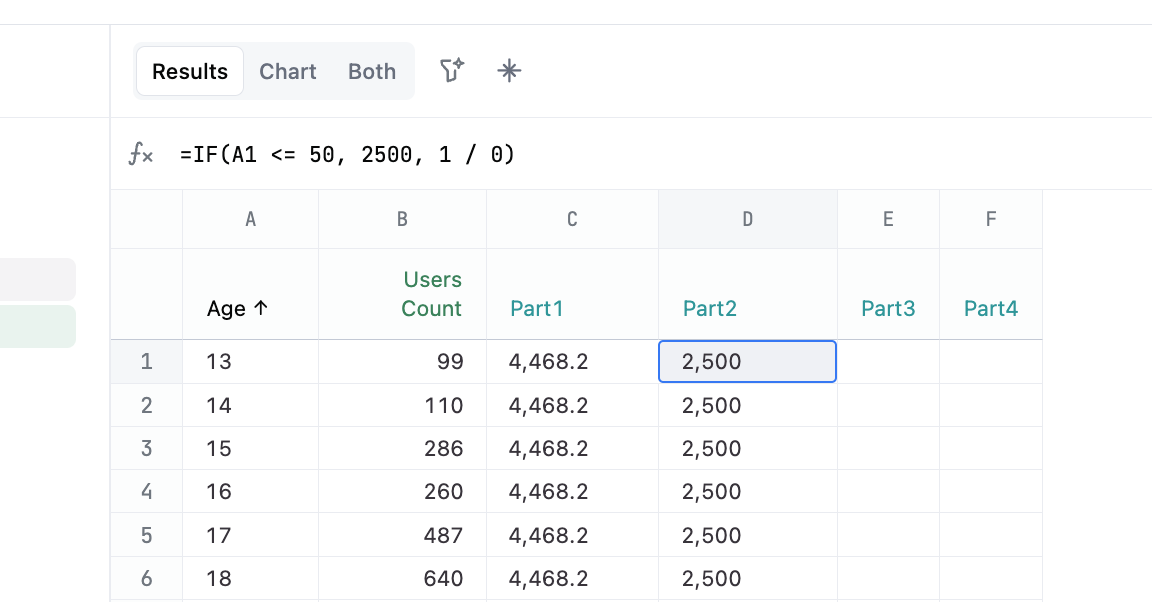
calc_1calc_2calc_3calc_4set the values for your four quadrants, these can also be hard-coded or referenced from calculated fields as noted in the example- Adjust the
users.ageto fit your query - Adjust the
users.countto fit your query
Example query
SELECT users.age,
       users.count,
       calc_1,
       calc_2,
       calc_3,
       calc_4
FROM users
Visualization code
{
  "layer": [
    {
      "layer": [
        {
          "mark": {
            "line": false,
            "type": "area",
            "tooltip": false
          },
          "encoding": {
            "y": {
              "type": "quantitative",
              "field": "calc_2"
            },
            "color": {
              "value": "red"
            }
          }
        },
        {
          "mark": {
            "line": false,
            "type": "area",
            "tooltip": false
          },
          "encoding": {
            "y": {
              "type": "quantitative",
              "field": "calc_3"
            },
            "color": {
              "value": "lightblue"
            }
          }
        },
        {
          "mark": {
            "line": false,
            "type": "area",
            "tooltip": false
          },
          "encoding": {
            "y": {
              "type": "quantitative",
              "field": "calc_1"
            },
            "y2": {
              "type": "quantitative",
              "field": "calc_2"
            },
            "color": {
              "value": "green"
            }
          }
        },
        {
          "mark": {
            "line": false,
            "type": "area",
            "tooltip": false
          },
          "encoding": {
            "y": {
              "type": "quantitative",
              "field": "calc_4"
            },
            "y2": {
              "type": "quantitative",
              "field": "calc_3"
            },
            "color": {
              "value": "purple"
            }
          }
        },
        {
          "mark": {
            "type": "point",
            "tooltip": true
          },
          "encoding": {
            "y": {
              "axis": {
                "title": "Users Count + (1)",
                "format": "NUMBER_0",
                "orient": "left",
                "formatType": "omniNumberFormat",
                "labelOverlap": true
              },
              "type": "quantitative",
              "field": "users\\.count",
              "title": "Users Count"
            },
            "color": {
              "datum": "Users Count"
            },
            "tooltip": [
              {
                "type": "quantitative",
                "field": "users\\.age",
                "title": "Age"
              },
              {
                "type": "quantitative",
                "field": "users\\.count",
                "title": "Users Count",
                "format": "NUMBER_0",
                "formatType": "omniNumberFormat"
              },
              {
                "type": "quantitative",
                "field": "users\\.age_max",
                "title": "Age Max"
              }
            ]
          }
        }
      ]
    },
    {
      "mark": {
        "type": "rule",
        "tooltip": true,
        "strokeDash": [
          4,
          2
        ]
      },
      "params": [
        {
          "name": "hover",
          "select": {
            "on": "mouseover",
            "type": "point",
            "clear": "mouseout",
            "nearest": true
          }
        }
      ],
      "encoding": {
        "opacity": {
          "value": 0,
          "condition": {
            "test": {
              "empty": false,
              "param": "hover"
            },
            "value": 1
          }
        },
        "tooltip": [
          {
            "type": "quantitative",
            "field": "users\\.age",
            "title": "Age"
          },
          {
            "type": "quantitative",
            "field": "users\\.count",
            "title": "Users Count",
            "format": "NUMBER_0",
            "formatType": "omniNumberFormat"
          }
        ]
      }
    }
  ],
  "width": "container",
  "height": "container",
  "encoding": {
    "x": {
      "axis": {
        "title": "Age",
        "labelOverlap": true
      },
      "sort": "ascending",
      "type": "ordinal",
      "field": "users\\.age",
      "title": "Age"
    },
    "color": {
      "scale": {
        "domain": [
          "Users Count",
          "Age Max"
        ],
        "scheme": "omni"
      },
      "legend": null
    }
  }
}
Bullet charts
Bullet charts are used to track a metric against a target. A bar is used to measure the actual value of the metric, a vertical line or marker for the target, and background bands for adding qualitative ranges.Single bullet chart


Visualization code
{
  "layer": [
    {
      "mark": "bar",
      "params": [
        {
          "bind": "legend",
          "name": "omni_click",
          "select": {
            "type": "point",
            "fields": [
              "omni__measure_name"
            ]
          }
        }
      ],
      "encoding": {
        "color": {
          "field": "omni__measure_name"
        },
        "opacity": {
          "value": 0
        }
      }
    },
    {
      "layer": [
        {
          "layer": [
            {
              "mark": {
                "type": "bar",
                "tooltip": true
              },
              "encoding": {
                "color": {
                  "field": "omni__measure_name",
                  "legend": null
                }
              },
              "transform": [
                {
                  "filter": {
                    "field": "omni__measure_name",
                    "oneOf": [
                      "Pace"
                    ]
                  }
                }
              ]
            },
            {
              "mark": {
                "type": "bar",
                "height": 7,
                "tooltip": true
              },
              "encoding": {
                "color": {
                  "field": "omni__measure_name",
                  "legend": null
                }
              },
              "transform": [
                {
                  "filter": {
                    "field": "omni__measure_name",
                    "oneOf": [
                      "Current"
                    ]
                  }
                }
              ]
            },
            {
              "mark": {
                "type": "tick",
                "tooltip": true,
                "thickness": 3
              },
              "encoding": {
                "color": {
                  "field": "omni__measure_name",
                  "legend": null
                }
              },
              "transform": [
                {
                  "filter": {
                    "field": "omni__measure_name",
                    "oneOf": [
                      "Target"
                    ]
                  }
                }
              ]
            }
          ],
          "encoding": {
            "x": {
              "axis": {
                "title": "Target",
                "format": "NUMBER_0",
                "orient": "bottom",
                "formatType": "omniNumberFormat",
                "labelOverlap": true
              },
              "type": "quantitative",
              "field": "omni__measure_value",
              "stack": null,
              "title": "Target + (2)"
            },
            "color": {
              "scale": {
                "range": [
                  "#000000ff",
                  "#bcbcbcff",
                  "#A66BBF"
                ],
                "domain": [
                  "Target",
                  "Pace",
                  "Current"
                ]
              }
            },
            "order": {
              "sort": "descending",
              "type": "quantitative",
              "field": "omni__key_order"
            }
          },
          "transform": [
            {
              "filter": {
                "field": "omni__measure_name",
                "oneOf": [
                  "Target",
                  "Pace",
                  "Current"
                ]
              }
            }
          ]
        }
      ],
      "encoding": {
        "y": {
          "axis": {
            "title": null,
            "labelOverlap": true
          },
          "type": "ordinal",
          "field": "CATEGORICAL",
          "title": [
            "Category"
          ]
        },
        "tooltip": [
          {
            "type": "nominal",
            "field": "CATEGORICAL",
            "title": [
              "Category"
            ]
          },
          {
            "type": "quantitative",
            "field": "CURRENT",
            "title": [
              "Current"
            ],
            "format": "NUMBER_0",
            "formatType": "omniNumberFormat"
          },
          {
            "type": "quantitative",
            "field": "PACE",
            "title": [
              "Pace"
            ],
            "format": "NUMBER_0",
            "formatType": "omniNumberFormat"
          },
          {
            "type": "quantitative",
            "field": "TARGET",
            "title": [
              "Target"
            ],
            "format": "NUMBER_0",
            "formatType": "omniNumberFormat"
          }
        ]
      },
      "transform": [
        {
          "as": [
            "omni__measure_name",
            "omni__measure_value"
          ],
          "fold": [
            "TARGET",
            "PACE",
            "CURRENT"
          ]
        },
        {
          "as": "omni__measure_name",
          "calculate": "{\"TARGET\":\"Target\",\"PACE\":\"Pace\",\"CURRENT\":\"Current\"}[datum.omni__measure_name]"
        },
        {
          "as": "omni__key_order",
          "calculate": "indexof([\"Target\",\"Pace\",\"Current\"], datum.omni__measure_name)"
        },
        {
          "filter": {
            "param": "omni_click"
          }
        }
      ]
    }
  ],
  "width": "container",
  "height": "container",
  "$schema": "https://vega.github.io/schema/vega-lite/v5.json",
  "transform": [
    {
      "as": "TARGET",
      "calculate": "datum['products.count']"
    },
    {
      "as": "PACE",
      "calculate": "datum['calc_2']"
    },
    {
      "as": "CURRENT",
      "calculate": "datum['calc_1']"
    },
    {
      "as": "CATEGORICAL",
      "calculate": "datum['calc_3']"
    }
  ]
}
Multiple categories
Same as the single bullet, just repeated across the categories.

Visualization code
{
  "layer": [
    {
      "mark": "bar",
      "params": [
        {
          "bind": "legend",
          "name": "omni_click",
          "select": {
            "type": "point",
            "fields": [
              "omni__measure_name"
            ]
          }
        }
      ],
      "encoding": {
        "color": {
          "field": "omni__measure_name"
        },
        "opacity": {
          "value": 0
        }
      }
    },
    {
      "layer": [
        {
          "layer": [
            {
              "mark": {
                "type": "bar",
                "tooltip": true
              },
              "encoding": {
                "color": {
                  "field": "omni__measure_name",
                  "legend": null
                }
              },
              "transform": [
                {
                  "filter": {
                    "field": "omni__measure_name",
                    "oneOf": [
                      "Pace"
                    ]
                  }
                }
              ]
            },
            {
              "mark": {
                "type": "bar",
                "height": 7,
                "tooltip": true
              },
              "encoding": {
                "color": {
                  "field": "omni__measure_name",
                  "legend": null
                }
              },
              "transform": [
                {
                  "filter": {
                    "field": "omni__measure_name",
                    "oneOf": [
                      "Current"
                    ]
                  }
                }
              ]
            },
            {
              "mark": {
                "type": "tick",
                "tooltip": true,
                "thickness": 3
              },
              "encoding": {
                "color": {
                  "field": "omni__measure_name",
                  "legend": null
                }
              },
              "transform": [
                {
                  "filter": {
                    "field": "omni__measure_name",
                    "oneOf": [
                      "Target"
                    ]
                  }
                }
              ]
            }
          ],
          "encoding": {
            "x": {
              "axis": {
                "title": "Target",
                "format": "NUMBER_0",
                "orient": "bottom",
                "formatType": "omniNumberFormat",
                "labelOverlap": true
              },
              "type": "quantitative",
              "field": "omni__measure_value",
              "stack": null,
              "title": "Target + (2)"
            },
            "color": {
              "scale": {
                "range": [
                  "#000000ff",
                  "#bcbcbcff",
                  "#A66BBF"
                ],
                "domain": [
                  "Target",
                  "Pace",
                  "Current"
                ]
              }
            },
            "order": {
              "sort": "descending",
              "type": "quantitative",
              "field": "omni__key_order"
            }
          },
          "transform": [
            {
              "filter": {
                "field": "omni__measure_name",
                "oneOf": [
                  "Target",
                  "Pace",
                  "Current"
                ]
              }
            }
          ]
        }
      ],
      "encoding": {
        "y": {
          "axis": {
            "title": null,
            "labelOverlap": true
          },
          "type": "ordinal",
          "field": "CATEGORICAL",
          "title": [
            "Category"
          ]
        },
        "tooltip": [
          {
            "type": "nominal",
            "field": "CATEGORICAL",
            "title": [
              "Category"
            ]
          },
          {
            "type": "quantitative",
            "field": "CURRENT",
            "title": [
              "Current"
            ],
            "format": "NUMBER_0",
            "formatType": "omniNumberFormat"
          },
          {
            "type": "quantitative",
            "field": "PACE",
            "title": [
              "Pace"
            ],
            "format": "NUMBER_0",
            "formatType": "omniNumberFormat"
          },
          {
            "type": "quantitative",
            "field": "TARGET",
            "title": [
              "Target"
            ],
            "format": "NUMBER_0",
            "formatType": "omniNumberFormat"
          }
        ]
      },
      "transform": [
        {
          "as": [
            "omni__measure_name",
            "omni__measure_value"
          ],
          "fold": [
            "TARGET",
            "PACE",
            "CURRENT"
          ]
        },
        {
          "as": "omni__measure_name",
          "calculate": "{\"TARGET\":\"Target\",\"PACE\":\"Pace\",\"CURRENT\":\"Current\"}[datum.omni__measure_name]"
        },
        {
          "as": "omni__key_order",
          "calculate": "indexof([\"Target\",\"Pace\",\"Current\"], datum.omni__measure_name)"
        },
        {
          "filter": {
            "param": "omni_click"
          }
        }
      ]
    }
  ],
  "width": "container",
  "height": "container",
  "$schema": "https://vega.github.io/schema/vega-lite/v5.json",
  "transform": [
    {
      "as": "TARGET",
      "calculate": "datum['products.count']"
    },
    {
      "as": "PACE",
      "calculate": "datum['calc_2']"
    },
    {
      "as": "CURRENT",
      "calculate": "datum['calc_1']"
    },
    {
      "as": "CATEGORICAL",
      "calculate": "datum['products.category']"
    }
  ]
}
Multiple categories with conditional coloring
Using the same result set as the multiple categories, the bars are colored by whether they are above or below the pacing.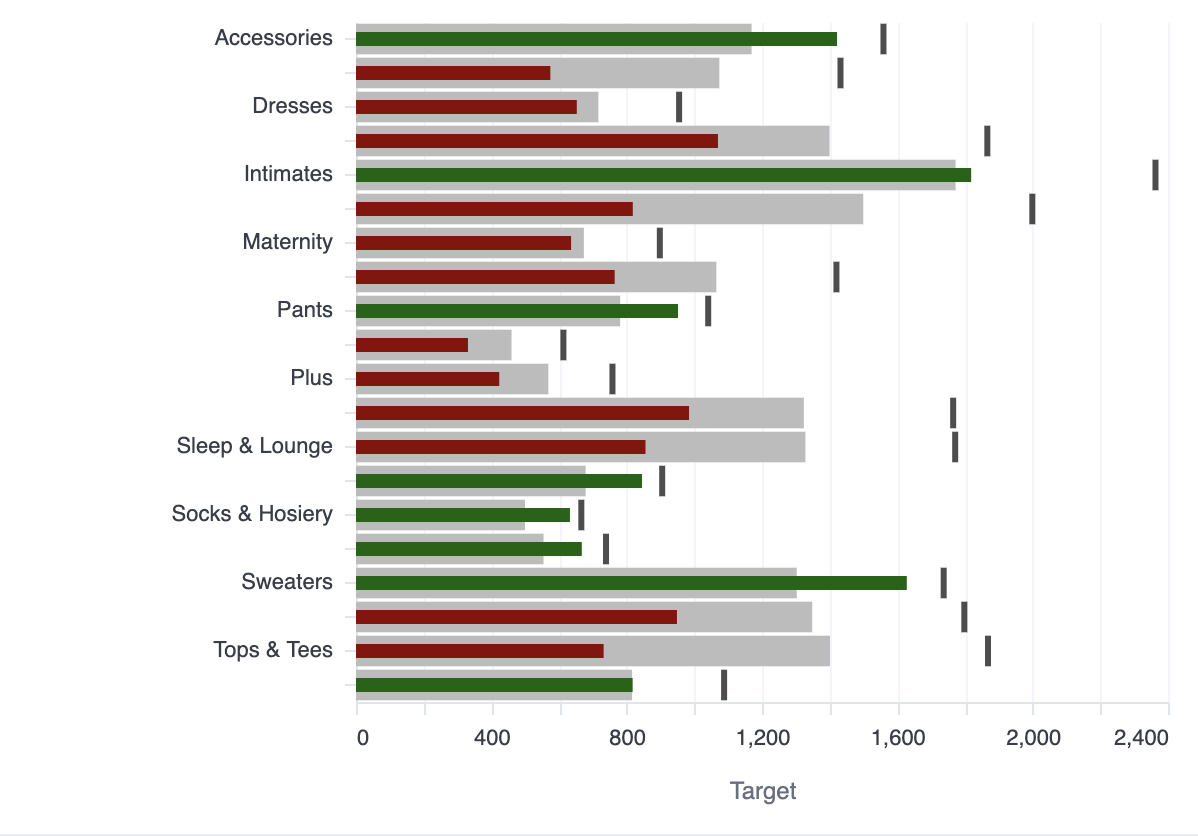
Visualization code
{
  "layer": [
    {
      "mark": "bar",
      "params": [
        {
          "bind": "legend",
          "name": "omni_click",
          "select": {
            "type": "point",
            "fields": [
              "omni__measure_name"
            ]
          }
        }
      ],
      "encoding": {
        "color": {
          "field": "omni__measure_name"
        },
        "opacity": {
          "value": 0
        }
      }
    },
    {
      "layer": [
        {
          "layer": [
            {
              "mark": {
                "type": "bar",
                "tooltip": true
              },
              "encoding": {
                "color": {
                  "field": "omni__measure_name",
                  "legend": null
                }
              },
              "transform": [
                {
                  "filter": {
                    "field": "omni__measure_name",
                    "oneOf": [
                      "Pace"
                    ]
                  }
                }
              ]
            },
            {
              "mark": {
                "type": "bar",
                "height": 7
              },
              "encoding": {
                "color": {
                  "value": "darkred",
                  "condition": {
                    "test": "datum.ON_PACE == true",
                    "value": "darkgreen"
                  }
                }
              },
              "transform": [
                {
                  "filter": {
                    "field": "omni__measure_name",
                    "oneOf": [
                      "Current"
                    ]
                  }
                }
              ]
            },
            {
              "mark": {
                "type": "tick",
                "tooltip": true,
                "thickness": 3
              },
              "encoding": {
                "color": {
                  "field": "omni__measure_name",
                  "legend": null
                }
              },
              "transform": [
                {
                  "filter": {
                    "field": "omni__measure_name",
                    "oneOf": [
                      "Target"
                    ]
                  }
                }
              ]
            }
          ],
          "encoding": {
            "x": {
              "axis": {
                "title": "Target",
                "format": "NUMBER_0",
                "orient": "bottom",
                "formatType": "omniNumberFormat",
                "labelOverlap": true
              },
              "type": "quantitative",
              "field": "omni__measure_value",
              "stack": null,
              "title": "Target + (2)"
            },
            "color": {
              "scale": {
                "range": [
                  "#000000ff",
                  "#bcbcbcff",
                  "#A66BBF",
                  "#b50000ff"
                ],
                "domain": [
                  "Target",
                  "Pace",
                  "Current",
                  "On Pace"
                ]
              }
            },
            "order": {
              "sort": "descending",
              "type": "quantitative",
              "field": "omni__key_order"
            }
          },
          "transform": [
            {
              "filter": {
                "field": "omni__measure_name",
                "oneOf": [
                  "Target",
                  "Pace",
                  "Current"
                ]
              }
            }
          ]
        }
      ],
      "encoding": {
        "y": {
          "axis": {
            "title": null,
            "labelOverlap": true
          },
          "type": "ordinal",
          "field": "CATEGORICAL",
          "title": [
            "Category"
          ]
        },
        "tooltip": [
          {
            "type": "nominal",
            "field": "CATEGORICAL",
            "title": [
              "Category"
            ]
          },
          {
            "type": "quantitative",
            "field": "CURRENT",
            "title": [
              "Current"
            ],
            "format": "NUMBER_0",
            "formatType": "omniNumberFormat"
          },
          {
            "type": "quantitative",
            "field": "PACE",
            "title": [
              "Pace"
            ],
            "format": "NUMBER_0",
            "formatType": "omniNumberFormat"
          },
          {
            "type": "quantitative",
            "field": "TARGET",
            "title": [
              "Target"
            ],
            "format": "NUMBER_0",
            "formatType": "omniNumberFormat"
          },
          {
            "field": "ON_PACE"
          }
        ]
      },
      "transform": [
        {
          "as": [
            "omni__measure_name",
            "omni__measure_value"
          ],
          "fold": [
            "TARGET",
            "PACE",
            "CURRENT",
            "ON_PACE"
          ]
        },
        {
          "as": "omni__measure_name",
          "calculate": "{\"TARGET\":\"Target\",\"PACE\":\"Pace\",\"CURRENT\":\"Current\",\"ON_PACE\":\"On Pace\"}[datum.omni__measure_name]"
        },
        {
          "as": "omni__key_order",
          "calculate": "indexof([\"Target\",\"Pace\",\"Current\",\"On Pace\"], datum.omni__measure_name)"
        },
        {
          "filter": {
            "param": "omni_click"
          }
        }
      ]
    }
  ],
  "width": "container",
  "height": "container",
  "$schema": "https://vega.github.io/schema/vega-lite/v5.json",
  "transform": [
    {
      "as": "TARGET",
      "calculate": "datum['products.count']"
    },
    {
      "as": "PACE",
      "calculate": "datum['calc_2']"
    },
    {
      "as": "CURRENT",
      "calculate": "datum['calc_1']"
    },
    {
      "as": "CATEGORICAL",
      "calculate": "datum['products.category']"
    },
    {
      "as": "ON_PACE",
      "calculate": "datum.CURRENT > datum.PACE"
    }
  ]
}
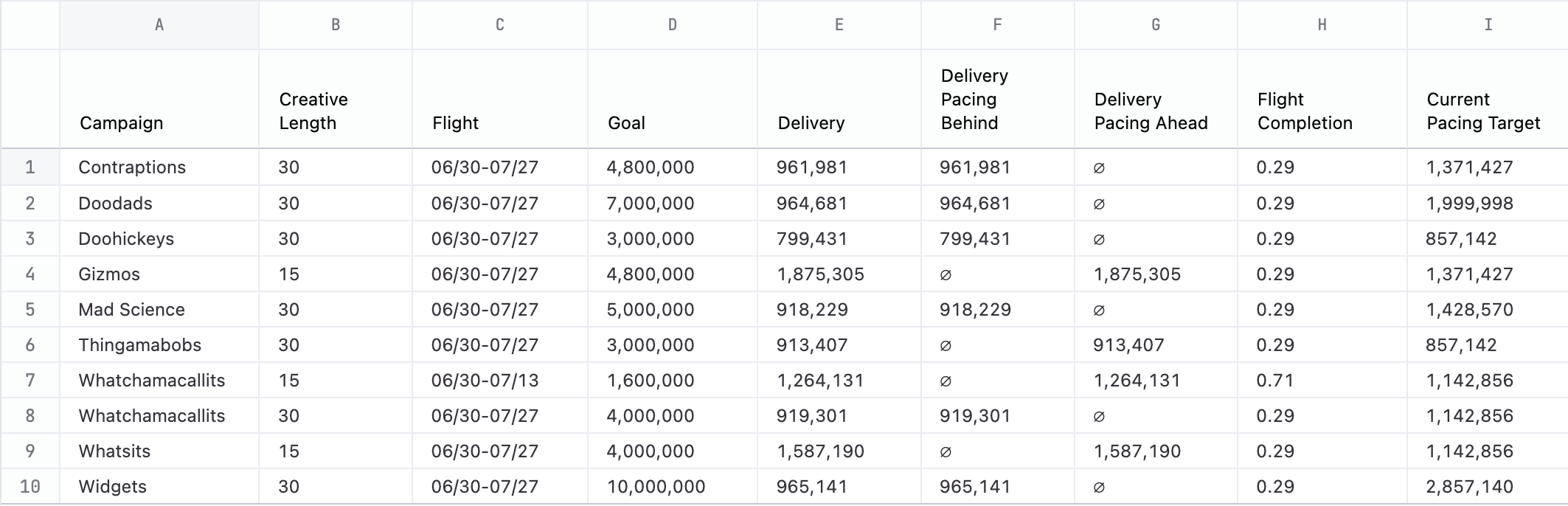
Bullet chart inside a table
Additional detail per column, row banding, conditional coloring and sizing. Fancy!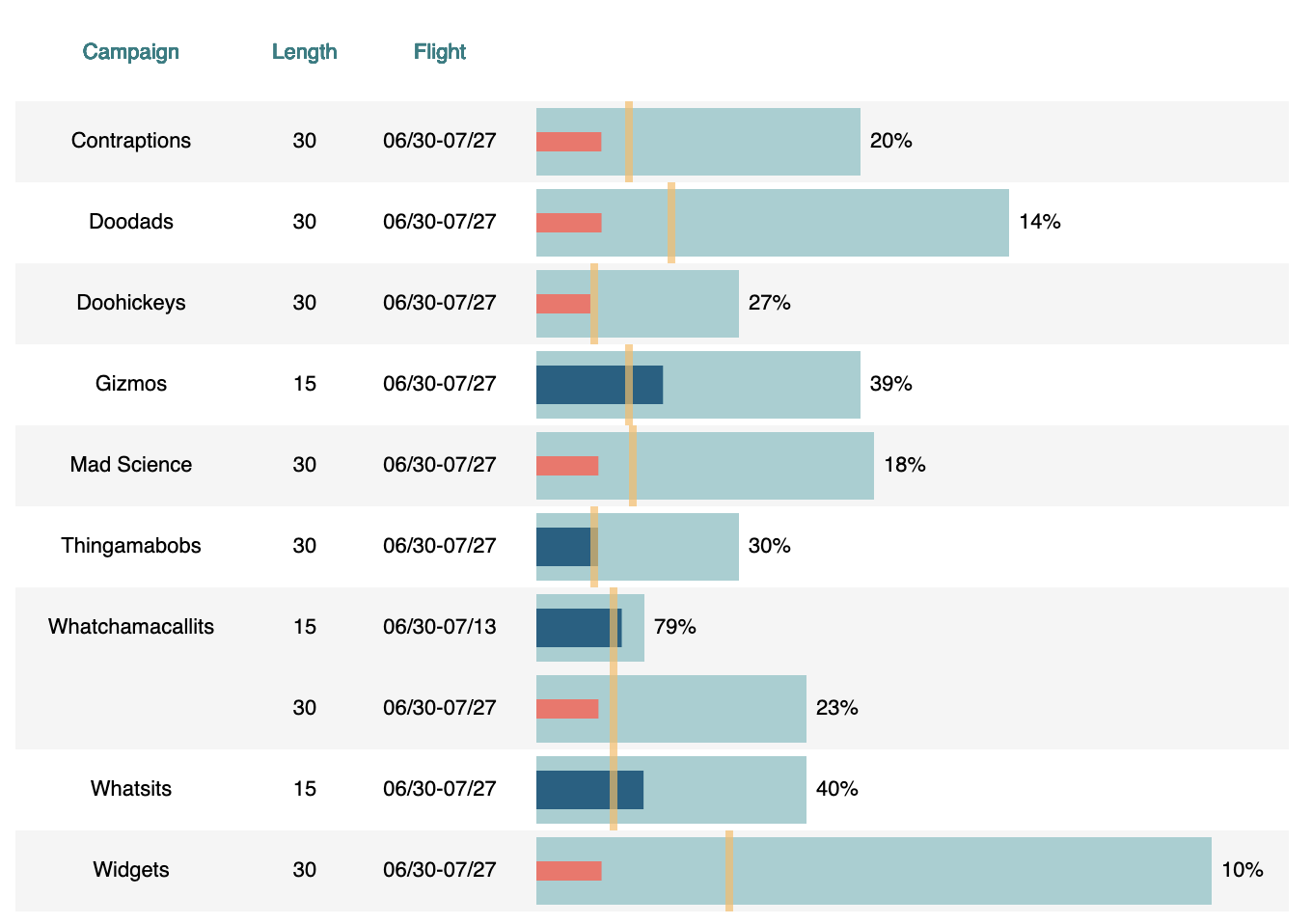
Visualization code
{
  "data": {
    "name": "bullet_chart_data"
  },
  "width": 640,
  "config": {
    "bar": {
      "binSpacing": 10
    },
    "axis": {
      "grid": false
    },
    "view": {
      "stroke": null
    }
  },
  "$schema": "https://vega.github.io/schema/vega-lite/v5.json",
  "vconcat": [
    {
      "height": 40,
      "hconcat": [
        {
          "mark": {
            "type": "text",
            "align": "center",
            "baseline": "middle"
          },
          "width": 120,
          "encoding": {
            "x": {
              "value": 60
            },
            "y": {
              "value": 20
            },
            "text": {
              "value": "Campaign"
            },
            "color": {
              "value": "#1a7e83"
            }
          }
        },
        {
          "mark": {
            "type": "text",
            "align": "center",
            "baseline": "middle"
          },
          "width": 60,
          "encoding": {
            "x": {
              "value": 30
            },
            "y": {
              "value": 20
            },
            "text": {
              "value": "Length"
            },
            "color": {
              "value": "#1a7e83"
            }
          }
        },
        {
          "mark": {
            "type": "text",
            "align": "center",
            "baseline": "middle"
          },
          "width": 80,
          "encoding": {
            "x": {
              "value": 40
            },
            "y": {
              "value": 20
            },
            "text": {
              "value": "Flight"
            },
            "color": {
              "value": "#1a7e83"
            }
          }
        },
        {
          "mark": {
            "type": "text",
            "align": "center",
            "baseline": "middle"
          },
          "width": 360,
          "encoding": {
            "x": {
              "value": 180
            },
            "y": {
              "value": 20
            },
            "text": {
              "value": ""
            },
            "color": {
              "value": "#1a7e83"
            }
          }
        }
      ],
      "spacing": 0
    },
    {
      "layer": [
        {
          "mark": "rect",
          "encoding": {
            "x": {
              "value": 0
            },
            "y": {
              "axis": null,
              "sort": "ascending",
              "type": "ordinal",
              "field": "row_id"
            },
            "x2": {
              "value": 660
            },
            "color": {
              "type": "nominal",
              "field": "is_even_row",
              "scale": {
                "range": [
                  "#f5f5f5",
                  "white"
                ]
              },
              "legend": null
            }
          }
        },
        {
          "mark": {
            "type": "text",
            "align": "center",
            "baseline": "middle"
          },
          "encoding": {
            "x": {
              "value": 60
            },
            "y": {
              "axis": null,
              "type": "ordinal",
              "field": "row_id"
            },
            "text": {
              "field": "campaign_display"
            }
          }
        },
        {
          "mark": {
            "type": "text",
            "align": "center",
            "baseline": "middle"
          },
          "encoding": {
            "x": {
              "value": 150
            },
            "y": {
              "axis": null,
              "type": "ordinal",
              "field": "row_id"
            },
            "text": {
              "field": "bullet_chart_data\\.creative_length"
            }
          }
        },
        {
          "mark": {
            "type": "text",
            "align": "center",
            "baseline": "middle"
          },
          "encoding": {
            "x": {
              "value": 220
            },
            "y": {
              "axis": null,
              "type": "ordinal",
              "field": "row_id"
            },
            "text": {
              "field": "bullet_chart_data\\.flight"
            }
          }
        },
        {
          "mark": {
            "size": 35,
            "type": "bar",
            "tooltip": true
          },
          "encoding": {
            "x": {
              "axis": null,
              "type": "quantitative",
              "field": "bullet_chart_data\\.goal",
              "scale": {
                "range": [
                  270,
                  620
                ]
              }
            },
            "y": {
              "axis": null,
              "type": "ordinal",
              "field": "row_id"
            },
            "color": {
              "value": "#a0cfd2"
            }
          }
        },
        {
          "mark": {
            "size": 10,
            "type": "bar"
          },
          "encoding": {
            "x": {
              "type": "quantitative",
              "field": "bullet_chart_data\\.delivery__pacing_behind_",
              "scale": {
                "range": [
                  250,
                  620
                ]
              }
            },
            "y": {
              "axis": null,
              "type": "ordinal",
              "field": "row_id"
            },
            "color": {
              "value": "#f97068"
            }
          }
        },
        {
          "mark": {
            "size": 20,
            "type": "bar"
          },
          "encoding": {
            "x": {
              "type": "quantitative",
              "field": "bullet_chart_data\\.delivery__pacing_ahead_",
              "scale": {
                "range": [
                  250,
                  620
                ]
              }
            },
            "y": {
              "axis": null,
              "type": "ordinal",
              "field": "row_id"
            },
            "color": {
              "value": "#096184"
            }
          }
        },
        {
          "mark": {
            "type": "tick",
            "color": "#ffbb61",
            "orient": "vertical",
            "thickness": 4
          },
          "encoding": {
            "x": {
              "type": "quantitative",
              "field": "flight_marker",
              "scale": {
                "range": [
                  250,
                  620
                ]
              }
            },
            "y": {
              "axis": null,
              "type": "ordinal",
              "field": "row_id"
            }
          }
        },
        {
          "mark": {
            "dx": 5,
            "type": "text",
            "align": "left",
            "baseline": "middle"
          },
          "encoding": {
            "x": {
              "type": "quantitative",
              "field": "bullet_chart_data\\.goal",
              "scale": {
                "range": [
                  250,
                  620
                ]
              }
            },
            "y": {
              "axis": null,
              "sort": "ascending",
              "type": "ordinal",
              "field": "row_id"
            },
            "text": {
              "field": "pacing_percentage",
              "format": ".0%"
            }
          }
        }
      ],
      "height": 420
    }
  ],
  "transform": [
    {
      "sort": [
        {
          "field": "bullet_chart_data\\.campaign",
          "order": "ascending"
        },
        {
          "field": "bullet_chart_data\\.creative_length",
          "order": "ascending"
        }
      ],
      "window": [
        {
          "as": "row_id",
          "op": "row_number"
        },
        {
          "as": "prev_campaign",
          "op": "lag",
          "field": "bullet_chart_data\\.campaign"
        }
      ]
    },
    {
      "as": "campaign_display",
      "calculate": "datum['bullet_chart_data.campaign'] === datum.prev_campaign ? '' : datum['bullet_chart_data.campaign']"
    },
    {
      "sort": [
        {
          "field": "bullet_chart_data\\.campaign",
          "order": "ascending"
        }
      ],
      "window": [
        {
          "as": "campaign_band_group",
          "op": "dense_rank",
          "field": "bullet_chart_data\\.campaign"
        }
      ]
    },
    {
      "as": "is_even_row",
      "calculate": "datum.campaign_band_group % 2 === 0"
    },
    {
      "as": "flight_marker",
      "calculate": "datum['bullet_chart_data.goal'] * datum['bullet_chart_data.flight_completion__']"
    },
    {
      "as": "pacing_percentage",
      "calculate": "(datum['bullet_chart_data.delivery__pacing_behind_'] + datum['bullet_chart_data.delivery__pacing_ahead_']) / datum['bullet_chart_data.goal']"
    }
  ],
  "description": "Campaign table with suppressed duplicate campaign names and banded rows grouped by campaign."
}