

Documentation Index

Fetch the complete documentation index at: https://docs.omni.co/llms.txt

Use this file to discover all available pages before exploring further.

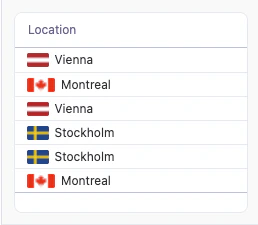
This example uses a Markdown column to display a location next to its national flag in a table. The flag image is loaded from flagcdn.com using a two-letter country code. A table column showing each location next to its national flag, such as a flag beside Vienna, Montreal, and Stockholm

Setup

To display a flag, you need a two-letter ISO 3166-1 alpha-2 country code (for example, at, ca, se, us) that can be passed into the flag image URL. You can provide this code in a few ways:
  • Enter the code manually in an input column
  • Use a calculation with XLOOKUP to map locations to codes from another table
  • Reference a field that already contains the code in your database
Set the column you want to display to Display as Markdown, then hide the helper code column so only the combined location renders. The template references the country code as {{calc_1.value}} and the location field from the saas__users_detailed view. Update these references to match your own fields.
ColNameDescription or formulaPurpose
ALocationLocation fieldLabel shown next to the flag
BCountry code (calc_1)Two-letter country code (e.g. at, ca, se, us)Passed into the flag image URL

Example code

Markdown template:
<div style="display:flex; align-items:center; gap:6px;">
  <img src="https://flagcdn.com/w20/{{calc_1.value}}.png" style="height:14px; border-radius:2px;">
  <span>{{saas__users_detailed.location.value}}</span>
</div>
CSS styles: No custom CSS is required for this example, so you can leave the CSS style field empty.