

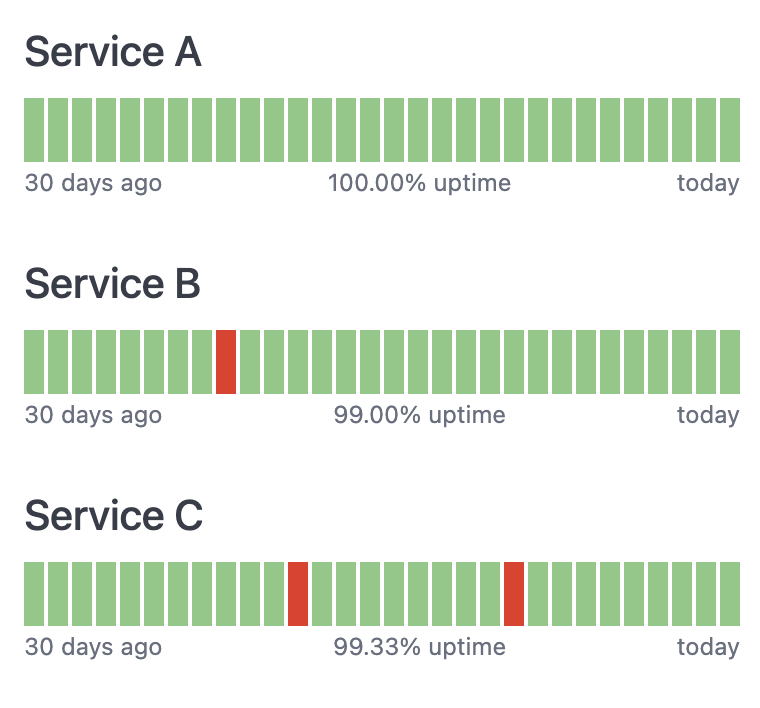
Typically used to show the reliability of a service over time, these can be configured for different timeframes or coloring thresholds.

Red/green uptime heatmap

This example shows the last 30 days of data, coloring any day red if the service level percentage is anything but 100%.
Setup

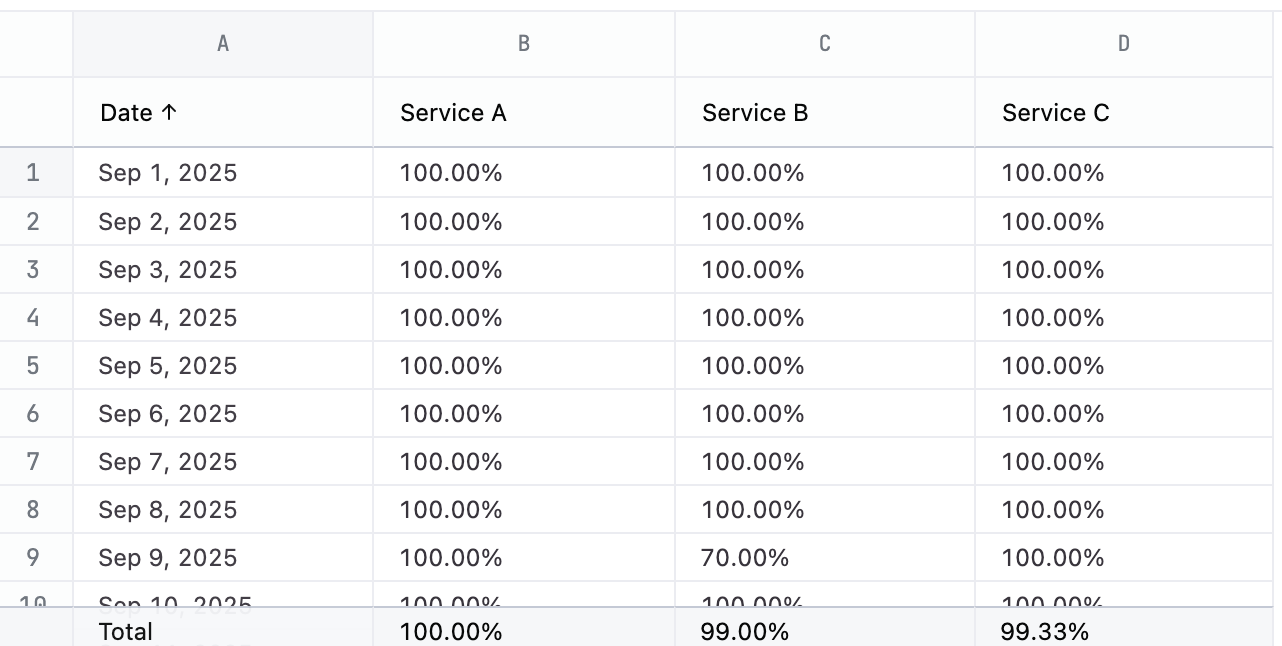
This chart has a simple structure - the time slot and a % value for each chart you want to make. Add column totals to the query and change the total calculation to average to add the average uptime below each chart.
Example code

<style>
  h3:first-of-type { margin-top: 0; }
  h3 { margin-bottom: var(--size2); }
  ul.grids {
    display: grid;
    list-style: none;
    margin: 0;
    padding: 0;
    grid-template-columns: repeat(30, 1fr);
    gap: 2px;

    & li {
      font-size: 8px;
      background: #E93323;
      display: block;
      width: 100%;
      height: 32px;
    }
    
    & li.uptime-1 {
      background: #84C982;
    }
  }

  ul.labels {
    display: flex;
    flex-direction: row;
    list-style: none;
    justify-content: space-between;
    padding: 0;
    margin: 0;
    font-size: var(--font-xs);
    color: var(--color-text2);
  }
</style>
<h3>Service A</h3>
<ul class="grids">
{{#result}}
<li class="uptime-{{uptime_data.service_a.raw}}">&nbsp;</li>
{{/result}}
</ul>
<ul class="labels">
  <li>30 days ago</li>
  <li>Service A uptime</li>
  <li>today</li>
</ul>

<h3>Service B</h3>
<ul class="grids">
{{#result}}
<li class="uptime-{{uptime_data.service_b.raw}}">&nbsp;</li>
{{/result}}
</ul>
<ul class="labels">
  <li>30 days ago</li>
  <li>Service B uptime</li>
  <li>today</li>
</ul>

<h3>Service C</h3>
<ul class="grids">
{{#result}}
<li class="uptime-{{uptime_data.service_c.raw}}">&nbsp;</li>
{{/result}}
</ul>
<ul class="labels">
  <li>30 days ago</li>
  <li>Service C uptime</li>
  <li>today</li>
</ul>

Gradient uptime heatmap

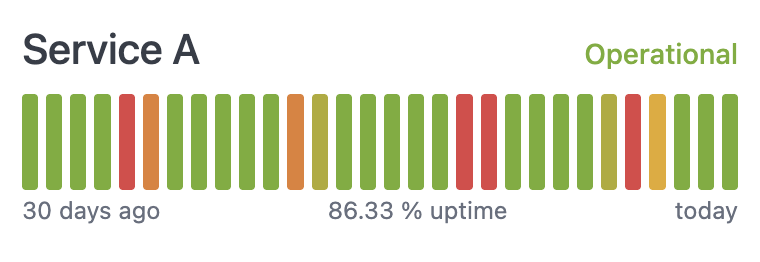
This example shows the last 30 days of data, bucketing the colors along a red to yellow to green gradient. It also adds colored text to explain the current status.
Setup

You’ll need a column for the time unit, a column for the percentage measurement, and a calculation to figure out how to apply the color. The gradient in this example is bucketed into 5 possible values. Adjust the calculation for Color tier to control how the coloring is applied. Add column totals to the query and change the total calculation to average to add the average uptime below each chart. Note that this example invents an uptime percentage value via a calculation. The following table explains the query setup, including the calculation formulas.
ColNameDescription or formulaPurpose
ADateTime unit slotused for drawing each box
BUptime (calc_1)Uptime value0-1 value for the time slot
CColor tier (calc_2)IF(B1 > 0.75, 1, IF(B1 > 0.7, 2, IF(B1 > 0.65, 3, IF(B1 > 0.6, 4, 5))))Bucket-ize the uptime value

Example code

<style>
  --l1: #76AD2D;
  --l2: #B0AB29;
  --l3: #E5A924;
  --l4: #E37F32;
  --l5: #E04345;
  
  h3 { 
    margin-block: 0 var(--size1);
    display: flex;
    flex-direction: row;
    justify-content: space-between;
    align-items: baseline;

    & .status {
      font-size: var(--font-sm);
      display: none;
    }
    & .status.level-1.operational {
      display: block;
      color: var(--l1);
    }
    & .status.level-2.impacted {
      display: block;
      color: var(--l2);
    }
    & .status.level-3.impacted{
      display: block;
      color: var(--l3);
    }
    & .status.level-4.impacted, {
      display: block;
      color: var(--l4);
    }
    & .status.level-5.down {
      display: block;
      color: var(--l5);
    }
  }
  ul.uptime {
    display: grid;
    list-style: none;
    margin: 0;
    padding: 0;
    grid-template-columns: repeat(30, 1fr);
    gap: 4px;

    & li {
      font-size: 8px;
      background: lightblue;
      display: block;
      width: 100%;
      height: 48px;
      border-radius: 2px;
    }
    
    & li.uptime-1 {
      background: var(--l1);
    }
    & li.uptime-2 {
      background: var(--l2);
    }
    & li.uptime-3 {
      background: var(--l3);
    }
    & li.uptime-4 {
      background: var(--l4);
    }
    & li.uptime-5 {
      background: var(--l5);
    }
  }

  ul.labels {
    display: flex;
    flex-direction: row;
    list-style: none;
    justify-content: space-between;
    padding: 0;
    margin: 0;
    font-size: var(--font-xs);
    color: var(--color-text2);
  }
p.notes {
  margin-top: var(--size8);
  color: var(--color-text1);
}  
</style>
<h3>Service A
  <span class="status level-{{result.29.calc_2.value}} operational">Operational</span>
  <span class="status level-{{result.29.calc_2.value}} impacted">Impacted</span>
  <span class="status level-{{result.29.calc_2.value}} down">Down</span>
</h3>
<ul class="uptime">
{{#result}}
<li class="uptime-{{calc_2.value}}">&nbsp;</li>
{{/result}}
</ul>
<ul class="labels">
  <li>30 days ago</li>
  <li>86.33 % uptime</li>
  <li>today</li>
</ul>