

Basic thermometer
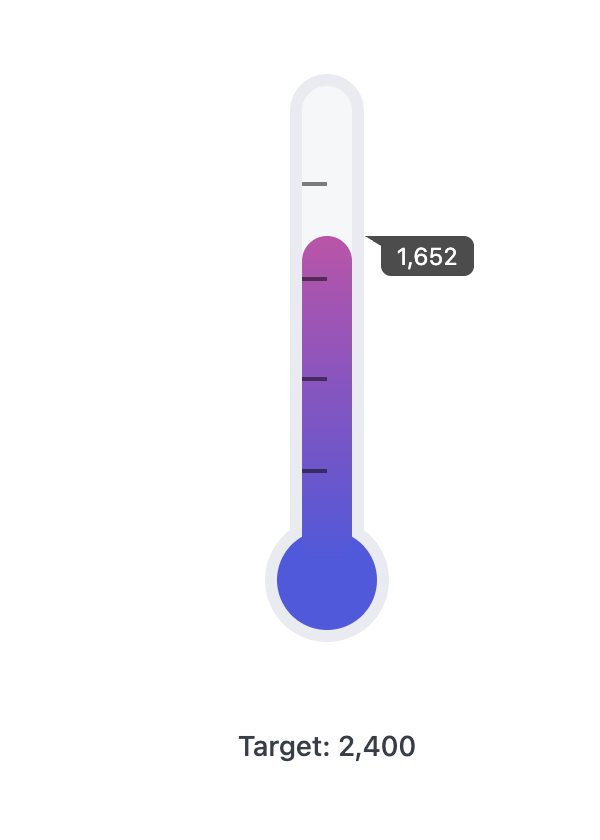
Setup
This query used for this example is pretty simple and needs only a single row that includes the following:- Value - the current value for the thermometer. In this example, it’s “Users Count”.
- Target (“calc_1”) - The 100% value for the thermometer. In this example, it’s the “target” calculation.
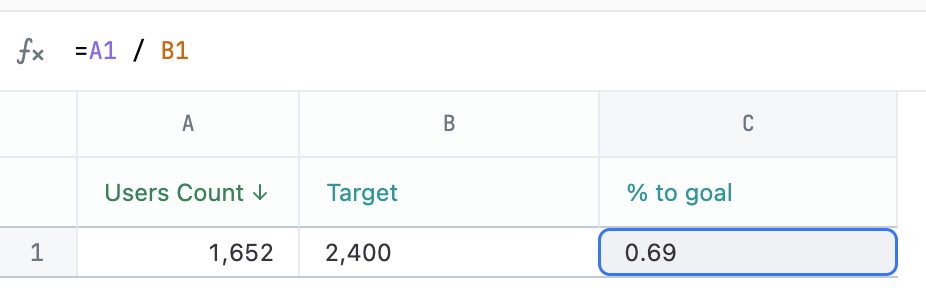
- % to goal (“calc_2”) - The calculation for the value’s progress to the goal - here it is
Value / Target(=A1 / B1is the actual calculation). This should be in decimal format, so 0.52 instead of 52%.
Example code
<style>
/* thermometer ripped from this awesome pen: https://codepen.io/Arkellys/pen/rgpNBK */

.wrapper {
  display: flex;
  flex-direction: column;
  align-items: center;
  margin: auto;
  box-sizing: content-box;
}
.thermometer {
  /* thermometer variables */
  --temperature: 70%; /* just a placeholder */
  --t-bg-color: var(--color-foreground2);
  --t-border-width: 6px;
  --t-border-color: var(--color-border1);
  --t-width: 25px;
  --t-height: 240px;
  --t-bulb-diam: calc(var(--t-width) * 2);
  --t-radius: 20px;
  --t-marker: 2px solid rgba(0,0,0,0.5);
  --t-bulb-color: #4D59E2;
  --t-temp-color: linear-gradient(#FF4994, var(--t-bulb-color)) no-repeat bottom;
  --t-border: var(--t-border-width) solid var(--t-border-color);

  /* tooltip variables */
  --tt-color: rgba(0,0,0,0.7);
  --tt-text-color: white;
  --tt-size: var(--font-xs);
  --tt-raidus: 5px;
  --tt-top-shift: 4px;
  --tt-v-padding: 4px;
  --tt-h-padding: calc(var(--tt-v-padding) * 2);
  --tt-left-shift: 125%;
  --tt-arrow-width: 1.5;
  --tt-arrow-height: 2.2;

  width: var(--t-width);
  background: var(--t-bg-color);
  height: var(--t-height);
  border: var(--t-border);
  border-radius: var(--t-radius);
  position: relative;
  z-index: 1;
  margin-bottom: var(--t-bulb-diam);
  margin-top: calc(var(--t-bulb-diam) / 2);

  & .border-cover {
    position: absolute;
    content: "";
    border-radius: 50%;
    width: 100%;
    height: calc(var(--t-width) + var(--t-border-width));
    bottom: var(--t-border-width);
    background: var(--t-bg-color);
    z-index: -1;
  }

  & .bulb {
    --bulb-bottom: calc(var(--t-bulb-diam) * -1);
    position: absolute;
    content: "{{result.0.calc_2.value_static}}";
    line-height: var(--t-bulb-diam);
    font-size: var(--font-xxs);
    text-align: center;
    color: rgba(255,255,255,0.67);
    border-radius: 50%;
    transform: translateX(-50%);
    width: var(--t-bulb-diam);
    height: var(--t-bulb-diam);
    background-color: var(--t-bulb-color);
    bottom: calc(var(--bulb-bottom) + 2 * var(--t-border-width));
    left: 50%;
    border: var(--t-border);
    z-index: -3;
  }

  .temperature {
    position: absolute;
    bottom: 0;
    background: var(--t-temp-color);
    width: 100%;
    border-radius: var(--t-radius);
    background-size: 100% var(--t-height);
    transition: all 0.2s ease-in-out;
    height: min(100%, calc(100% * {{result.0.calc_2.raw}}));

    & .tooltip {
      position: absolute;
      background: var(--tt-color);
      color: var(--tt-text-color);
      z-index: 2;
      padding: var(--tt-v-padding) var(--tt-h-padding);
      border-radius: 0 var(--tt-raidus) var(--tt-raidus);
      font-size: var(--tt-size);
      line-height: 1;
      left: calc(var(--tt-left-shift) + 1em / var(--tt-arrow-width));
      top: calc(-1em + var(--tt-top-shift) - var(--tt-v-padding));
      top: 0;
    }
    & .tooltip-arrow {
      position: absolute;
      content: "";
      border-top: calc(var(--tt-size) / var(--tt-arrow-height)) solid transparent;
      border-bottom: calc(var(--tt-size) / var(--tt-arrow-height)) solid transparent;
      border-right: calc(var(--tt-size) / var(--tt-arrow-width)) solid var(--tt-color);
      left: calc(1% + var(--tt-left-shift));
      top: 0;
    }
  }

  .markers {
    position: absolute;
    height: 59%;
    top: 20%;
    width: 50%;
    border-top: var(--t-marker);
    border-bottom: var(--t-marker);

    & .middle {
      content: "";
      height: 34%;
      width: 100%;
      top: 32%;
      position: absolute;
      border-top: var(--t-marker);
      border-bottom: var(--t-marker);
    }
  }

}

</style>

<section class="wrapper">
  <article class="thermometer">
    <div class="border-cover"></div>
    <div class="temperature">
      <div class="tooltip">{{result.0.users.count.value_static}}</div>
      <div class="tooltip-arrow"></div>
    </div>
    <div class="markers"><span class="middle"></span></div>
    <div class="bulb"></div>
  </article>
  <h6>Target: {{result.0.calc_1.value_static}}</h6>
</section>
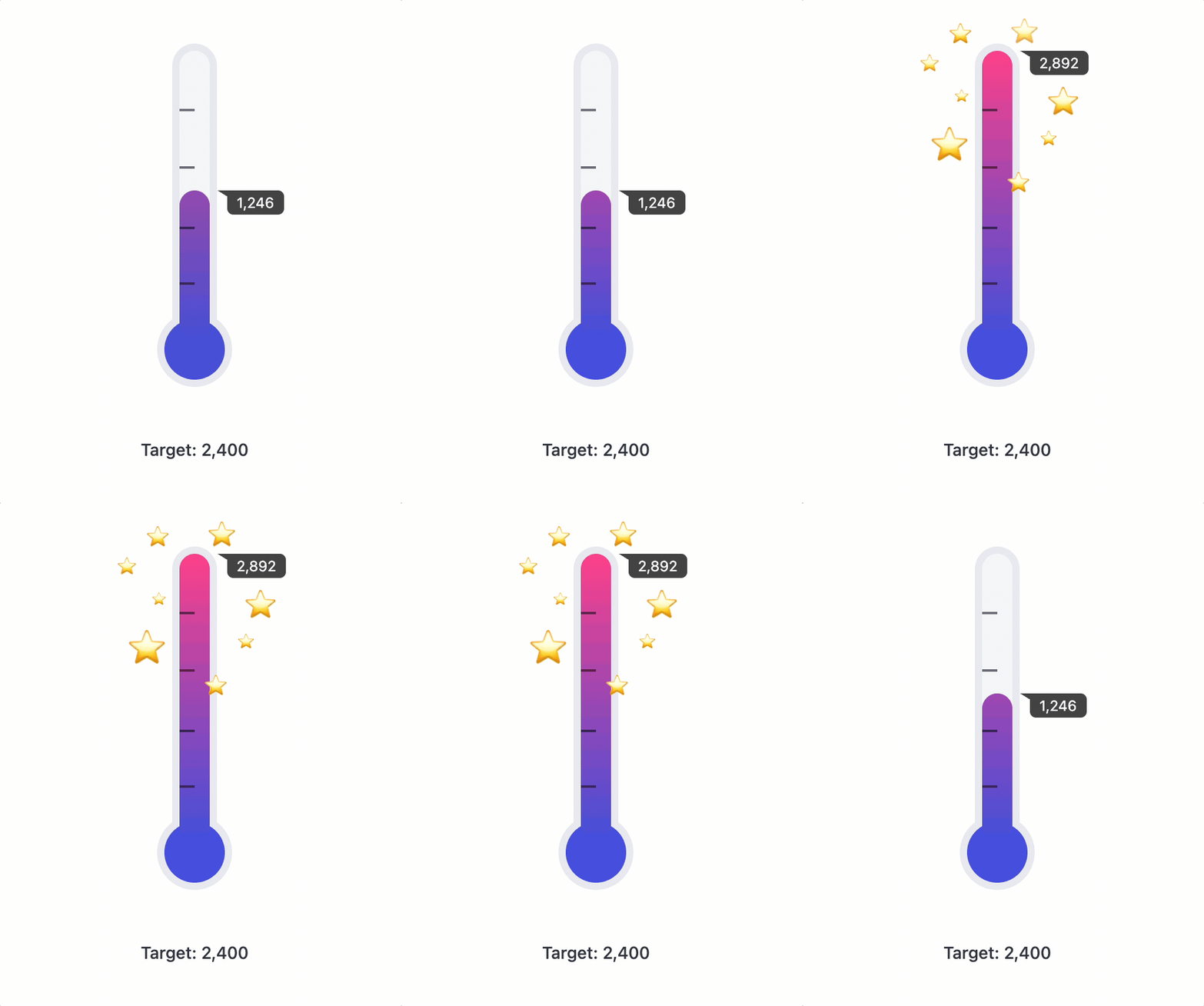
Thermometer with a celebration
Setup
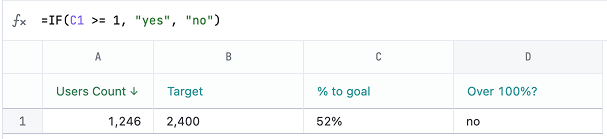
The setup for the “celebrate with stars” version includes one additional field, Over 100%? (“calc_3”). This calculation is a simple calculation to see if the target has been exceeded. It will be used to assign a CSS class that exposes the stars:=IF(C1 >= 1, "yes", "no")
Example code
<style>
/* thermometer ripped from this awesome pen: https://codepen.io/Arkellys/pen/rgpNBK */

.wrapper {
  display: flex;
  flex-direction: column;
  align-items: center;
  margin: auto;
  box-sizing: content-box;
}
.thermometer {
  /* thermometer variables */
  --temperature: 70%; /* just a placeholder */
  --t-bg-color: var(--color-foreground2);
  --t-border-width: 6px;
  --t-border-color: var(--color-border1);
  --t-width: 25px;
  --t-height: 240px;
  --t-bulb-diam: calc(var(--t-width) * 2);
  --t-radius: 20px;
  --t-marker: 2px solid rgba(0,0,0,0.5);
  --t-bulb-color: #4D59E2;
  --t-temp-color: linear-gradient(#FF4994, var(--t-bulb-color)) no-repeat bottom;
  --t-border: var(--t-border-width) solid var(--t-border-color);

  /* tooltip variables */
  --tt-color: rgba(0,0,0,0.7);
  --tt-text-color: white;
  --tt-size: var(--font-xs);
  --tt-raidus: 5px;
  --tt-top-shift: 4px;
  --tt-v-padding: 4px;
  --tt-h-padding: calc(var(--tt-v-padding) * 2);
  --tt-left-shift: 125%;
  --tt-arrow-width: 1.5;
  --tt-arrow-height: 2.2;

  width: var(--t-width);
  background: var(--t-bg-color);
  height: var(--t-height);
  border: var(--t-border);
  border-radius: var(--t-radius);
  position: relative;
  z-index: 1;
  margin-bottom: var(--t-bulb-diam);
  margin-top: calc(var(--t-bulb-diam) / 2);

  & .border-cover {
    position: absolute;
    content: "";
    border-radius: 50%;
    width: 100%;
    height: calc(var(--t-width) + var(--t-border-width));
    bottom: var(--t-border-width);
    background: var(--t-bg-color);
    z-index: -1;
  }

  & .bulb {
    --bulb-bottom: calc(var(--t-bulb-diam) * -1);
    position: absolute;
    content: "{{result.0.calc_2.value_static}}";
    line-height: var(--t-bulb-diam);
    font-size: var(--font-xxs);
    text-align: center;
    color: rgba(255,255,255,0.67);
    border-radius: 50%;
    transform: translateX(-50%);
    width: var(--t-bulb-diam);
    height: var(--t-bulb-diam);
    background-color: var(--t-bulb-color);
    bottom: calc(var(--bulb-bottom) + 2 * var(--t-border-width));
    left: 50%;
    border: var(--t-border);
    z-index: -3;
  }

  .temperature {
    position: absolute;
    bottom: 0;
    background: var(--t-temp-color);
    width: 100%;
    border-radius: var(--t-radius);
    background-size: 100% var(--t-height);
    transition: all 0.2s ease-in-out;
    height: min(100%, calc(100% * {{result.0.calc_2.raw}}));

    & .tooltip {
      position: absolute;
      background: var(--tt-color);
      color: var(--tt-text-color);
      z-index: 2;
      padding: var(--tt-v-padding) var(--tt-h-padding);
      border-radius: 0 var(--tt-raidus) var(--tt-raidus);
      font-size: var(--tt-size);
      line-height: 1;
      left: calc(var(--tt-left-shift) + 1em / var(--tt-arrow-width));
      top: calc(-1em + var(--tt-top-shift) - var(--tt-v-padding));
      top: 0;
    }
    & .tooltip-arrow {
      position: absolute;
      content: "";
      border-top: calc(var(--tt-size) / var(--tt-arrow-height)) solid transparent;
      border-bottom: calc(var(--tt-size) / var(--tt-arrow-height)) solid transparent;
      border-right: calc(var(--tt-size) / var(--tt-arrow-width)) solid var(--tt-color);
      left: calc(1% + var(--tt-left-shift));
      top: 0;
    }
  }

  .markers {
    position: absolute;
    height: 59%;
    top: 20%;
    width: 50%;
    border-top: var(--t-marker);
    border-bottom: var(--t-marker);

    & .middle {
      content: "";
      height: 34%;
      width: 100%;
      top: 32%;
      position: absolute;
      border-top: var(--t-marker);
      border-bottom: var(--t-marker);
    }
  }

  .celebrate {
    --stars-width: calc(var(--t-width) * 6);
    width: var(--stars-width);
    height: var(--stars-width);
    left: calc(-1 * var(--stars-width) + var(--stars-width) / 2 + var(--t-border-width) * 2);
    top: calc(-1 * var(--t-bulb-diam));
    position: absolute;
    margin-bottom: calc(--t-height);
    font-size: 2px;
  }

  .star {
    position: absolute;
    line-height: 1;
    opacity: 0;

    &:nth-child(1) { transition-duration: 0.5s; font-size: 10px; top: 55%; left: 27%; }
    &:nth-child(2) { transition-duration: 1.2s; font-size: 15px; top: 35%; left: 8%; }
    &:nth-child(3) { transition-duration: 0.3s; font-size: 18px; top: 100%; right: 32%; }
    &:nth-child(4) { transition-duration: 0.8s; font-size: 30px; top: 75%; left: 14% }
    &:nth-child(5) { transition-duration: 1.1s; font-size: 25px; top: 53%; right: 5%; }
    &:nth-child(6) { transition-duration: 1.5s; font-size: 22px; top: 15%; left: 58%; }
    &:nth-child(7) { transition-duration: 0.5s; font-size: 18px; top: 18%; left: 24%}
    &:nth-child(8) { transition-duration: 0.7s; font-size: 13px; top: 77%; right: 17% }
  }
  .celebrate.yes .star {
    opacity: 1;
    transition-property: all;
    transition-timing-function: ease-in-out;
  }
}

</style>

<section class="wrapper">
  <article class="thermometer">
    <div class="border-cover"></div>
    <div class="temperature">
      <div class="tooltip">{{result.0.users.count.value_static}}</div>
      <div class="tooltip-arrow"></div>
    </div>
    <div class="markers"><span class="middle"></span></div>
    <div class="celebrate {{result.0.calc_3.raw}}">
      <div class="star">⭐️</div>
      <div class="star">⭐️</div>
      <div class="star">⭐️</div>
      <div class="star">⭐️</div>
      <div class="star">⭐️</div>
      <div class="star">⭐</div>
      <div class="star">⭐️</div>
      <div class="star">⭐️</div>
    </div>
    <div class="bulb"></div>
  </article>
  <h6>Target: {{result.0.calc_1.value_static}}</h6>
</section>