

Customizing filter suggestions
How suggestions are sourced
By default, Omni populates up to 2,000 suggestions (not configurable) by querying the field’s distinct values in the context of the topic the field belongs to:JOIN or WHERE clauses in the suggestion query.
Changing the suggestion source
Three dimension parameters override the default query. Setting any of them means suggestions no longer come from the field’s own distinct values.| Parameter | Description | Available on measures? |
|---|---|---|
suggest_from_field | Pulls suggestions from a different field, usually one that queries faster | Yes |
suggest_from_topic | Routes the suggestion query to a different topic | No |
suggestion_list | Sets the list of options explicitly, bypassing the query. Also allows you to set a display label separate from the underlying value, which is helpful when the stored value isn’t intuitive. | Yes |
suggest_from_field and suggest_from_topic can’t be used with faceting on the same dimension.How other filters affect suggestions
When faceting is enabled, selecting values in one filter narrows the suggestions shown in other filters to values that exist alongside your current selections.Customizing per-dimension suggestion behavior
Thefaceting parameter lets you customize how suggestions behave on a per-dimension basis.
- Independent of selections
- Depend on specified fields
- Exclude specified fields
To make suggestions independent of all other filter selections, add Note:
depends_on: [] as a child to faceting. In this example, gender suggestions will be available regardless of other filter selections:Suggestions are independent of other filter selections
depends_on cannot be used with exclude.Enabling faceting across the workbook
facet_workbook_filters is disabled by default. Set it to true to turn faceting on for every filter in the workbook. When enabled, all filter suggestions in the workbook will be faceted based on the current filter selection.
Caching and refreshing
Filter suggestions are retained for 30 days, independent of the model’s cache policy. To make them obey the policy’smax_cache_age instead, set filter_suggestions_must_obey_policy to true on the cache policy:
Obey cache policy & retain for 24 hours
Refreshing stale filter suggestions
In rare circumstances, suggestions may be cached in a stale state. To enable the refresh option for a specific query:- Mac - Hold
Command + Shift - Windows - Hold
Control + Shift
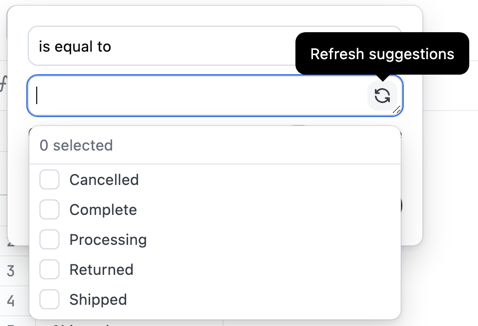
The filter suggestion menu with the refresh option enabled
Next steps
- Adding and configuring filters on workbook queries
- Troubleshooting filters not showing all expected values