

Count GA4 events exactly, including today
events_YYYYMMDD tables as one events_all view over events_*. Its Table Date field (table_suffix_date) dates each row by its table’s name.
With streaming export on, GA4 writes the current day’s events to events_intraday_YYYYMMDD, and deletes that table after the day’s events_YYYYMMDD table is complete. events_* matches both, so while both exist, events_all counts that day twice. The day is usually yesterday, so reports on finished days are affected too.
If a short double count on the newest finished day doesn’t matter for your reporting, use events_all. Otherwise, add the view in this guide.
Requirements
To follow the steps in this guide, you’ll need:- A BigQuery connection to a GA4 dataset with both daily and streaming export turned on, and at least one
events_YYYYMMDDtable - Modeler or Connection Admin permissions for the connection, so you can edit the shared model
See the double count
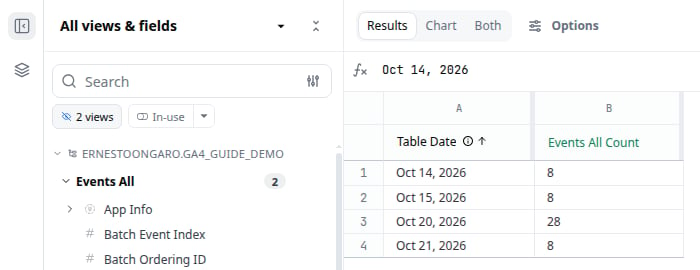
In this example dataset, October 20 has a 14-event daily table, and its 14-event intraday table isn’t deleted yet, soevents_all reports 28:
Add an events_exact view
The new view keeps every daily table. It keeps an intraday table only when its date is later than the newest daily table, because before that, the daily table already holds the same events.-
In the model IDE, click File > New view, name the view
events_exact, and replace its contents with:events_exact.view -
Replace
my-project.analytics_123456789with your BigQuery project and GA4 dataset in both places. -
Add the other GA4 columns you report on as dimensions, in the same form as
event_name: {}.
table_date uses the last eight characters of _TABLE_SUFFIX, so the daily table 20261020 and the intraday table intraday_20261020 both become October 20, 2026.
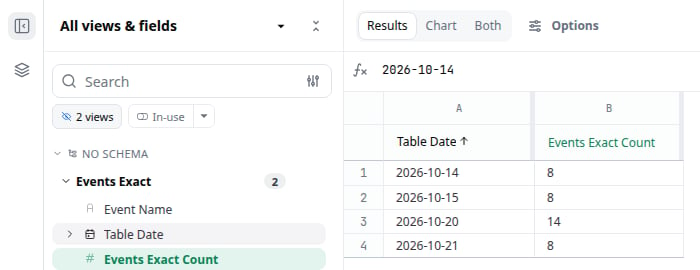
To check the result, open a workbook on the model and query Table Date and Count from Events Exact. Compare the most recent daily day with the same day in Events All. In this example, events_exact counts October 20 once, and still includes October 21, which only has an intraday table:
base_ga4__events model instead.
Query cost
- Filter on
table_date. BigQuery then reads only the tables in the filter, as it does for the generated Table Date field. A filter on another date column, such asevent_date, reads every table. - Every query adds at least 10 MB to the bill. BigQuery bills
INFORMATION_SCHEMAqueries at a 10 MB minimum, and the subquery runs with every query on this view. On a small property, this minimum can be most of a query’s cost. - During the overlap, you pay to read both tables for that day. BigQuery skips tables only for filters with fixed values, and the subquery’s result isn’t fixed. Until GA4 deletes the intraday table, a query that includes that day reads both tables, then drops the intraday rows.
Next steps
- Add the view to a topic so users can find it in workbooks and AI chat.
- Read about wildcard
table_nameto combine other sets of BigQuery tables the same way.