

Enabling the timezone picker
To use the timezone picker, enable all the following settings:1
Enable the User-specific Timezones connection setting
An Organization Admin or Connection Admin must enable the underlying connection’s User-specific Timezones setting. See Timezone conversion for more information.
2
Enable the Timezone override organization setting
An Organization Admin must enable the Timezone override default document ability in Settings > Content permissions. See Content permissions for more information.
3
Enable the Timezone override document setting
A user with Editor, Manager, or Owner permissions on the document must enable the document’s Timezone override setting. See Dashboard settings for more information.
Embed users will have access to the timezone picker when all of the above settings are enabled.
Using the timezone picker
When all three settings are enabled, the timezone picker displays in the document’s header and the footer of the dashboard: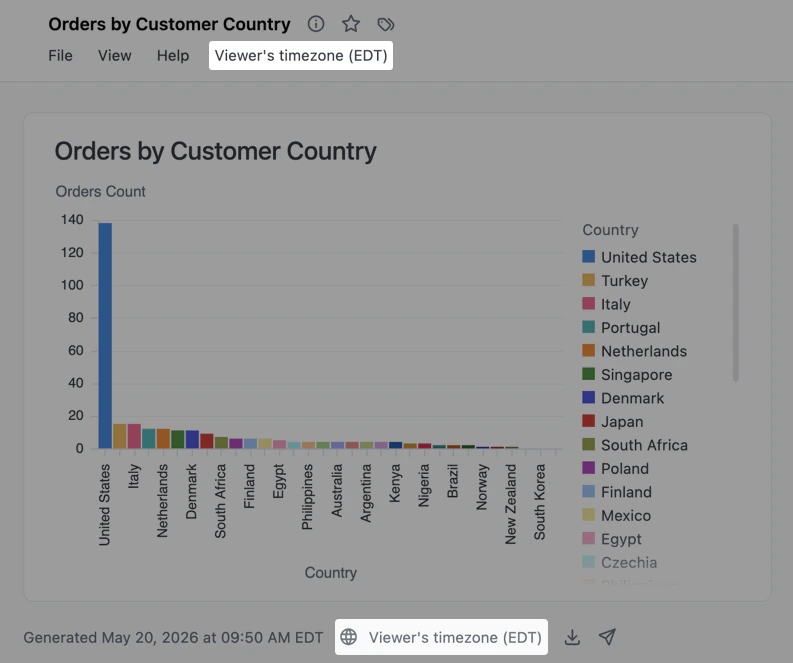
Timezone picker on a dashboard. The picker can also be used from a workbook header.
- Viewer’s timezone - Each viewer’s profile timezone
- UTC - Coordinated Universal Time
- A specific timezone - For example,
America/Denver
Next steps
- Learn more about timezone conversion in Omni
- Configure interactivity for your documents in dashboard settings
- Set organization-level content permissions