

Use cases
Routines work best for recurring questions where an AI-written response adds more than a static export would. Scheduled routines suit regular updates; conditional routines suit exceptions that are only worth a message when they happen. For example:- Morning briefings for sales teams — “Summarize yesterday’s closed-won deals by rep and flag any account that slipped to next quarter,” delivered before the team logs on
- Operational summaries — “Describe how today’s order volume and fulfillment times compare to the same day last week, and call out anything unusual”
- Pipeline and revenue narratives — “Write a short update on how we’re tracking against this month’s revenue target and which segments are driving the change”
- Plain-language monitoring — “Check for any spikes in error rates or refunds over the last 24 hours and explain what you find”
- Exception alerts — “When daily active users drop below 1000, notify the product team with a summary of the drop” — a conditional routine that only delivers when the condition is met, instead of every day
- Inventory monitoring — “When inventory for any SKU falls under 50 units, email the operations team with the affected SKUs and current stock levels”
How routines work
A routine runs in one of two modes:- Schedule mode — The routine runs your prompt every time the schedule you set occurs.
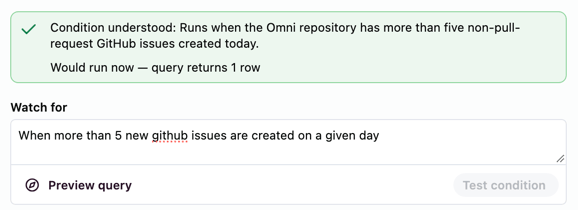
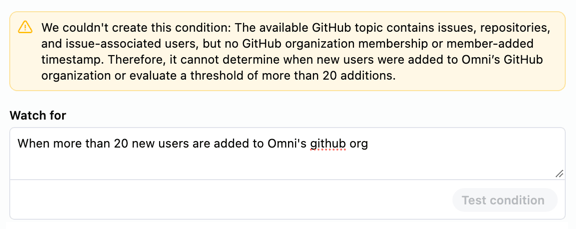
- Condition mode — The routine checks a plain-language condition against your data on the schedule you set, and runs your prompt only when the condition is met. A condition can check a threshold, whether data is present or missing, or whether results changed since the last check.
Routine results do not include hyperlinked dashboard links, even when delivered to Slack.
/identifier anywhere in a routine’s prompt runs that saved skill, resolved as the routine owner each time the routine fires. If the prompt names a skill owned by someone else, the routine’s create/edit form shows a message naming the owner, since that owner’s future edits to the skill change what the routine delivers. If the identifier can’t be resolved when the routine fires — for example, the skill was deleted or renamed — the run continues and the delivery names the skill it couldn’t find.
Creating routines
Restricted Querier permissions or higher are required to create routines. This also requires the Use routines custom role permission. External users can’t create routines, regardless of their connection role.
- Omni Agent
- Omni UI
- API
- CLI
Ask for anything recurring and the agent will set up the routine for you:
“Every Monday at 9am, email me a summary of last week’s signups”You can also add a condition to the routine, so that the routine will run only if the condition is met:
“Every day at 9AM, check if inventory for any SKU falls under 50 units and then email me”The routine will be created and immediately active, use the model and topic the conversation is scoped to, and run with your permissions. Results are delivered to you unless you say otherwise — name other people, a user group, or a Slack channel in your prompt to deliver elsewhere. Naming several people delivers to a Slack group direct message, up to 8 people. Slack delivery requires a connected Slack workspace.In the Omni Agent, the new routine appears as a card in the conversation. Click Edit routine to open it in split view beside the chat, where you can review and adjust the prompt, schedule, destination, and recipients.You can do this anywhere you can talk to the Omni Agent:
- Omni Agent — in chat, in the Omni app
- Omni Slack Agent — DM the agent or
@Omniit in a channel - MCP — through the
askOmnitool, from an MCP client like Claude or Cursor - API — submit the prompt as an AI job with
POST /api/v1/ai/jobs - Omni CLI — submit the same job with
omni ai job-submit
Updating routines
- Omni Agent
- Omni UI
- API
- CLI
To update a routine from chat, you must have the routine open in split view. Click Edit routine on a routine card to open the routine’s edit form beside the chat, then ask the agent to modify specific settings. For example:
“Update the Weekly Signups routine to run at 9AM instead of 8AM”If the routine delivers to a Slack group direct message, you can add or remove people by name without resetting the rest of the group:
“Also DM Blobby about this” “Stop sending this to Blob Ross”The agent can only update the routine currently open in the split view — asking about a different routine in a general chat conversation won’t work, even if you created that routine earlier in the session.When you ask the agent to update a routine, it renders an “update routine” chip in the conversation summarizing what changed. The edit form updates live to match the agent’s changes, so you can see your modifications take effect immediately.
Finding routines from chat
Ask the agent to find or list your routines, for example:“What do I have scheduled?” “Open the Monday routine that posts to #growth”The agent returns up to 10 matching routines. Click the routine to open it in split view beside the chat. On surfaces that can’t show split view, such as the Omni Slack Agent or an MCP client, each result includes an edit link instead.
Manually triggering routines
- Omni UI
- API
- CLI
- Click Routines in the sidebar.
- In the list of routines, click the icon next to the routine you want to run.
- Select Run now.
Deleting routines
- Omni Agent
- Omni UI
- API
- CLI
The agent can delete a routine that is currently open in split view. To have the agent delete a routine:
- Open the routine in split view by clicking Edit routine on the routine card in the conversation.
- Ask the agent to delete the routine.
- The agent will prompt you to confirm the deletion.
- Click Delete routine.
Best practices
- Be specific in your prompts — Clear, detailed instructions produce more consistent results across automated runs
- Test before scheduling — Run your prompt in the Omni Agent first to verify it produces the result you expect before creating a routine
- Choose appropriate schedules — Match the routine’s frequency to how often the underlying data changes and when the result is useful
- Review results regularly — Check routine output periodically to make sure it still meets your needs as your data and questions evolve
Limitations
- Routines cannot edit dashboards. They can only inspect and report on a dashboard referenced in a prompt.
- Each routine delivers to a single destination. To send a run to both email and Slack, create one routine per destination.
- Routine chat tools aren’t supported for embedded instances using single content mode, scheduled routine runs, and API jobs that run on behalf of embed users.