

How it works
You do two things: ask Claude to build the dashboard, and then send it to Omni. Claude and Omni do the rest through the Omni MCP server. The full flow is:- You: Ask Claude (in the desktop app or on
claude.ai) to build a dashboard using your Omni data. - Claude: Uses the Omni MCP server’s tools to query your Omni data.
- Claude: Uses the Omni query results to build a dashboard artifact.
- You: Export the dashboard, sending it to Omni Analytics. See Exporting a dashboard from Claude for the exact steps.
- Claude: Uses the same MCP server connection to send the dashboard to Omni.
- Omni: Rebuilds the dashboard as an app. As part of the process, Omni converts each query in the dashboard to a query on your semantic model.
Requirements
To import a Claude dashboard, you’ll need:- A Claude plan that includes Dashboards. See the Claude documentation for more information.
-
To have the following enabled in your Omni organization:
- Settings required to use the Omni MCP server
- AI Hub > MCP > Agentic capabilities
- Settings > Apps > Enable apps, if you want to import the dashboard as an app. Otherwise, Claude will create an Omni dashboard.
- Querier permissions or higher on the model Claude uses to build the dashboard. If your organization uses custom roles, you’ll need the Use Omni Agent, Use workbooks, and Create apps permissions.
-
A configured Omni MCP connection in Claude. See Using the MCP server in Claude Desktop to learn how to complete the setup.
Note: Your Omni MCP connection can’t have an
X-MCP-User-IDheader. The import tools always act as the connection’s own user.
Exporting a dashboard from Claude
Don’t export a dashboard more than once. Omni creates a new app each time you export a dashboard from Claude, even if you already exported it. Existing apps aren’t updated from subsequent exports.
- In Claude, ask for a dashboard about your Omni data.
- Open the dashboard that you want to send.
- Click the Share button on the dashboard, then Export.
- In the Send to section, click Omni Analytics.
- Use the Omni Agent to style the app. Claude doesn’t include styles in the exported dashboard file, so you’ll need to apply styling in Omni.
- Configure navigation, embedding, and other functionality in the app’s settings
- Share the app with your organization
Reviewing the import in Omni
You can see only your own import jobs. Organization Admins can see the import jobs of all users.
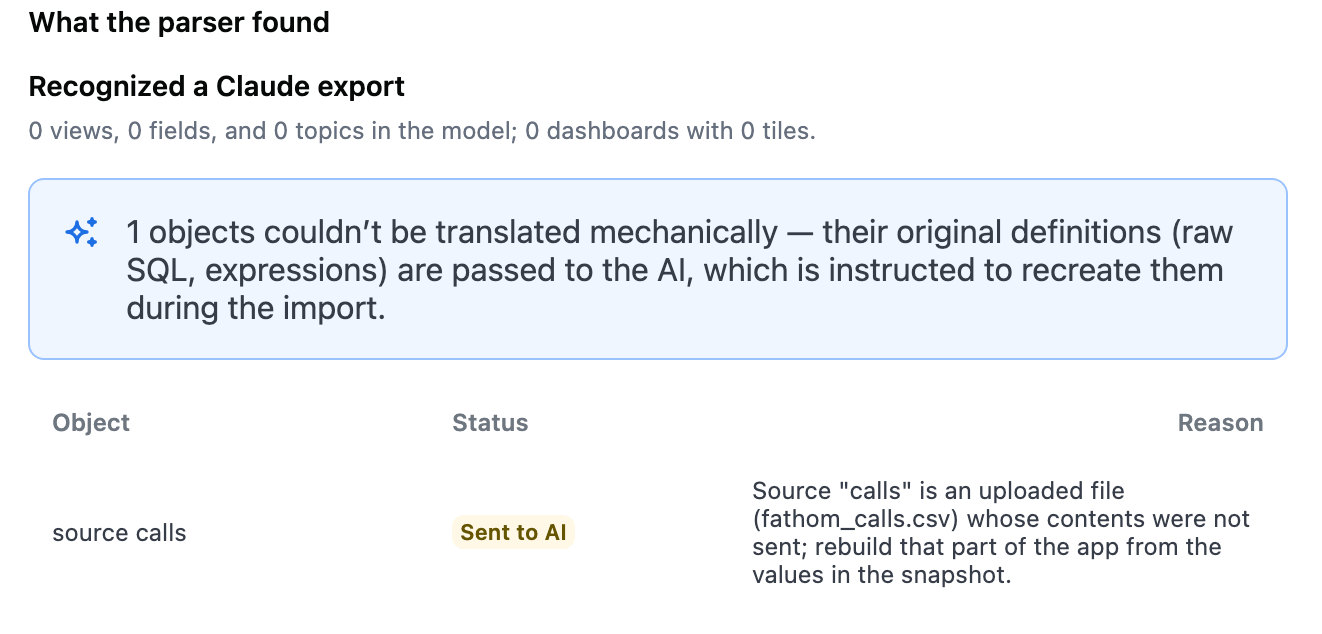
Issues that Omni couldn't translate when building the app
For more details, see How does Omni verify the data in the app?
Limitations
- Not supported for embedded instances. Embed users can’t import Claude dashboards.
- Each export from Claude creates a new app. If you send the same dashboard again, Omni creates a second app. Omni doesn’t update the app from the earlier export.
- Claude doesn’t include styles in the export. To style the app, see Styling apps.
- Uploaded files aren’t imported. If the dashboard uses data from a file that you uploaded to Claude, Omni rebuilds that part from the dashboard’s static data.
- Size limits:
- The dashboard file can be a maximum of 16 MB.
- The dashboard can have a maximum of 50 data sources.
- If a dashboard page is very large or very complex, Omni imports the page as a static snapshot.
- The data must be on the model’s connection. If the dashboard’s queries use data from a different database, Omni refuses the import.
Troubleshooting
Common questions
How does Omni convert a Claude dashboard to an app?
How does Omni convert a Claude dashboard to an app?
When you send a Claude dashboard to Omni, Claude calls the
import-claude-dashboard-from-url tool on Omni’s MCP server and gives Omni a link to the dashboard file. The link works only once and expires after approximately 10 minutes.Next, Omni does the following:1
Parses the Claude dashboard file
Omni reads the dashboard file and finds each data source in the dashboard.
2
Converts data sources to Omni queries
Omni converts each data source to an Omni query:
- SQL goes through Omni’s SQL parser. If the parser can’t convert a query, the Omni Agent rewrites it. Omni makes a maximum of four attempts for each query.
- Queries from Omni’s
runQuerytool are planned on the model. - Data from Omni’s
getDataoraskOmnitools keep only the question that was asked. Omni generates a new query from that question.
3
Builds the app
Lastly, the Omni Agent builds an app that uses the translated queries.
How does Omni select the model for the app?
How does Omni select the model for the app?
Omni selects the model for the app in this order:
- The model in the connection’s
X-MCP-Model-IDheader, if the connection has one - The model that Claude specifies in the request
- The only shared model that you can explore
How does Omni verify the data in the app?
How does Omni verify the data in the app?
Omni never runs the dashboard’s SQL directly - every query runs through the semantic model, with your permissions. This means that row-level security and access grants apply.To verify the result, Omni compares the numbers from each query with the numbers in the dashboard that Claude sent.
Can I export a dashboard if apps aren't enabled in Omni?
Can I export a dashboard if apps aren't enabled in Omni?
Yes. If apps aren’t enabled in your Omni organization, Claude will use the
askOmni MCP tool to create a dashboard instead of an app.Note: Import jobs that create dashboards don’t currently display in Settings > Imports.Next steps
- Apps - Learn about Omni apps
- Styling apps - Style the app that Omni built
- MCP server tools - Read about the import tools
- Using the MCP server in Claude Desktop - Connect Claude to Omni