

JOINS when users explore data. This allows for exploration without the need to write SQL.
Relationship definitions
Global relationships are defined in your model’srelationships file and look similar to the following:
Example joins in relationships.yml file
- Consistent, accurate, and free from duplication
- Easy to navigate
- Aligned with your business logic
orders connect to users or how sessions link to users, so that anyone exploring data in Omni can seamlessly combine those sources without writing SQL.
Auto-inferred relationships
When a new model is created, Omni auto-infers relationships based on the schema metadata. You can control how Omni infers relationships during schema refresh using the Auto-generate relationships connection setting. Omni supports two inference strategies:- Column name matching - Omni checks each table and looks for comparable field names and types, using this metadata to infer relationships
- Foreign key constraints - For databases that support foreign keys (Postgres, Snowflake), Omni can use constraint metadata to infer relationships
orders table and a users table like the following:
The users table contains an id, and orders has a user_id. With column name inference enabled, Omni would infer that users.id = orders.user_id and create a relationship between the tables. Omni-inferred relationships will have relationship_type: assumed_many_to_one in their definition.
Configuring relationship auto-generation
The Auto-generate relationships setting controls how Omni infers relationships during schema refreshes. The setting is configured per connection on the connection’s settings page (Settings > Connections > your connection). For databases that support foreign key constraints (Postgres, Snowflake), the setting provides four modes:- Both - Infer relationships from foreign key constraints and column name matching (default)
- Foreign keys only - Infer relationships only from foreign key constraints
- Column names only - Infer relationships only from column name matching
- None - Skip auto-generation entirely
Topic-scoped relationships
If you want a join to only be accessible in a specific topic, you can create a topic-scoped relationship. This type of relationship is defined directly in a topic file using thejoins parameter.
For example, the joins in the following Transactions topic would only be available to users when they’re in that specific topic:
Transactions topic
users view might join to sessions by user_id in one topic, but by account_id in another.
In practice, you might start with global relationships for shared connections like orders → customers, and then define topic relationships when a topic requires a customized join or additional context. Omni automatically merges topic and global relationships when generating SQL, giving you the flexibility to tailor joins while keeping your model consistent.
Topic-specific views offer a similar trade-off, where even views and fields can be customized at the topic level. This is a common pattern when using topic-specific joins. For example, you may want to extend an aliased view inside a topic to customize fields for a specific use case.
Reversible relationships
Omni curates the workbook experience to prevent unexpected join results. When exploring in All Views and Fields, Omni hides joins that would fan out the base dataset unless the relationship explicitly allows it withreversible: true.
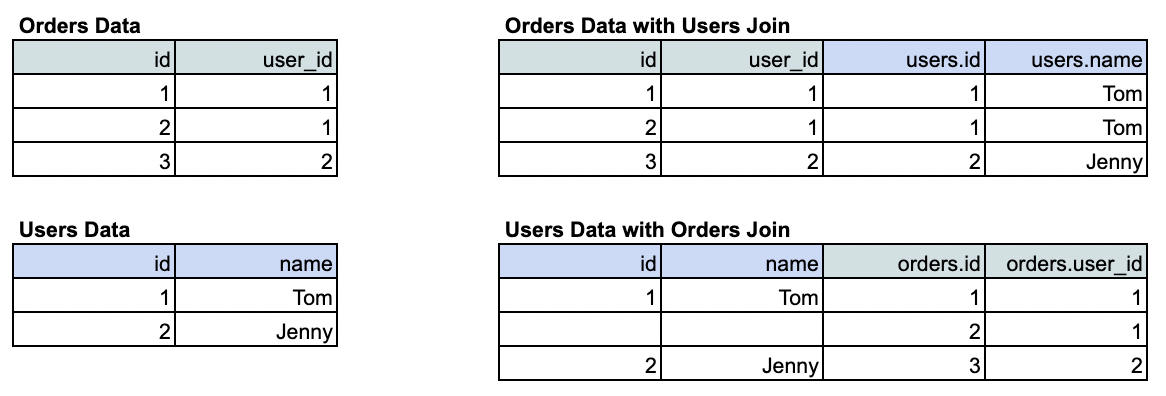
users is joined into orders. This join doesn’t change the number of rows — each order simply gains descriptive information about the user who placed it. This is a many_to_one relationship and represents the default join direction Omni includes in the workbook.
In contrast, the bottom example shows orders joined into users. Here, the base table’s shape changes because each user now appears multiple times, once for every order they’ve placed. This is a one_to_many relationship that fans out the data.
By default, Omni surfaces only joins like the first example (many_to_one) to keep workbook results intuitive and prevent duplicate rows. To make a join usable in both directions, you can explicitly flag it as bi-directional by setting reversible: true in the relationship’s definition.