> ## Documentation Index
> Fetch the complete documentation index at: https://docs.omni.co/llms.txt
> Use this file to discover all available pages before exploring further.
# Enabling timezone selection on documents
> Override the query timezone for a document using the timezone picker, allowing viewers to change how time-based data is displayed.
The timezone picker overrides the query timezone for a single document without changing your profile settings. When enabled, a timezone menu appears in the document header and dashboard footer so you and your viewers can switch the timezone used for all queries in the document. You can also apply timezone overrides to deliveries and downloads.
## Enabling the timezone picker
To use the timezone picker, enable all the following settings:
An Organization Admin or Connection Admin must enable the underlying connection's **User-specific Timezones** setting. See [Timezone conversion](/connect-data/timezones) for more information.
An Organization Admin must enable the **Timezone override** default document ability in **Settings > Content permissions**. See [Content permissions](/administration/content-permissions) for more information.
A user with Editor, Manager, or Owner permissions on the document must enable the document's **Timezone override** setting. See [Dashboard settings](/visualize-present/dashboards/settings) for more information.
Embed users will have access to the timezone picker when all of the above settings are enabled.
## Using the timezone picker
When all three settings are enabled, the timezone picker displays in the document's header and the footer of the dashboard:
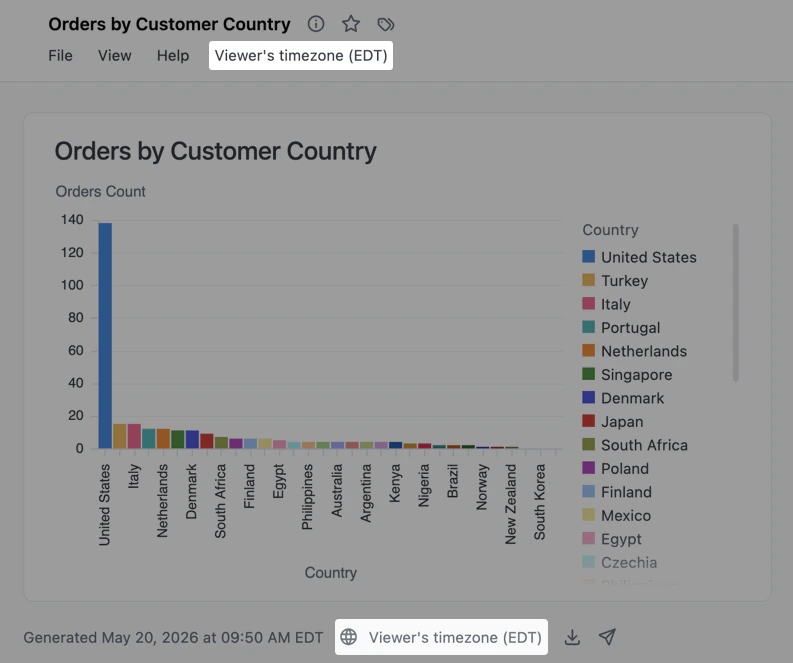 Use the picker to select one of the following:
* **Viewer's timezone** - Each viewer's profile timezone
* **UTC** - Coordinated Universal Time
* **A specific timezone** - For example, `America/Denver`
Your selection persists when navigating between the dashboard and workbook in the document, ensuring a consistent timezone experience as you move between viewing and editing your analysis.
You can also override timezones in [deliveries](/share/deliveries), [dashboard downloads](/visualize-present/dashboards/download), and [query result downloads](/analyze-explore/point-click-queries#downloading-results).
## Next steps
* Learn more about [timezone conversion](/connect-data/timezones) in Omni
* Configure interactivity for your documents in [dashboard settings](/visualize-present/dashboards/settings)
* Set organization-level [content permissions](/administration/content-permissions)
Use the picker to select one of the following:
* **Viewer's timezone** - Each viewer's profile timezone
* **UTC** - Coordinated Universal Time
* **A specific timezone** - For example, `America/Denver`
Your selection persists when navigating between the dashboard and workbook in the document, ensuring a consistent timezone experience as you move between viewing and editing your analysis.
You can also override timezones in [deliveries](/share/deliveries), [dashboard downloads](/visualize-present/dashboards/download), and [query result downloads](/analyze-explore/point-click-queries#downloading-results).
## Next steps
* Learn more about [timezone conversion](/connect-data/timezones) in Omni
* Configure interactivity for your documents in [dashboard settings](/visualize-present/dashboards/settings)
* Set organization-level [content permissions](/administration/content-permissions)