> ## Documentation Index
> Fetch the complete documentation index at: https://docs.omni.co/llms.txt
> Use this file to discover all available pages before exploring further.
# User profile
> The code for this example can be used in a Markdown column to combine a user's name, email, and avatar into a single table column.
The code for these examples can be used in a Markdown column to combine a user's details—like their name, email, and an avatar—into a single [table](/visualize-present/visualizations/types/table) column.
For each example, select the column you want to format in the table visualization, set **Display as** to **Markdown**, and add the Markdown template and CSS. The fields are referenced using [Mustache syntax](/visualize-present/mustache-reference); replace them with your own fields.
## Name and email
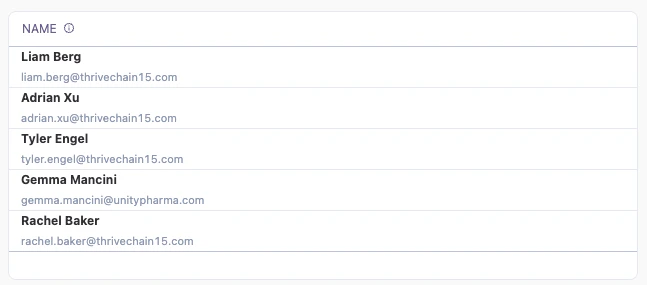
This style stacks a bold name over a smaller, muted email in a single column.
 ### Setup
This example references the `name` and `email` fields from the `saas__users_detailed` view. Because the email is rendered inside the name column, you can [hide the original email column](/visualize-present/visualizations/types/table#showing-and-hiding-columns) so it doesn't appear twice in the table.
| Col | Name | Description or formula | Purpose |
| --- | ----- | ---------------------- | ------------------------------ |
| A | Name | User's name field | Shown as the bold primary text |
| B | Email | User's email field | Shown as the muted subtext |
### Example code
**Markdown template**:
```handlebars wrap theme={null}
**{{saas__users_detailed.name.value}}**
### Setup
This example references the `name` and `email` fields from the `saas__users_detailed` view. Because the email is rendered inside the name column, you can [hide the original email column](/visualize-present/visualizations/types/table#showing-and-hiding-columns) so it doesn't appear twice in the table.
| Col | Name | Description or formula | Purpose |
| --- | ----- | ---------------------- | ------------------------------ |
| A | Name | User's name field | Shown as the bold primary text |
| B | Email | User's email field | Shown as the muted subtext |
### Example code
**Markdown template**:
```handlebars wrap theme={null}
**{{saas__users_detailed.name.value}}**
{{saas__users_detailed.email.value}}
```
**CSS styles**:
No custom CSS is required for this example, so you can leave the **CSS style** field empty.
## Avatar with initials
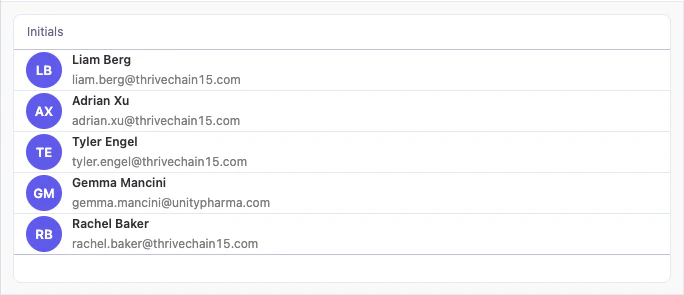
This style adds a circular avatar showing each user's initials next to their name and email.
 ### Setup
This example adds a [calculation](/analyze-explore/calculations) that extracts the user's initials from their name—the first letter of the first name and the first letter of the last name, where column `A` is the name field. Set the initials calculation column to **Display as** **Markdown**, then hide the original name and email columns so only the combined profile renders.
The Markdown template references the initials calculation as `{{calc_1.value}}`. If your calculation has a different name, update the reference to match.
| Col | Name | Description or formula | Purpose |
| --- | ------------------- | ------------------------------------------------ | ------------------------------------------ |
| A | Name | User's name field | Bold primary text; source for the initials |
| B | Email | User's email field | Muted subtext |
| C | Initials (`calc_1`) | `=LEFT(A5, 1) & MID(A5, (FIND(" ", A5) + 1), 1)` | First and last initial shown in the avatar |
### Example code
**Markdown template**:
```handlebars wrap theme={null}
### Setup
This example adds a [calculation](/analyze-explore/calculations) that extracts the user's initials from their name—the first letter of the first name and the first letter of the last name, where column `A` is the name field. Set the initials calculation column to **Display as** **Markdown**, then hide the original name and email columns so only the combined profile renders.
The Markdown template references the initials calculation as `{{calc_1.value}}`. If your calculation has a different name, update the reference to match.
| Col | Name | Description or formula | Purpose |
| --- | ------------------- | ------------------------------------------------ | ------------------------------------------ |
| A | Name | User's name field | Bold primary text; source for the initials |
| B | Email | User's email field | Muted subtext |
| C | Initials (`calc_1`) | `=LEFT(A5, 1) & MID(A5, (FIND(" ", A5) + 1), 1)` | First and last initial shown in the avatar |
### Example code
**Markdown template**:
```handlebars wrap theme={null}
{{calc_1.value}}
{{saas__users_detailed.name.value}}
{{saas__users_detailed.email.value}}
```
**CSS styles**:
```css expandable theme={null}
```