> ## Documentation Index
> Fetch the complete documentation index at: https://docs.omni.co/llms.txt
> Use this file to discover all available pages before exploring further.
# Star rating
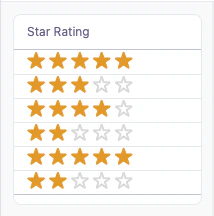
> The code for this example can be used in a Markdown column to display a numeric rating as filled and empty stars.
This example uses a Markdown column to display a numeric rating as a row of stars in a [table](/visualize-present/visualizations/types/table), with filled (orange) stars for the rating and empty (gray) stars filling the remainder up to five.
 ## Setup
This example uses a numeric rating field and two [calculations](/analyze-explore/calculations): one for the filled stars and one for the empty stars. Both calculations use a `SWITCH` statement on the rating (column `A`). Add both calculations to your query, then set the column you want to display to **Display as** **Markdown** and hide the rating and remaining helper columns.
The template references the calculations as `{{calc_1.value}}` (filled) and `{{calc_2.value}}` (empty). Calculation reference names depend on the order they're created, so update them to match your own.
| Col | Name | Description or formula | Purpose |
| --- | ----------------------- | --------------------------------------------------------------- | ------------------------------------------- |
| A | Rating | Numeric rating field (1–5) | Drives both star calculations |
| B | Filled stars (`calc_1`) | `=SWITCH(A1, 1, "★", 2, "★★", 3, "★★★", 4, "★★★★", 5, "★★★★★")` | Orange stars equal to the rating |
| C | Empty stars (`calc_2`) | `=SWITCH(A1, 1, "☆☆☆☆", 2, "☆☆☆", 3, "☆☆", 4, "☆", 5, "")` | Gray stars filling the remainder up to five |
## Example code
**Markdown template**:
```handlebars wrap theme={null}
## Setup
This example uses a numeric rating field and two [calculations](/analyze-explore/calculations): one for the filled stars and one for the empty stars. Both calculations use a `SWITCH` statement on the rating (column `A`). Add both calculations to your query, then set the column you want to display to **Display as** **Markdown** and hide the rating and remaining helper columns.
The template references the calculations as `{{calc_1.value}}` (filled) and `{{calc_2.value}}` (empty). Calculation reference names depend on the order they're created, so update them to match your own.
| Col | Name | Description or formula | Purpose |
| --- | ----------------------- | --------------------------------------------------------------- | ------------------------------------------- |
| A | Rating | Numeric rating field (1–5) | Drives both star calculations |
| B | Filled stars (`calc_1`) | `=SWITCH(A1, 1, "★", 2, "★★", 3, "★★★", 4, "★★★★", 5, "★★★★★")` | Orange stars equal to the rating |
| C | Empty stars (`calc_2`) | `=SWITCH(A1, 1, "☆☆☆☆", 2, "☆☆☆", 3, "☆☆", 4, "☆", 5, "")` | Gray stars filling the remainder up to five |
## Example code
**Markdown template**:
```handlebars wrap theme={null}
{{calc_1.value}}{{calc_2.value}}
```
**CSS styles**:
```css expandable theme={null}
```