> ## Documentation Index
> Fetch the complete documentation index at: https://docs.omni.co/llms.txt
> Use this file to discover all available pages before exploring further.
# Fancy subtotal table
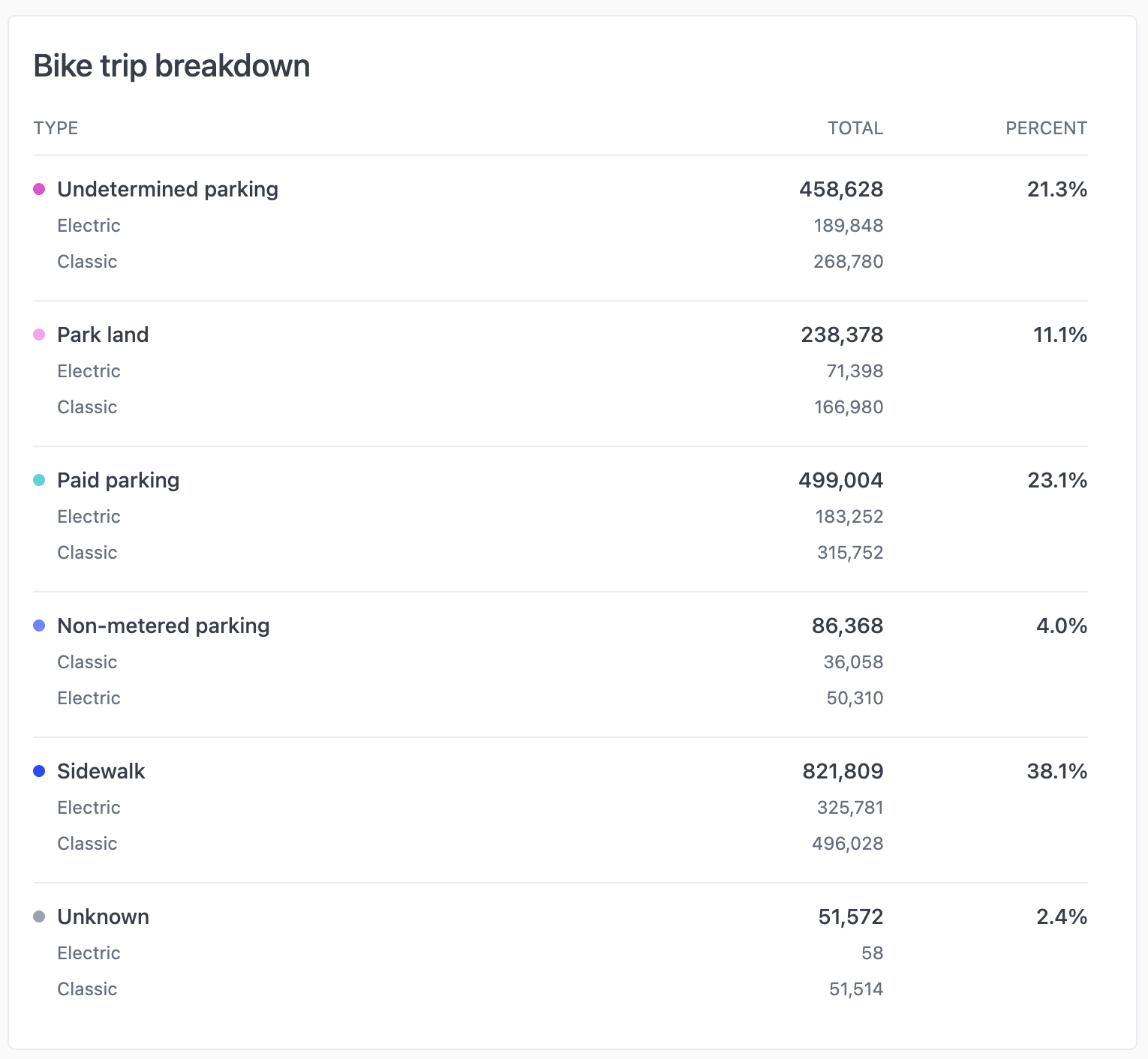
> The code for this example can be used in the Markdown visualization to create different styles for displaying a simple table with subtotals.
This table puts the category labels and their subtotals as the first row for the category. Sub-categories are listed in smaller text below.
 ## Setup
Your query must have 2 dimensions (the primary category and the sub category) and a measure to total. The rest of the columns are calculations to get the percentages and provide some styling information to the markdown.
Sort the results by the primary category and enable subtotals from the primary category's triple-dot menu. Use secondary sorts to control how the sub-categories are ordered. You can do a secondary sort by shift-clicking on the column header.
The following table describes the fields in the result set and their purpose.
**Note:** The labels of each calculation includes the calculation's ID in parentheses. This hopefully helps connect the mustache references in the markdown to the correct column of data. Depending on the order in which you create your calculations, these IDs may be different.
## Setup
Your query must have 2 dimensions (the primary category and the sub category) and a measure to total. The rest of the columns are calculations to get the percentages and provide some styling information to the markdown.
Sort the results by the primary category and enable subtotals from the primary category's triple-dot menu. Use secondary sorts to control how the sub-categories are ordered. You can do a secondary sort by shift-clicking on the column header.
The following table describes the fields in the result set and their purpose.
**Note:** The labels of each calculation includes the calculation's ID in parentheses. This hopefully helps connect the mustache references in the markdown to the correct column of data. Depending on the order in which you create your calculations, these IDs may be different.
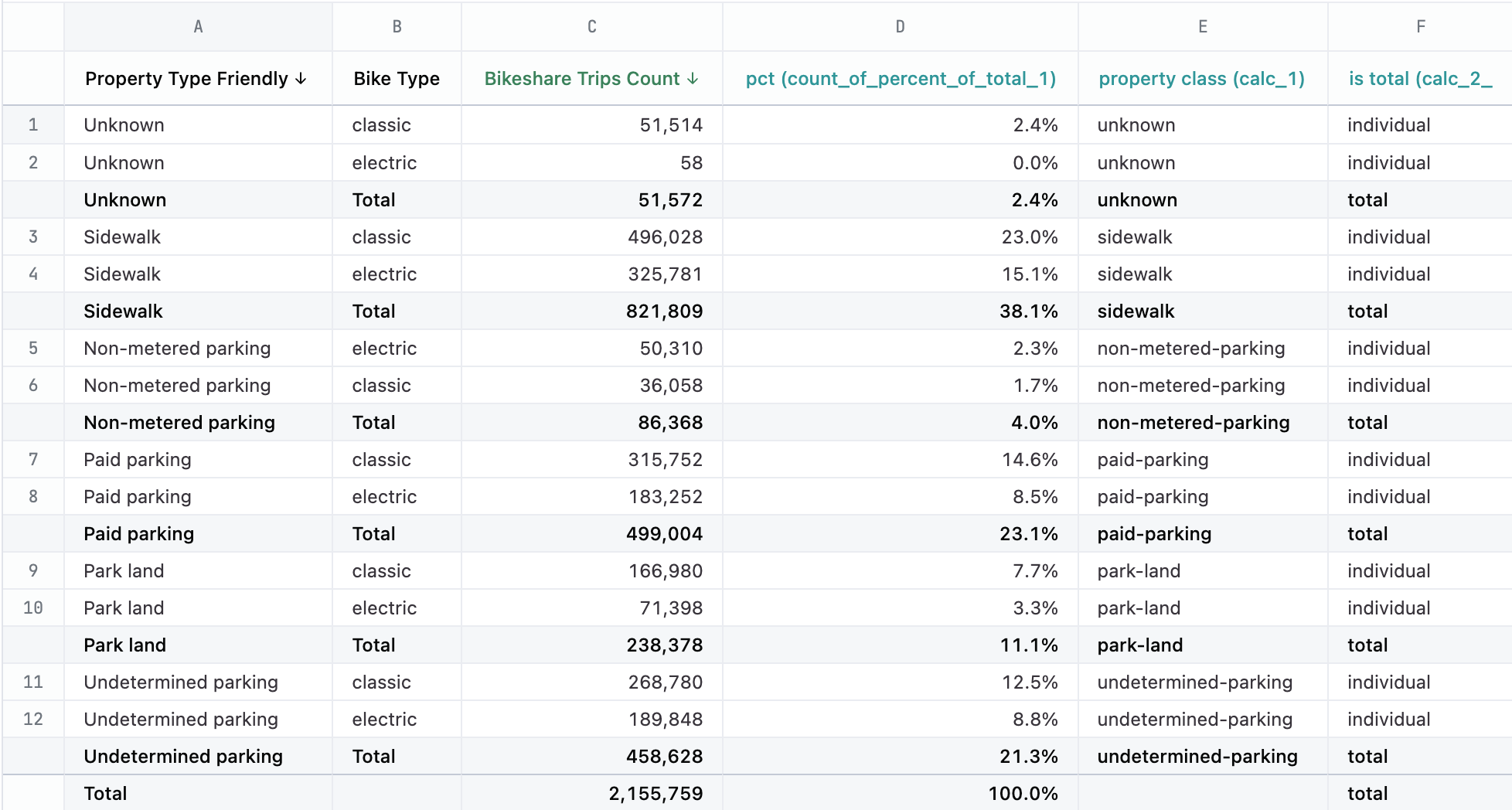 ### Column descriptions
| Col | Name | Calculation formula | Purpose |
| --- | ---------------------------------- | ------------------------------------- | -------------------------------------------------------------------------------- |
| A | Property type friendly | query data | Primary category with subtotals enabled |
| B | Bike Type | query data | Sub-category |
| C | Bikeshare Trips Count | query data | metric to total |
| D | pct (count\_of\_percent\_total\_1) | =C1 / SUM(C:C) | To display the overall % share of each category to the total |
| E | property class (calc\_1) | =SUBSTITUTE(LOWER(A1), " ", "-") | making a css-friendly class name for the primary category to use for coloring |
| F | is total (calc\_2) | =IF(B1 \<> "", "individual", "total") | css-friendly class name to identify the row in the results as a total row or not |
## Example code
```html expandable theme={null}
### Column descriptions
| Col | Name | Calculation formula | Purpose |
| --- | ---------------------------------- | ------------------------------------- | -------------------------------------------------------------------------------- |
| A | Property type friendly | query data | Primary category with subtotals enabled |
| B | Bike Type | query data | Sub-category |
| C | Bikeshare Trips Count | query data | metric to total |
| D | pct (count\_of\_percent\_total\_1) | =C1 / SUM(C:C) | To display the overall % share of each category to the total |
| E | property class (calc\_1) | =SUBSTITUTE(LOWER(A1), " ", "-") | making a css-friendly class name for the primary category to use for coloring |
| F | is total (calc\_2) | =IF(B1 \<> "", "individual", "total") | css-friendly class name to identify the row in the results as a total row or not |
## Example code
```html expandable theme={null}
Bike trip breakdown
-
Type
Total
Percent
{{#result}}
-
{{bikeshare_start_stations.property_type_friendly.value}}
{{bikeshare_trips.bike_type.value}}
{{bikeshare_trips.count.value}}
{{count_percent_of_total_1.value}}
{{/result}}
```