> ## Documentation Index
> Fetch the complete documentation index at: https://docs.omni.co/llms.txt
> Use this file to discover all available pages before exploring further.

<AgentInstructions>

## Submitting Feedback

If you encounter incorrect, outdated, or confusing documentation on this page, submit feedback:

POST https://docs.omni.co/feedback

```json
{
  "path": "/showcase/visualizations/repeating-square-fill-chart",
  "feedback": "Description of the issue"
}
```

Only submit feedback when you have something specific and actionable to report.

</AgentInstructions>

# Repeating square fill charts

> The code for this example can be used in the Markdown visualization to create a series of percentage-filled squares, one for each row in your results.

Squares will automatically adjust size and wrap to the next line.

<img src="https://mintcdn.com/omni-e7402367/NPCbSR0hOlCzzT5f/images/docs/visualization-and-dashboards/visualization-types/markdown/examples/assets/images/small-multiple-square-fill-7b07d92a5b094e5d07c3954dd3099855.png?fit=max&auto=format&n=NPCbSR0hOlCzzT5f&q=85&s=d34454ec1049116609a7417252d6708e" alt="" width="1736" height="1344" data-path="images/docs/visualization-and-dashboards/visualization-types/markdown/examples/assets/images/small-multiple-square-fill-7b07d92a5b094e5d07c3954dd3099855.png" />

## Setup

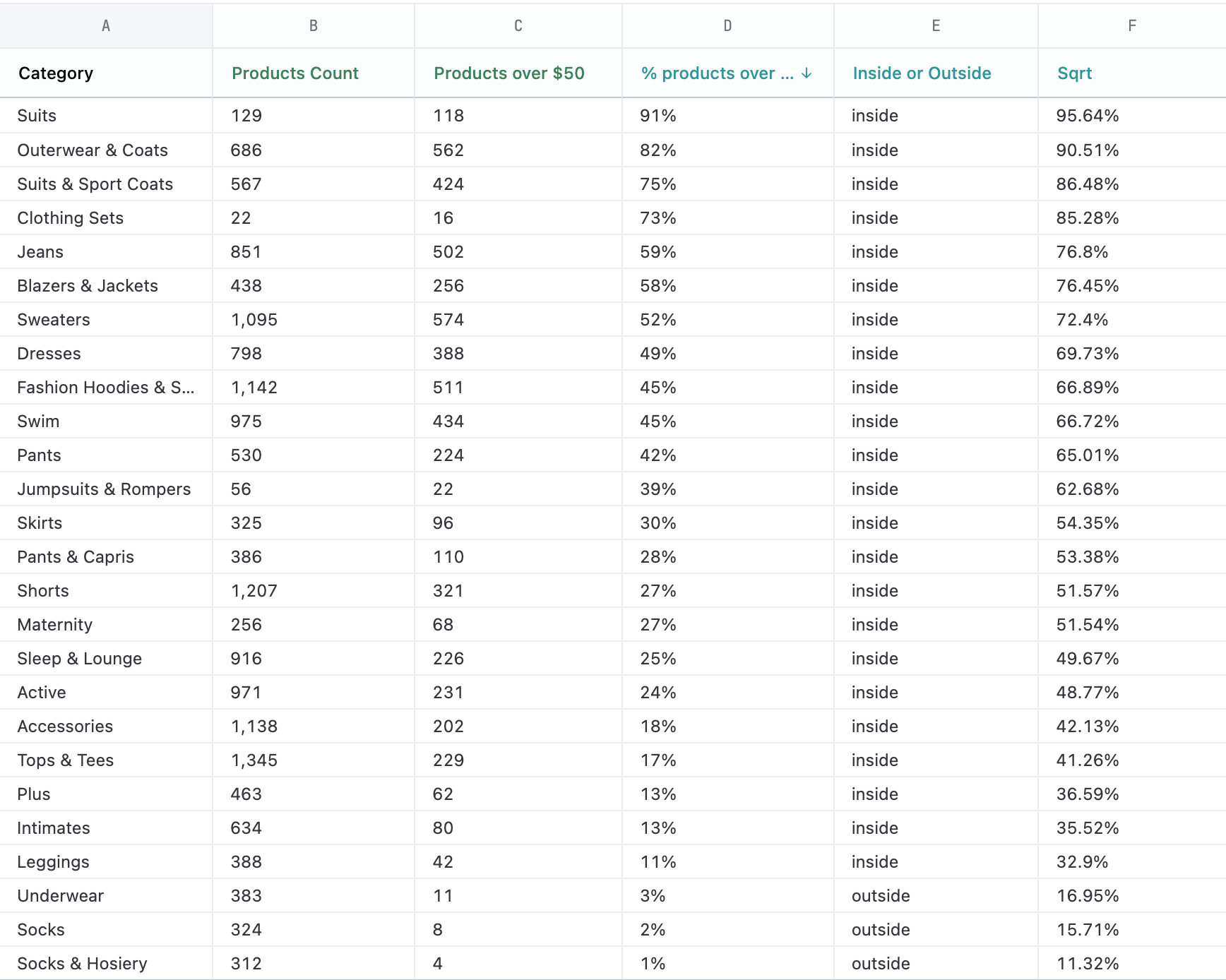
These charts use the Mustache iterator syntax to draw a shape for each row in the results. Your query should have a dimension that determines the number of pies and their labels and the values for the numerator and denominator to calculate the percentage fill. Then you'll need to add a few calculations. The following table explains each field used in the example, including the calculation formulas.
<img src="https://mintcdn.com/omni-e7402367/NPCbSR0hOlCzzT5f/images/docs/visualization-and-dashboards/visualization-types/markdown/examples/assets/images/small-multiple-square-fill-results-1922290816f02b0f7c304096455090ee.png?fit=max&auto=format&n=NPCbSR0hOlCzzT5f&q=85&s=90088c0bca310ac85e5f424c6bda2a74" alt="" width="1736" height="1388" data-path="images/docs/visualization-and-dashboards/visualization-types/markdown/examples/assets/images/small-multiple-square-fill-results-1922290816f02b0f7c304096455090ee.png" />

| Col | Name                         | Description or formula              | Purpose                                                 |
| --- | ---------------------------- | ----------------------------------- | ------------------------------------------------------- |
| A   | Category                     | query field                         | determines number of squares to make and their labels   |
| B   | Products Count               | query field                         | denominator for % calculation                           |
| C   | Products over \$50           | query field                         | numerator for % calculation                             |
| D   | % over \$50 (`calc_1`)       | =C1 / B1                            | calculation for filling square, label                   |
| E   | inside or outside (`calc_3`) | =IF(D1 \< 0.1, "outside", "inside") | calculation to help position and color the label        |
| F   | square root (`calc_4`)       | =SQRT(D1)                           | calculation to get the length of the side of the square |

## Example code

```html expandable theme={null}
<style>
  h3 {
    margin-top: 0;
  }
  .percent-fill-boxes {
    & ul {
      list-style: none;
      margin: 0;
      padding: 0;
      display: grid;
      grid-template-columns: repeat(auto-fit, minmax(100px, 1fr));
      gap: var(--size4);
    }
    & li {
      list-style: none;
      margin: 0;
      padding: 0;
    }
    p {
      margin: 0;
      padding: 0;
    }
    & .big-box {
      width: 100%;
      aspect-ratio: 1 / 1;
      background-color: var(--color-border2);
      position: relative;
      display: flex;
      flex-direction: column-reverse;
    }
    & .little-box {
      aspect-ratio: 1 / 1;
      display: block;
      background-color: var(--color-info);
      position: relative;
      
      & span {
        display: block;
        font-size: var(--font-xxs);
        font-variant-numeric: tabular-nums;
        width: 4ch;
        padding-right: 2px;
        line-height: var(--line-height-xxs);
        position: absolute;

        &.inside {
          text-align: right;
          top: 0;
          right: 0;
          color: var(--color-text-inverse);
        }

        &.outside {
          top: calc(-1 * var(--line-height-xxs));
          right: -4ch;
          text-align: left;
          color: var(--color-text2)
;        }
      }
    }
    & p.label {
      text-align: left;
    }
  }
</style>

<article class="percent-fill-boxes">
  <h3>% of products over $50</h3>
  <ul>
  {{#result}}
    <li>
      <div class="big-box"">
        <p class="little-box" style="width: {{calc_4.value}}">
          <span class="{{calc_3.value}}">{{calc_1.value}}</span>
        </p>
      </div>
      <p class="label">{{products.category.value}}</p>
    </li>
  {{/result}}
    
  </ul>
</article>
```
