> ## Documentation Index
> Fetch the complete documentation index at: https://docs.omni.co/llms.txt
> Use this file to discover all available pages before exploring further.
# Location with national flag
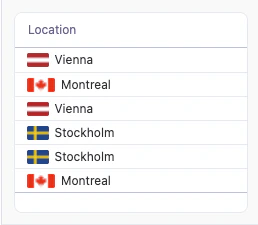
> The code for this example can be used in a Markdown column to display a location alongside its national flag.
This example uses a Markdown column to display a location next to its national flag in a [table](/visualize-present/visualizations/types/table). The flag image is loaded from [flagcdn.com](https://flagcdn.com) using a two-letter country code.
 ## Setup
To display a flag, you need a two-letter [ISO 3166-1 alpha-2](https://en.wikipedia.org/wiki/ISO_3166-1_alpha-2) country code (for example, `at`, `ca`, `se`, `us`) that can be passed into the flag image URL. You can provide this code in a few ways:
* Enter the code manually in an [input column](/analyze-explore/input-columns)
* Use a calculation with `XLOOKUP` to map locations to codes from another table
* Reference a field that already contains the code in your database
Set the column you want to display to **Display as** **Markdown**, then hide the helper code column so only the combined location renders.
The template references the country code as `{{calc_1.value}}` and the `location` field from the `saas__users_detailed` view. Update these references to match your own fields.
| Col | Name | Description or formula | Purpose |
| --- | ----------------------- | ----------------------------------------------------- | ------------------------------ |
| A | Location | Location field | Label shown next to the flag |
| B | Country code (`calc_1`) | Two-letter country code (e.g. `at`, `ca`, `se`, `us`) | Passed into the flag image URL |
## Example code
**Markdown template**:
```handlebars wrap theme={null}
## Setup
To display a flag, you need a two-letter [ISO 3166-1 alpha-2](https://en.wikipedia.org/wiki/ISO_3166-1_alpha-2) country code (for example, `at`, `ca`, `se`, `us`) that can be passed into the flag image URL. You can provide this code in a few ways:
* Enter the code manually in an [input column](/analyze-explore/input-columns)
* Use a calculation with `XLOOKUP` to map locations to codes from another table
* Reference a field that already contains the code in your database
Set the column you want to display to **Display as** **Markdown**, then hide the helper code column so only the combined location renders.
The template references the country code as `{{calc_1.value}}` and the `location` field from the `saas__users_detailed` view. Update these references to match your own fields.
| Col | Name | Description or formula | Purpose |
| --- | ----------------------- | ----------------------------------------------------- | ------------------------------ |
| A | Location | Location field | Label shown next to the flag |
| B | Country code (`calc_1`) | Two-letter country code (e.g. `at`, `ca`, `se`, `us`) | Passed into the flag image URL |
## Example code
**Markdown template**:
```handlebars wrap theme={null}
 {{saas__users_detailed.location.value}}
```
**CSS styles**:
No custom CSS is required for this example, so you can leave the **CSS style** field empty.