> ## Documentation Index
> Fetch the complete documentation index at: https://docs.omni.co/llms.txt
> Use this file to discover all available pages before exploring further.
## Submitting Feedback
If you encounter incorrect, outdated, or confusing documentation on this page, submit feedback:
POST https://docs.omni.co/feedback
```json
{
"path": "/modeling/topics/index",
"feedback": "Description of the issue"
}
```
Only submit feedback when you have something specific and actionable to report.
# Curating datasets with topics
> Create curated topics in Omni to give non-technical users a self-service way to explore data and build visualizations.
Topics are curated, user-friendly datasets that make it easier for non-technical users to explore, analyze, and create visualizations without writing SQL or needing to deeply understand the underlying data model.
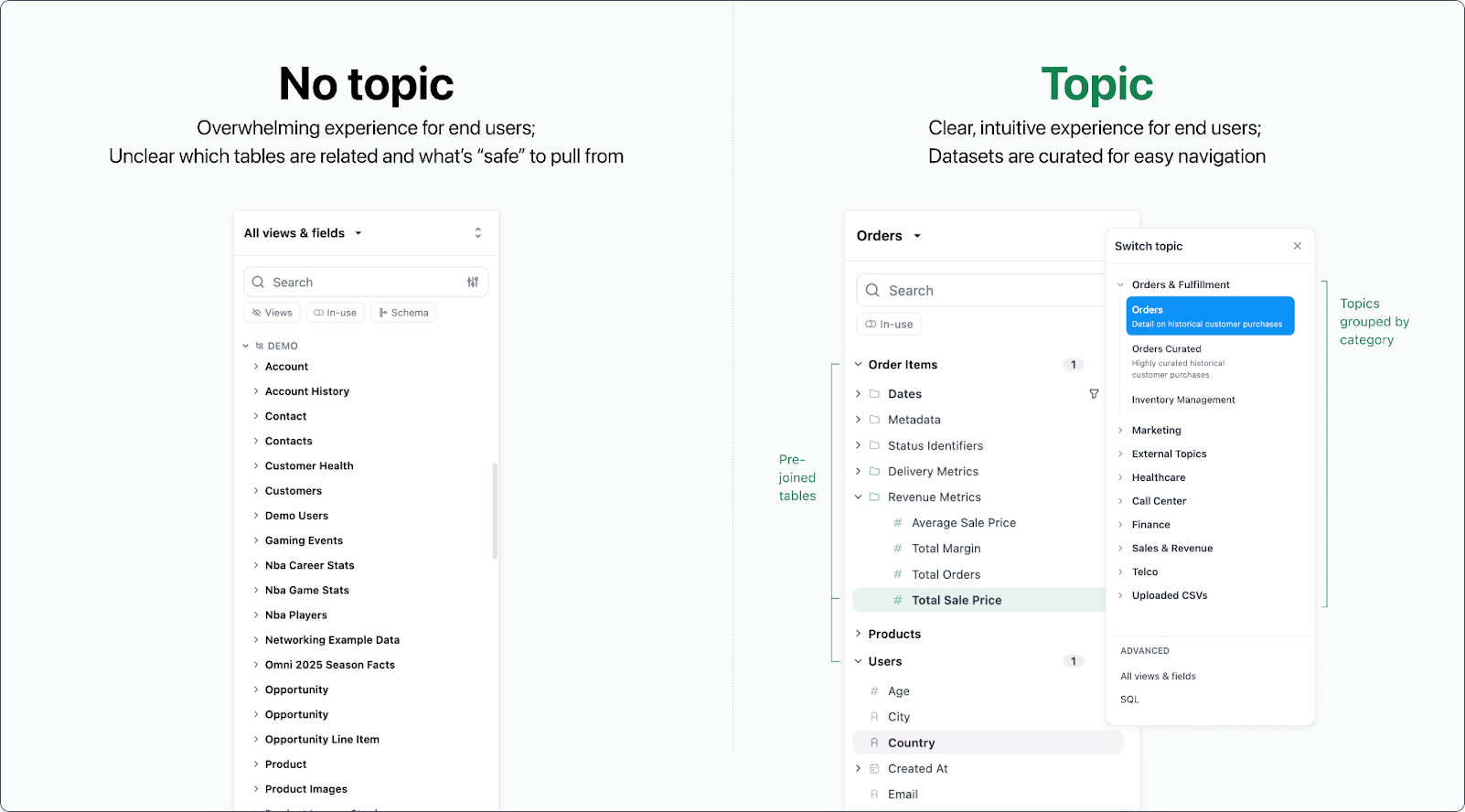
Topics are essential to set up your Omni instance for success. They bring together relevant tables, joins, measures, and dimensions into a logical structure that matches how business users think about their work and allows the data team to curate the UI for easy, intuitive self-service:
 ## Topic basics
Topics are defined within a [model](/modeling) and linked to a specific database connection. They specify a primary base table along with any associated tables that can be joined for analysis. In a topic file, you define what parts of your data model you want used - and how they should be modified - for each use case.
Topics can help you improve:
* **Self-service** - Curated topics shield end-users from complex database schemas, table relationships, and raw SQL queries. Business users are empowered to self-serve with point-and-click, Excel, and AI without needing to understand the technical aspects of the data model. For example, an analyst could pick fields from the `Order Items` and `Users` tables in the `Orders` topic without needing to think about the underlying joins.
## Topic basics
Topics are defined within a [model](/modeling) and linked to a specific database connection. They specify a primary base table along with any associated tables that can be joined for analysis. In a topic file, you define what parts of your data model you want used - and how they should be modified - for each use case.
Topics can help you improve:
* **Self-service** - Curated topics shield end-users from complex database schemas, table relationships, and raw SQL queries. Business users are empowered to self-serve with point-and-click, Excel, and AI without needing to understand the technical aspects of the data model. For example, an analyst could pick fields from the `Order Items` and `Users` tables in the `Orders` topic without needing to think about the underlying joins.
 * **AI reliability** - Natural language questions in Omni (i.e. [using Blobby](/ai/queries)) are required to go through topics. This ensures that all questions are routed through the curated datasets that you manage, allowing you to control the context, behavior, and permissions.
For example, you can choose to [limit which topics can be analyzed by AI](/modeling/models/ai-chat-topics) and contextualize each one differently to achieve better results.
* **Data curation** - Topics encourage building intuitive, focused experiences that match how your business runs. These datasets can mirror your departmental structure or focus on tailored use cases so that users know exactly where to go to answer their questions. Instead of a massive BI environment with dozens of tables, you can have a few key topics that cover most questions your team needs to answer.
* **Reusability** - As data adoption grows, refinements made to these curated datasets can be [promoted to the shared model](/modeling/develop/model-management) and directly benefit everyone.
* **Governance** - Topics allow fine-tuned control over what your users can see. Each topic can be enhanced with [row- or column-level security](/modeling/develop/data-access-control) or even hidden from specific users. You can also use [additional parameters](/modeling/topics/parameters) for tailoring the AI experience, caching behavior, and more to fully customize a topic's behavior.
Your data model reflects how the data is structured (i.e. raw relationships, joins & logic living in the warehouse) whereas topics sit on top of that data model and reshape it into business-friendly groupings for easier exploration. Think of topics as a presentation layer tailored for quick insights - they effectively translate your database model into reusable logic for building dashboards and workbooks.
* **AI reliability** - Natural language questions in Omni (i.e. [using Blobby](/ai/queries)) are required to go through topics. This ensures that all questions are routed through the curated datasets that you manage, allowing you to control the context, behavior, and permissions.
For example, you can choose to [limit which topics can be analyzed by AI](/modeling/models/ai-chat-topics) and contextualize each one differently to achieve better results.
* **Data curation** - Topics encourage building intuitive, focused experiences that match how your business runs. These datasets can mirror your departmental structure or focus on tailored use cases so that users know exactly where to go to answer their questions. Instead of a massive BI environment with dozens of tables, you can have a few key topics that cover most questions your team needs to answer.
* **Reusability** - As data adoption grows, refinements made to these curated datasets can be [promoted to the shared model](/modeling/develop/model-management) and directly benefit everyone.
* **Governance** - Topics allow fine-tuned control over what your users can see. Each topic can be enhanced with [row- or column-level security](/modeling/develop/data-access-control) or even hidden from specific users. You can also use [additional parameters](/modeling/topics/parameters) for tailoring the AI experience, caching behavior, and more to fully customize a topic's behavior.
Your data model reflects how the data is structured (i.e. raw relationships, joins & logic living in the warehouse) whereas topics sit on top of that data model and reshape it into business-friendly groupings for easier exploration. Think of topics as a presentation layer tailored for quick insights - they effectively translate your database model into reusable logic for building dashboards and workbooks.
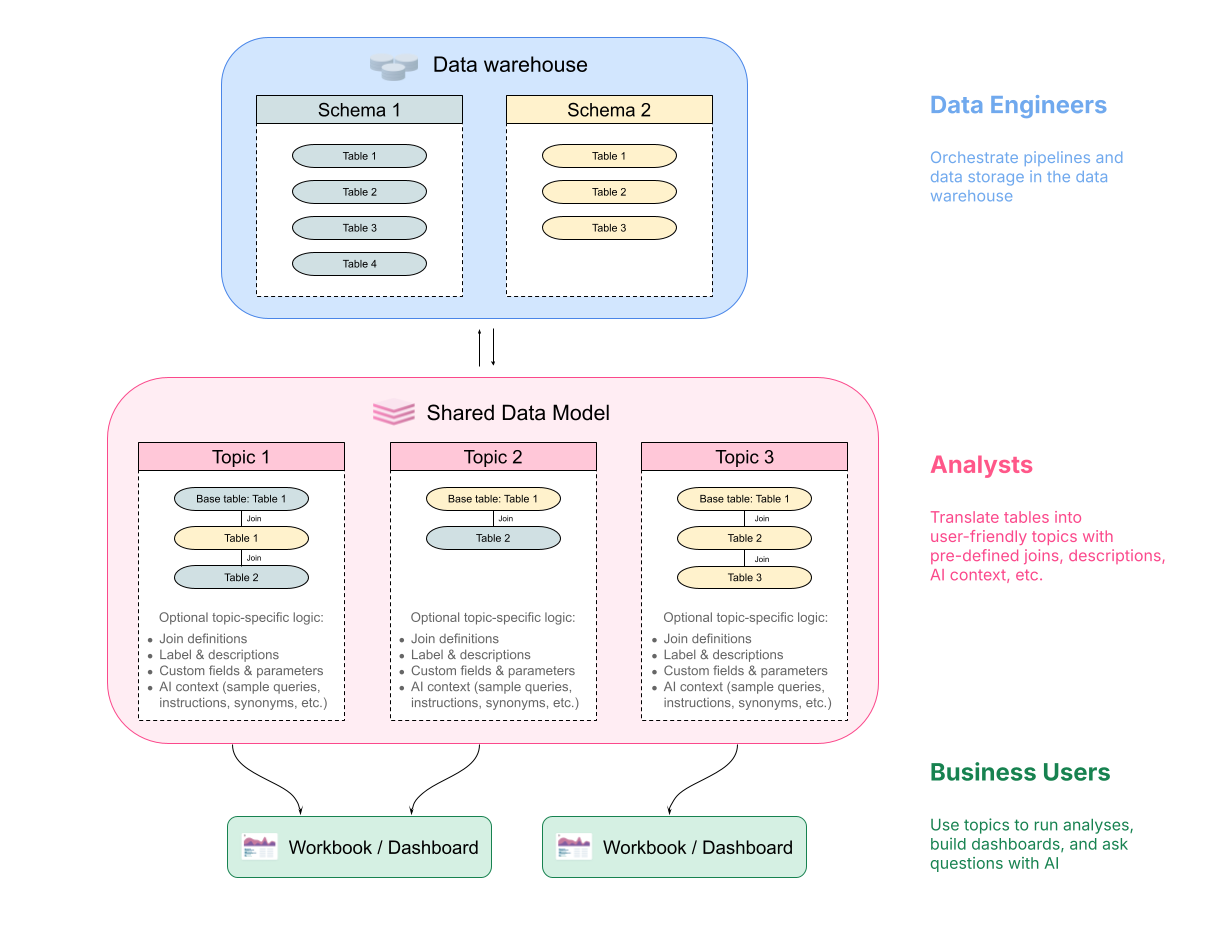 Your database is likely optimized for data storage and querying, but chances are how your data team interacts with data is different from what your end-users want to see. Think of topics as optimizing the UI experience for business users on top of the already optimized database modeling you have set up.
If using dbt, your modeling may be a bit closer to how Omni thinks of topics, but you’ll still find plenty of value in being able to design the user experience and apply fine controls over permissions, data access, AI, etc.
We typically see data teams build out the initial datasets, and then stakeholders with business knowledge contribute based on their needs. For large organizations, there may be departmental teams that build on top of the core logic established by data engineers.
Topics can be a great way to make your data reflect your desired monetization strategy. For example, you may give your base-tier customers access to a few topic-scoped standard dashboards. Then, customers who opt into a higher tier may unlock access to additional topics for more insights. If you’re offering AI querying experiences to your customers, Topics are crucial to generating reliable, accurate results.
Reach out to your Omni Customer Success manager if you want help designing the right strategy for your business.
## Developing and using topics
Check out the [Topic best practices](/modeling/topics/best-practices) for our recommendations on building efficient, approachable topics. **Not sure what to build?** Get some inspiration from our [Topic examples](/modeling/topics/examples).
Omni offers two ways to develop topics: visually (in workbooks) or using code (in the model IDE). You can use one or both of these methods to develop your topics.
Some settings, such as those controlling cache policies, access grants, and default filters, can only be added using the model IDE.
There are two ways to create topics in workbooks:
* **Starting with an existing view.** In a query tab, select the **All view & fields** option in the field browser. Locate the view you want to use, right click, and select **Create topic**.
* **From a CSV or XLSX upload**. This method requires enabling [data input tables (CSV uploads)](/analyze-explore/data-input-csvs). When uploading the file, users with **Querier permissions or higher** will see a **Create topic** checkbox.
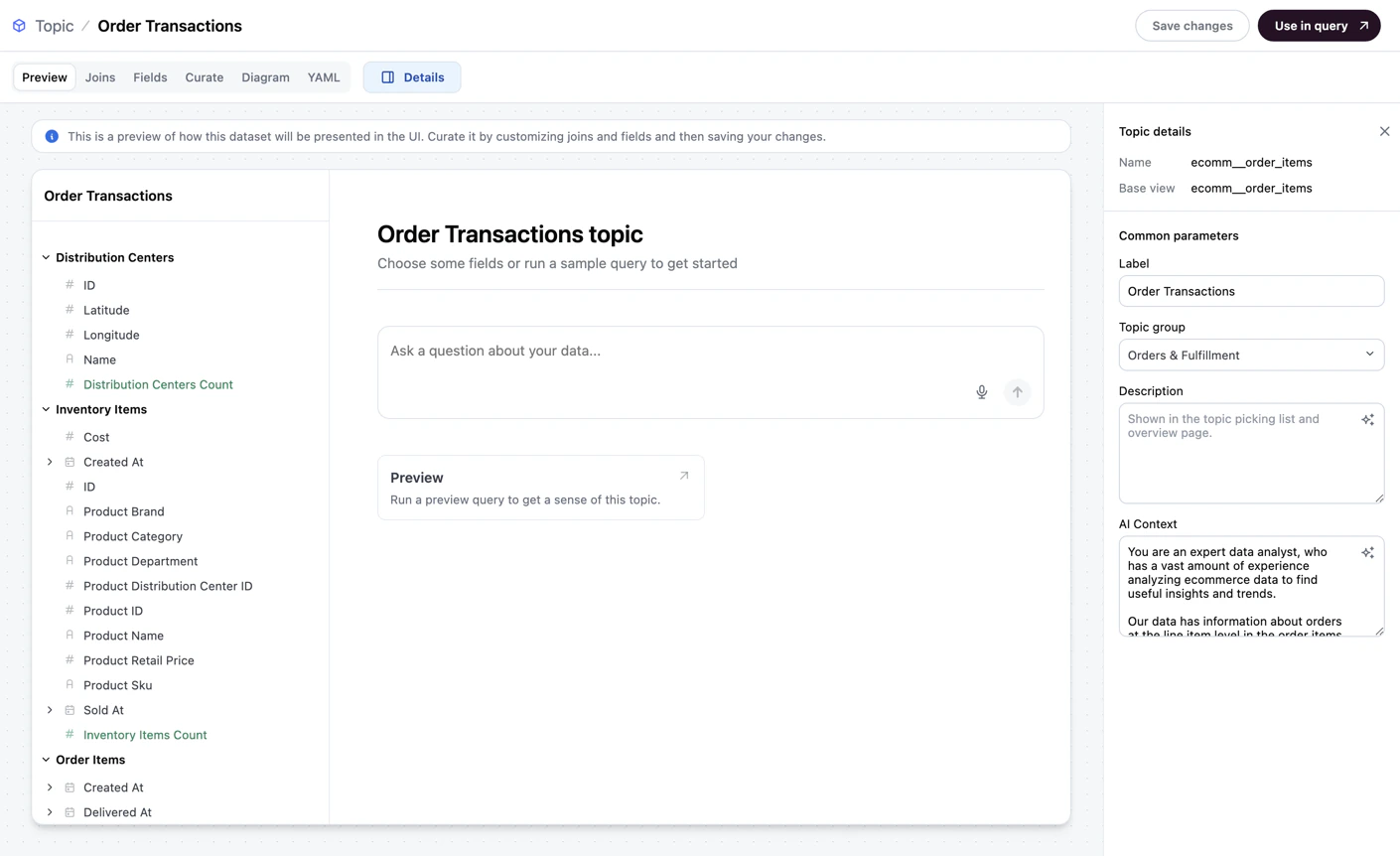
From here, you can use the visual editor to add metadata, joins, fields, and other settings, as well as visualize the topic's structure with an in-app diagram. Refer to the [Creating topics guide](/modeling/topics/setup) for more information and a step-by-step example.
**To open the topic editor for an existing topic**, open the topic in a workbook and click **Model > Edit topic**.
Using the model IDE allows you to use code to modify a topic's underlying file, which is where the configuration for the topic is stored.
To get started developing topics in the IDE, we recommend checking out:
* The [Creating topics guide](/modeling/topics/setup), which will walk you through a step-by-step example
* The [Topic file parameters reference](/modeling/topics/parameters) for information about supported topic settings
### Using topics in analyses
Once created, users with access to the topics will be able to use them in workbook queries. Refer to the [Building queries on topics guide](/analyze-explore/queries/topics) for more information.
### Deleting topics
**Modeler** or **Connection Admin** permissions are required to delete topics.
Deleting a topic will remove the topic's file from the model and break any queries built on the topic. Use the [Content Validator](/modeling/develop/content-validator) to identify and fix issues.
Open the model you want to work with in the model IDE.
Locate the topic you want to delete in the **Topics** section.
Hover over the topic, then click the icon.
Click **Delete topic**.
When prompted, click **OK** to confirm the deletion.
## Tracking topic usage
**Organization Admin** permissions are required to access the **Analytics** dashboard.
To track the usage of the topics in your instance, check out the **Topic Usage summary** in the **Model** section of your [**Analytics** dashboard](/administration/analytics). You can use this data to understand which topics your users are using, which ones to prune, and what opportunities there are for new additions.
Your database is likely optimized for data storage and querying, but chances are how your data team interacts with data is different from what your end-users want to see. Think of topics as optimizing the UI experience for business users on top of the already optimized database modeling you have set up.
If using dbt, your modeling may be a bit closer to how Omni thinks of topics, but you’ll still find plenty of value in being able to design the user experience and apply fine controls over permissions, data access, AI, etc.
We typically see data teams build out the initial datasets, and then stakeholders with business knowledge contribute based on their needs. For large organizations, there may be departmental teams that build on top of the core logic established by data engineers.
Topics can be a great way to make your data reflect your desired monetization strategy. For example, you may give your base-tier customers access to a few topic-scoped standard dashboards. Then, customers who opt into a higher tier may unlock access to additional topics for more insights. If you’re offering AI querying experiences to your customers, Topics are crucial to generating reliable, accurate results.
Reach out to your Omni Customer Success manager if you want help designing the right strategy for your business.
## Developing and using topics
Check out the [Topic best practices](/modeling/topics/best-practices) for our recommendations on building efficient, approachable topics. **Not sure what to build?** Get some inspiration from our [Topic examples](/modeling/topics/examples).
Omni offers two ways to develop topics: visually (in workbooks) or using code (in the model IDE). You can use one or both of these methods to develop your topics.
Some settings, such as those controlling cache policies, access grants, and default filters, can only be added using the model IDE.
There are two ways to create topics in workbooks:
* **Starting with an existing view.** In a query tab, select the **All view & fields** option in the field browser. Locate the view you want to use, right click, and select **Create topic**.
* **From a CSV or XLSX upload**. This method requires enabling [data input tables (CSV uploads)](/analyze-explore/data-input-csvs). When uploading the file, users with **Querier permissions or higher** will see a **Create topic** checkbox.
From here, you can use the visual editor to add metadata, joins, fields, and other settings, as well as visualize the topic's structure with an in-app diagram. Refer to the [Creating topics guide](/modeling/topics/setup) for more information and a step-by-step example.
**To open the topic editor for an existing topic**, open the topic in a workbook and click **Model > Edit topic**.
Using the model IDE allows you to use code to modify a topic's underlying file, which is where the configuration for the topic is stored.
To get started developing topics in the IDE, we recommend checking out:
* The [Creating topics guide](/modeling/topics/setup), which will walk you through a step-by-step example
* The [Topic file parameters reference](/modeling/topics/parameters) for information about supported topic settings
### Using topics in analyses
Once created, users with access to the topics will be able to use them in workbook queries. Refer to the [Building queries on topics guide](/analyze-explore/queries/topics) for more information.
### Deleting topics
**Modeler** or **Connection Admin** permissions are required to delete topics.
Deleting a topic will remove the topic's file from the model and break any queries built on the topic. Use the [Content Validator](/modeling/develop/content-validator) to identify and fix issues.
Open the model you want to work with in the model IDE.
Locate the topic you want to delete in the **Topics** section.
Hover over the topic, then click the icon.
Click **Delete topic**.
When prompted, click **OK** to confirm the deletion.
## Tracking topic usage
**Organization Admin** permissions are required to access the **Analytics** dashboard.
To track the usage of the topics in your instance, check out the **Topic Usage summary** in the **Model** section of your [**Analytics** dashboard](/administration/analytics). You can use this data to understand which topics your users are using, which ones to prune, and what opportunities there are for new additions.