> ## Documentation Index
> Fetch the complete documentation index at: https://docs.omni.co/llms.txt
> Use this file to discover all available pages before exploring further.
# Templated filters
> Use Mustache template syntax to inject dynamic, user-driven values into SQL definitions for views and fields in your Omni model.
Refer to the [Filters documentation](/modeling/filters) for information about defining curated filters directly in your model YAML.
Omni allows parameterization of SQL using the Mustache template engine, which can be used in the definition of both views and fields. This is perhaps best understood through examples.
Templated filters can inject dynamic text into a SQL query, often a dimension or fact table. Our syntax requires an opening and closing reference around the dynamic input, using `{{# }}` to open, and `{{/ }}` to close the dynamic sections. Inside the braces, you use the name of the object, usually of the form `view.field_name.filter` (the word "filter"). This will correspond to a filter\_only field in the view (see examples below). Inside the pair of braces, you will include the lookup value.
## Setting default values
Default values can be set using `{{^ }}default_value_clause{{/ }}` immediately after the existing templated filter syntax.
For example, the following would use a default filter of name like `'foo'`:
```yaml wrap theme={null}
{{# users.filter_field.filter }}name{{/ users.filter_field.filter }}
{{^ users.filter_field.filter }}name like '%foo%'{{/ users.filter_field.filter }}
```
## Examples
Any YAML parameter that expects a string must be wrapped in double quotes if the leading character has special meaning in YAML. For example, `sql: {{ view.field_name.filter }}` would need to be `sql: "{{ view.field_name.filter }}"` to avoid validation errors.
### Parameterized WHERE clause in views based on a SQL query
This simple example allows a query-view to be parameterized. This example uses a filter-only field (see more on this in the dedicated section below), but can also reference a field in the view itself.
```yaml theme={null}
# Reference this view as user_fact_example
sql: |
SELECT
user_id,
COUNT(*) AS total_items
FROM order_items
WHERE
{{# schema__user_fact_example.order_date.filter }} order_items.created_at {{/ schema__user_fact_example.order_date.filter}}
AND {{# schema__user_fact_example.status.filter }} order_items.status {{/ schema__user_fact_example.status.filter}}
GROUP BY 1
dimensions:
user_id:
sql: '"USER_ID"'
total_items:
sql: '"TOTAL_ITEMS"'
measures:
count:
aggregate_type: count
filters:
order_date:
type: timestamp
status:
type: string
suggest_from_field: order_items.status
```
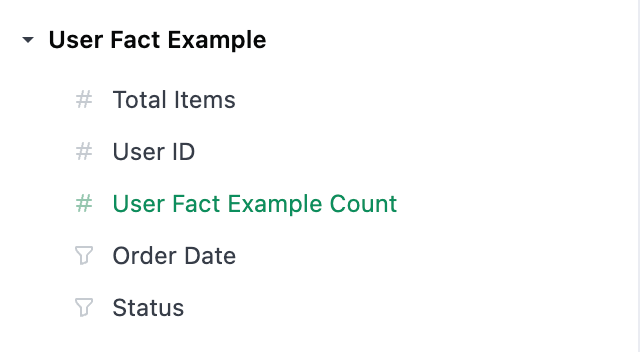
The `filters` will appear as filter-only fields in the field picker, in their own section under the measures section. These can then be used as normal filters, and the specified expression is inserted in place.
 ### Time frame switcher
In many cases, the [UI-based time frame switcher control](/visualize-present/dashboards/controls) may be a better path.
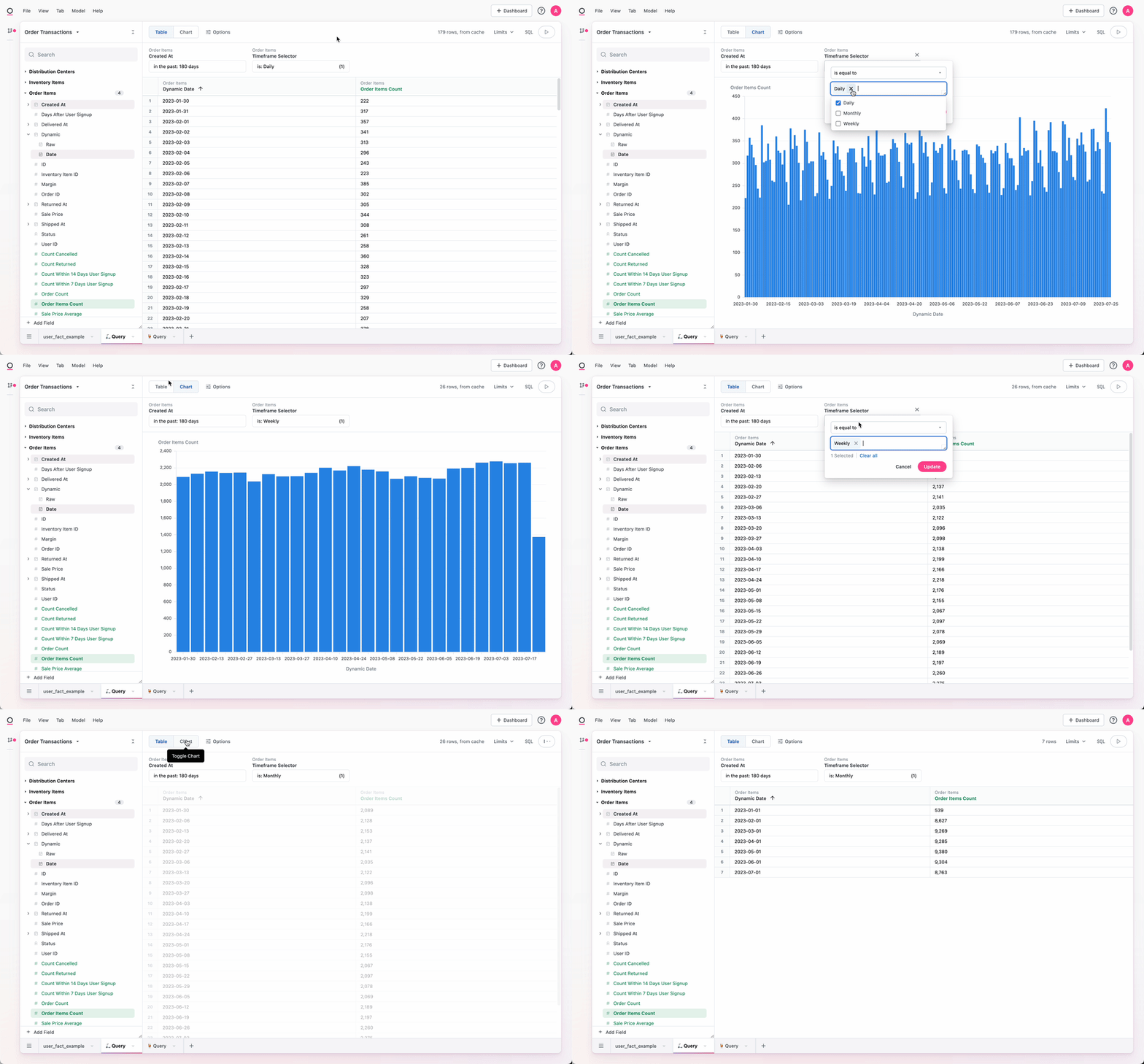
A field of dynamic granularity can be constructed such that a single filter on a dashboard swaps the granularity for multiple time series in one.
By editing the .view file, it is necessary to add a dynamic dimension and a filter. In the example below, replace all references to `created_date` with the appropriate date field and `order_items` with the fully qualified view reference.
```yaml theme={null}
# In the .view file
dimensions:
created_date_dynamic:
sql: |
CASE
WHEN {{# schema__order_items.timeframe_selector.filter }} 'Daily' {{/ schema__order_items.timeframe_selector.filter }} THEN ${created_at[date]}
WHEN {{# schema__order_items.timeframe_selector.filter }} 'Weekly' {{/ schema__order_items.timeframe_selector.filter }} THEN ${created_at[week]}
WHEN {{# schema__order_items.timeframe_selector.filter }} 'Monthly' {{/ schema__order_items.timeframe_selector.filter }} THEN ${created_at[month]}
END
label: Dynamic
timeframes: [Date]
filters:
timeframe_selector:
type: string
suggestion_list:
- value: Daily
- value: Weekly
- value: Monthly
```
This `timeframe_selector` filter can then be used either in workbooks or on dashboards across multiple tiles to update them all at once.
### Time frame switcher
In many cases, the [UI-based time frame switcher control](/visualize-present/dashboards/controls) may be a better path.
A field of dynamic granularity can be constructed such that a single filter on a dashboard swaps the granularity for multiple time series in one.
By editing the .view file, it is necessary to add a dynamic dimension and a filter. In the example below, replace all references to `created_date` with the appropriate date field and `order_items` with the fully qualified view reference.
```yaml theme={null}
# In the .view file
dimensions:
created_date_dynamic:
sql: |
CASE
WHEN {{# schema__order_items.timeframe_selector.filter }} 'Daily' {{/ schema__order_items.timeframe_selector.filter }} THEN ${created_at[date]}
WHEN {{# schema__order_items.timeframe_selector.filter }} 'Weekly' {{/ schema__order_items.timeframe_selector.filter }} THEN ${created_at[week]}
WHEN {{# schema__order_items.timeframe_selector.filter }} 'Monthly' {{/ schema__order_items.timeframe_selector.filter }} THEN ${created_at[month]}
END
label: Dynamic
timeframes: [Date]
filters:
timeframe_selector:
type: string
suggestion_list:
- value: Daily
- value: Weekly
- value: Monthly
```
This `timeframe_selector` filter can then be used either in workbooks or on dashboards across multiple tiles to update them all at once.
 ### Conversion rates
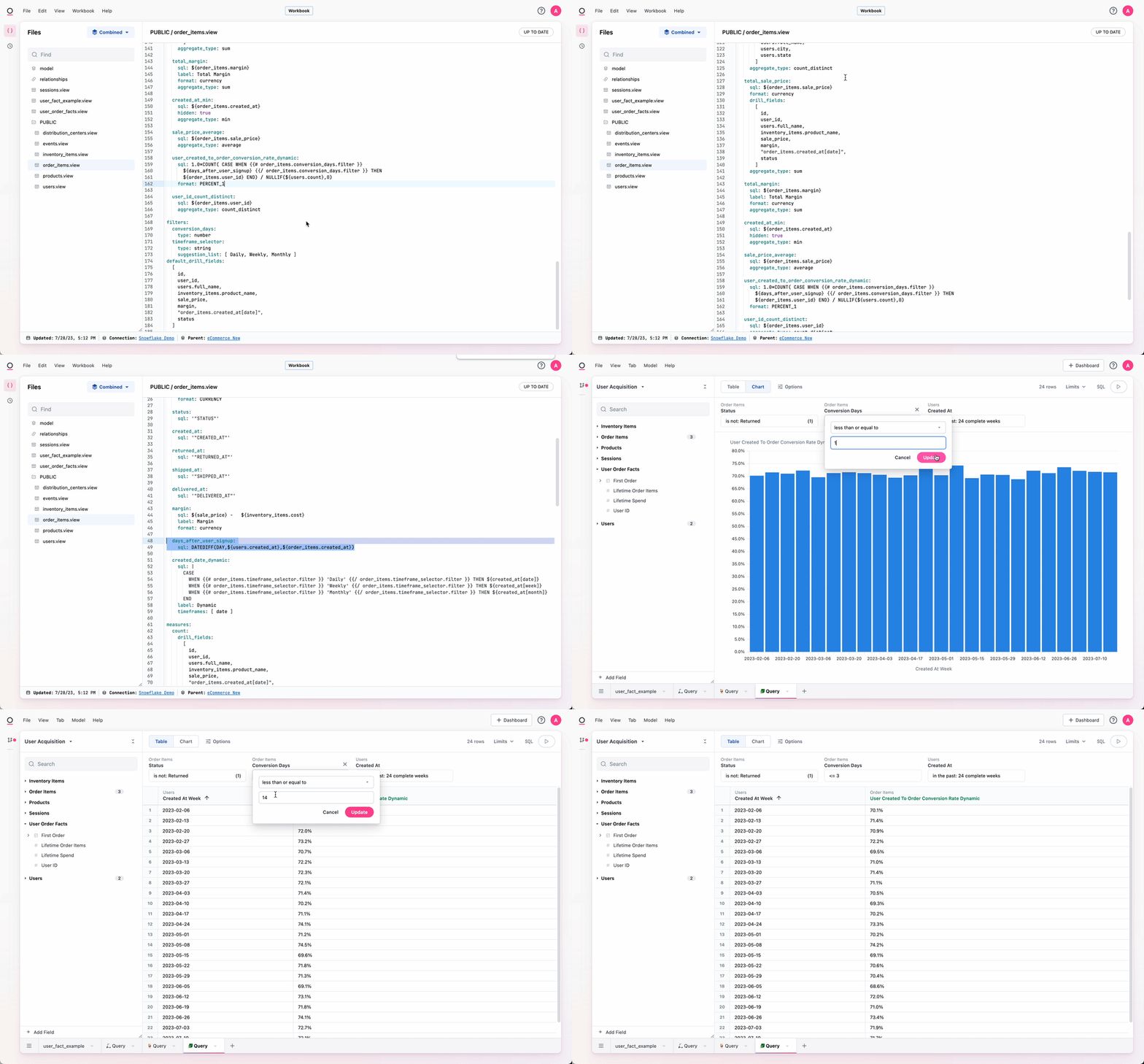
A common analytical pattern is to compare conversion rates with 1, 3, 7, 30, or however many days.
For the more static form, one might do something like this:
```yaml theme={null}
# Reference this view as order_items
dimensions:
days_after_user_signup:
# assumes a join has been made to a users view
sql: DATEDIFF(DAY,${users.created_at},${order_items.created_at})
measures:
count_users_with_order_within_7_days:
aggregate_type: count_distinct
sql: ${user_id}
filters:
days_after_user_signup:
less_than: 8
user_created_to_order_conversion_rate_7d:
sql: 1.0 * ${count_users_with_order_within_7_days} / NULLIF(${users.count},0)
```
This is very useful, but requires that measures be created for 1, 3, 7, 30, etc. -day conversion rates. We can add a dynamic option:
```yaml theme={null}
measures:
user_created_to_order_conversion_rate_dynamic:
sql: |
1.0 * COUNT(
CASE
WHEN {{# order_items.conversion_days.filter }} ${days_after_user_signup} {{/ order_items.conversion_days.filter }}
THEN ${order_items.user_id}
END)
/ NULLIF(${users.count},0)
format: PERCENT_1
filters:
conversion_days:
type: number
```
### Conversion rates
A common analytical pattern is to compare conversion rates with 1, 3, 7, 30, or however many days.
For the more static form, one might do something like this:
```yaml theme={null}
# Reference this view as order_items
dimensions:
days_after_user_signup:
# assumes a join has been made to a users view
sql: DATEDIFF(DAY,${users.created_at},${order_items.created_at})
measures:
count_users_with_order_within_7_days:
aggregate_type: count_distinct
sql: ${user_id}
filters:
days_after_user_signup:
less_than: 8
user_created_to_order_conversion_rate_7d:
sql: 1.0 * ${count_users_with_order_within_7_days} / NULLIF(${users.count},0)
```
This is very useful, but requires that measures be created for 1, 3, 7, 30, etc. -day conversion rates. We can add a dynamic option:
```yaml theme={null}
measures:
user_created_to_order_conversion_rate_dynamic:
sql: |
1.0 * COUNT(
CASE
WHEN {{# order_items.conversion_days.filter }} ${days_after_user_signup} {{/ order_items.conversion_days.filter }}
THEN ${order_items.user_id}
END)
/ NULLIF(${users.count},0)
format: PERCENT_1
filters:
conversion_days:
type: number
```
 ### Dynamically filter active subscriptions using date range (SCD2)
If you have data that defines the dates for the beginning of a subscription and the end of a subscription, this example allows end users the ability to filter for active subscriptions during a dynamic time frame.
This utilizes Omni's out of the box time frame selector, so some dates selections will not work well such as "On Day of Month", but any value that is a range of dates or a specific date will return the active subscriptions during that time.
```yaml theme={null}
# table that has subscription start and end data
schema: ...
table_name: your_table_name
dimensions:
valid_from: {}
valid_to: {}
# add a dimension that is set to Active or Not Active depending on date from dynamic filter
is_active:
sql: |
CASE
WHEN ${valid_from} <= {{filters.your_table_name.subscription_active_date.range_end}} AND ${valid_to} >= {{filters.your_table_name.subscription_active_date.range_start}}
THEN 'Active'
ELSE 'Not Active'
END
# filter only field for setting dynamic time frame
filters:
subscription_active_date:
type: timestamp
```
### Dynamically switching database table in a query
In some cases, users may need to be able to quickly switch between multiple tables when performing an analysis. For example, tables with similar data structures but differing data, such as different time grains.
**Note**: The approach described below should be placed in a new view. You can add a view in the model IDE by clicking **File > New View**.
For some databases, such as Snowflake, you will need to wrap the `{{filters.your_table_name.filter_field.value}}` in `IDENTIFIER()` to cast from a string to a SQL query-able value.
```yaml theme={null}
# code for the query view in IDE
# sql code to dynamically select a table as defined by filter_field filter
sql: |-
SELECT *
FROM {{filters.your_table_name.filter_field.value}}
dimensions: ...
# filter only field creating a suggestion list of tables to select
# set to default to the first table in the list
# set to only allow for one table to be selected
filters:
filter_field:
type: string
suggestion_list:
- value: existing_table_1
- value: existing_table_2
default_filter:
is: existing_table_1
filter_single_select_only: true
```
### Dynamically filter total count
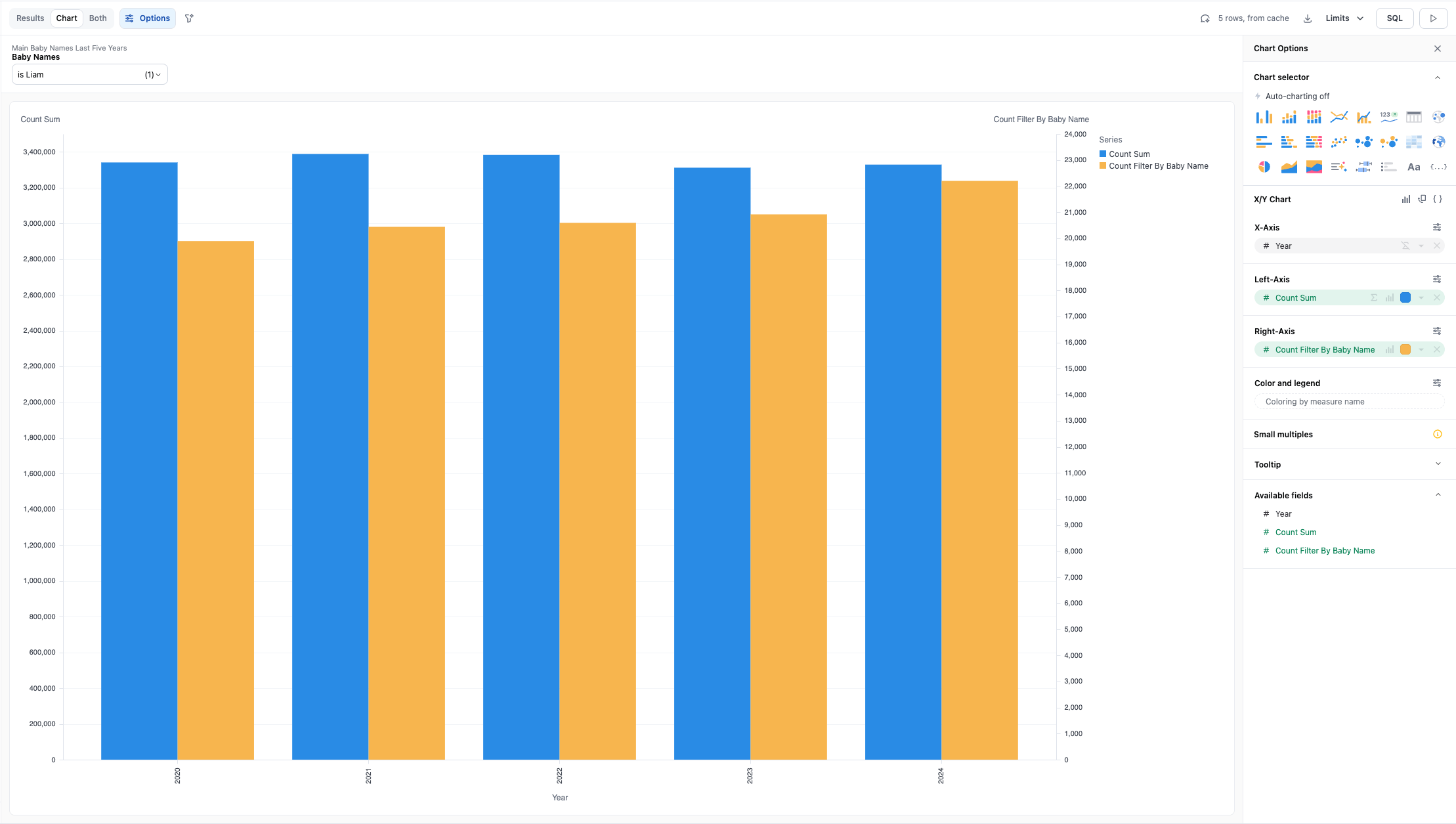
Dynamically filter a count down to just the count for a specific value. This allows for creating visualizations where you compare the overall count to the count filtered by the dynamic value on a single visualization.
```yaml theme={null}
# code for view in IDE
schema: main
table_name: baby_names_last_five_years
dimensions:
# baby name in view
baby_name:
sql: baby_name
label: Baby Name
# count of baby name
count:
sql: count
label: Count
measures:
# measure that takes count then filters by filter only field
# reads name select from filter only field (baby_name_filter) then filters the baby_name and then returns the count when true else 0
count_filter_by_baby_name:
sql: |
CASE
WHEN {{# main__baby_names_last_five_years.baby_name_filter.filter }} main__baby_names_last_five_years.baby_name {{/ main__baby_names_last_five_years.baby_name_filter.filter }} THEN ${main__baby_names_last_five_years.count}
ELSE 0
END
aggregate_type: sum
filters:
# filter only field to be used for filtering added meaure (count_filter_by_baby_name) to be the total count for just the selected baby name
baby_name_filter:
type: string
suggest_from_field: main__baby_names_last_five_years.baby_name
```
### Dynamically filter active subscriptions using date range (SCD2)
If you have data that defines the dates for the beginning of a subscription and the end of a subscription, this example allows end users the ability to filter for active subscriptions during a dynamic time frame.
This utilizes Omni's out of the box time frame selector, so some dates selections will not work well such as "On Day of Month", but any value that is a range of dates or a specific date will return the active subscriptions during that time.
```yaml theme={null}
# table that has subscription start and end data
schema: ...
table_name: your_table_name
dimensions:
valid_from: {}
valid_to: {}
# add a dimension that is set to Active or Not Active depending on date from dynamic filter
is_active:
sql: |
CASE
WHEN ${valid_from} <= {{filters.your_table_name.subscription_active_date.range_end}} AND ${valid_to} >= {{filters.your_table_name.subscription_active_date.range_start}}
THEN 'Active'
ELSE 'Not Active'
END
# filter only field for setting dynamic time frame
filters:
subscription_active_date:
type: timestamp
```
### Dynamically switching database table in a query
In some cases, users may need to be able to quickly switch between multiple tables when performing an analysis. For example, tables with similar data structures but differing data, such as different time grains.
**Note**: The approach described below should be placed in a new view. You can add a view in the model IDE by clicking **File > New View**.
For some databases, such as Snowflake, you will need to wrap the `{{filters.your_table_name.filter_field.value}}` in `IDENTIFIER()` to cast from a string to a SQL query-able value.
```yaml theme={null}
# code for the query view in IDE
# sql code to dynamically select a table as defined by filter_field filter
sql: |-
SELECT *
FROM {{filters.your_table_name.filter_field.value}}
dimensions: ...
# filter only field creating a suggestion list of tables to select
# set to default to the first table in the list
# set to only allow for one table to be selected
filters:
filter_field:
type: string
suggestion_list:
- value: existing_table_1
- value: existing_table_2
default_filter:
is: existing_table_1
filter_single_select_only: true
```
### Dynamically filter total count
Dynamically filter a count down to just the count for a specific value. This allows for creating visualizations where you compare the overall count to the count filtered by the dynamic value on a single visualization.
```yaml theme={null}
# code for view in IDE
schema: main
table_name: baby_names_last_five_years
dimensions:
# baby name in view
baby_name:
sql: baby_name
label: Baby Name
# count of baby name
count:
sql: count
label: Count
measures:
# measure that takes count then filters by filter only field
# reads name select from filter only field (baby_name_filter) then filters the baby_name and then returns the count when true else 0
count_filter_by_baby_name:
sql: |
CASE
WHEN {{# main__baby_names_last_five_years.baby_name_filter.filter }} main__baby_names_last_five_years.baby_name {{/ main__baby_names_last_five_years.baby_name_filter.filter }} THEN ${main__baby_names_last_five_years.count}
ELSE 0
END
aggregate_type: sum
filters:
# filter only field to be used for filtering added meaure (count_filter_by_baby_name) to be the total count for just the selected baby name
baby_name_filter:
type: string
suggest_from_field: main__baby_names_last_five_years.baby_name
```
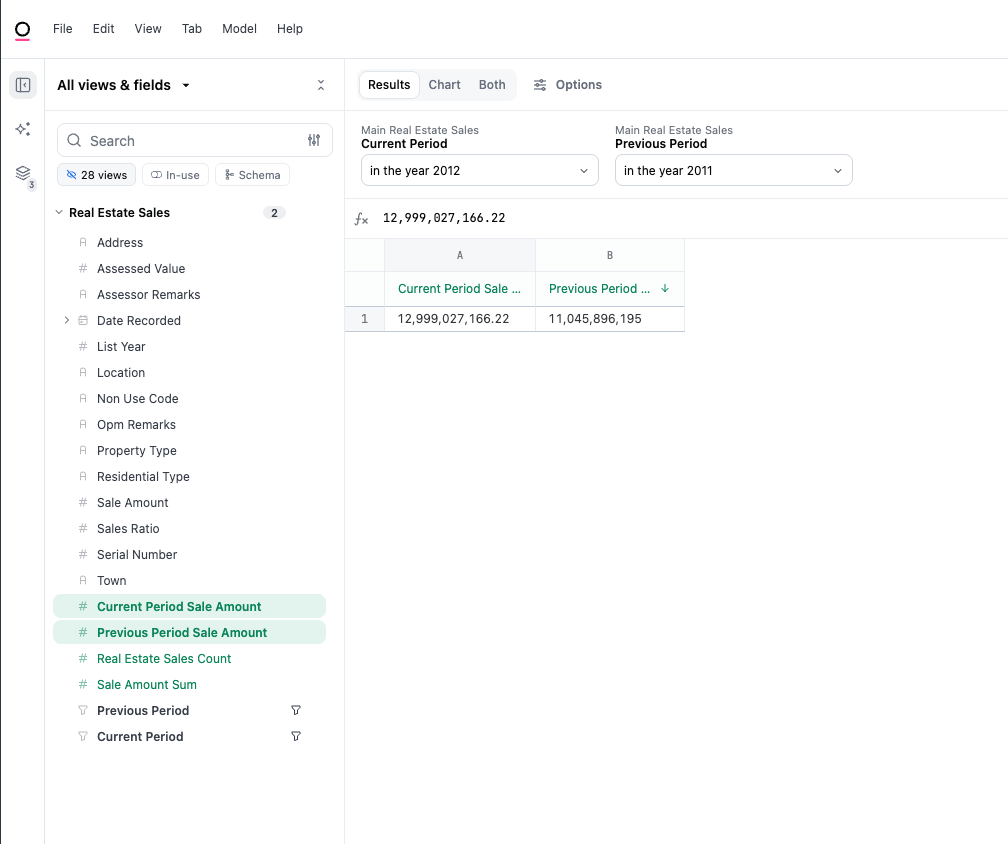
 ### Dynamic period-over-period with custom date range
Having the ability to create custom date ranges in period over period allows for flexibility to select any date range within each period to compare values against.
In the below example, there is a view file of demo real estate data where two filter-only fields have been added to create the custom date range selectors that will then be used to filter against the added measures that sum the sales\_amount if the date matches the date selected in the custom filter\_only field.
```yaml theme={null}
# Reference this view as main__real_estate_sales
schema: main
table_name: real_estate_sales
# dimensions that already existed on the table trimmed to just dimensions used in templated filter
dimensions:
...
date_recorded:
sql: '"Date Recorded"'
sale_amount:
sql: '"Sale Amount"'
...
measures:
count:
aggregate_type: count
# added measures that are filtered by added filter only fields
# filtered on date_recorded and only return the sale amount if date_recorded matches the custom filter only field date
previous_period_sale_amount:
sql: |
SUM(CASE
WHEN {{# main__real_estate_sales.previous_period.filter }} ${main__real_estate_sales.date_recorded} {{/ main__real_estate_sales.previous_period.filter }} THEN ${main__real_estate_sales.sale_amount}
ELSE 0
END)
current_period_sale_amount:
sql: |
SUM(CASE
WHEN {{# main__real_estate_sales.current_period.filter }} ${main__real_estate_sales.date_recorded} {{/ main__real_estate_sales.current_period.filter }} THEN ${main__real_estate_sales.sale_amount}
ELSE 0
END)
# filter only fields used for creating custom period over period
filters:
previous_period:
type: timestamp
suggest_from_field: main__real_estate_sales.date_recorded
current_period:
type: timestamp
suggest_from_field: main__real_estate_sales.date_recorded
```
### Dynamic period-over-period with custom date range
Having the ability to create custom date ranges in period over period allows for flexibility to select any date range within each period to compare values against.
In the below example, there is a view file of demo real estate data where two filter-only fields have been added to create the custom date range selectors that will then be used to filter against the added measures that sum the sales\_amount if the date matches the date selected in the custom filter\_only field.
```yaml theme={null}
# Reference this view as main__real_estate_sales
schema: main
table_name: real_estate_sales
# dimensions that already existed on the table trimmed to just dimensions used in templated filter
dimensions:
...
date_recorded:
sql: '"Date Recorded"'
sale_amount:
sql: '"Sale Amount"'
...
measures:
count:
aggregate_type: count
# added measures that are filtered by added filter only fields
# filtered on date_recorded and only return the sale amount if date_recorded matches the custom filter only field date
previous_period_sale_amount:
sql: |
SUM(CASE
WHEN {{# main__real_estate_sales.previous_period.filter }} ${main__real_estate_sales.date_recorded} {{/ main__real_estate_sales.previous_period.filter }} THEN ${main__real_estate_sales.sale_amount}
ELSE 0
END)
current_period_sale_amount:
sql: |
SUM(CASE
WHEN {{# main__real_estate_sales.current_period.filter }} ${main__real_estate_sales.date_recorded} {{/ main__real_estate_sales.current_period.filter }} THEN ${main__real_estate_sales.sale_amount}
ELSE 0
END)
# filter only fields used for creating custom period over period
filters:
previous_period:
type: timestamp
suggest_from_field: main__real_estate_sales.date_recorded
current_period:
type: timestamp
suggest_from_field: main__real_estate_sales.date_recorded
```
 ## Filter-only fields
```yaml theme={null}
filters:
order_date:
type: timestamp
status:
type: string
suggest_from_field: order_items.status
```
```yaml theme={null}
filters:
rolling_window:
type: string
suggestion_list:
- value: "6"
label: 7 days
- value: "13"
label: 14 days
default_filter:
is: "6"
filter_single_select_only: true
```
```yaml theme={null}
filters:
timeframe_selector:
type: string
suggest_from_field: date_spine.date_string
suggest_from_topic: opp_line_items
```
For specific filter syntax, like measure filters see [here](/modeling/filters).
### aliases
```yaml theme={null}
filter_name:
aliases: [old_filter_name]
```
Similar to table level aliases, occasionally a field name may change in your database, which can cause content to break. To fix this, we can add `aliases:` to the field in question pointing references from the old field name to the updated field name, restoring content and eliminating content related errors. This behaves similar to table level aliases, as shown
### bind\_to
```yaml theme={null}
filters:
date_filter:
type: timestamp
bind_to: [created_at, updated_at]
```
A list of field names that the filter-only field's filter expression should be applied to. When a filter is applied to this filter-only field, the filter expression will be applied to each field in this list. Filters on dimensions will go into the `WHERE` clause, while filters will go into the `HAVING` clause.
### default\_filter
```yaml theme={null}
status_templated_filter:
type: string
default_filter:
is: "Completed"
suggestion_list:
- value: Compeleted
- value: Returned
# note the [] will default to any value here
templated_filter_default_anything:
type: string
default_filter:
is: []
rolling_window:
type: string
suggestion_list:
- value: "6"
label: 7 days
- value: "13"
label: 14 days
default_filter:
is: "6"
filter_single_select_only: true
```
* `default_filter` will automatically populate the filter value in the templated object
* This is often paired with `filter_single_select_only` and `suggestion_list` when a single-selection is required
* For setting the filter arguments, use the [filter syntax](/modeling/filters)
### description
```yaml theme={null}
status_templated_filter:
type: string
default_filter:
is: "Completed"
suggestion_list:
- value: Compeleted
- value: Returned
description: This is for filtering stuff in the status fact table
```
* Metadata about the field, made available in the workbook/dashboard table UI upon hovering over a field with a description, or on right click from the field picker
* Omni expects unquoted text (quotes will be removed / ignored)
### display\_order
```yaml theme={null}
status_templated_filter:
type: string
default_filter:
is: "Completed"
suggestion_list:
- value: Compeleted
- value: Returned
description: This is for filtering stuff in the status fact table
display_order: 1
other_status_templated_filter:
type: string
default_filter:
is: "Completed"
suggestion_list: [Compeleted, Returned]
description: This is for filtering stuff in the other status fact table
display_order: 2
```
* Omni expects a whole number
* This will override the sort order for the field picker, inside the field's grouping (i.e. inside a given view)
* `display_order` will supersede alphabetical sorting
* For example, if the two fields above in users are given `display_order:` they will float to the top of the field list in users, and the remaining fields would be sorted alphabetically
* To rearrange views, `display_order` can be used at the view level
* For fields inside groups using `group_label`, the group will be ranked with the min of all the fields in the group (i.e. if there are 3 fields with `display_order` of 4, 5 and \{empty}, the group will have a `display_order` of 4)
### filter\_single\_select\_only
```yaml theme={null}
filters:
rolling_window:
type: string
suggestion_list:
- value: "6"
label: 7 days
- value: "13"
label: 14 days
default_filter:
is: "6"
filter_single_select_only: true
```
* This argument will require the filter field to use a choose-one dropdown rather than the default flexible filter modal
* Recommended with templated filters that require one-and-only-one object
### group\_label
```yaml theme={null}
rolling_window:
group_label: Time Filters
type: string
filter_single_select_only: true
```
* This will nest a group of fields in the field picker for curated organization
* Omni expects unquoted text (quotes will be removed / ignored)
* Note measures and dimensions will still be in separate sections in the field picker under each view
* Fields can be nested under timeframes using the group label - the text rather than the field should be used (i.e. `Created At` not `created_at`)
### hidden
```yaml theme={null}
rolling_window:
hidden: true
```
* Remove the field from the UI. Still referenceable in the model, but hidden in the workbook UI.
* Expects 'true' or 'false'
### ignored
Likely should not be used with filters, can just delete or comment out if it's not desired in the model
### label
```yaml theme={null}
status:
type: string
label: Status Filterer
suggestion_list:
- value: "Completed"
- value: "Returned"
```
* Label will override the field name for all UI appearances of the field
* Omni expects unquoted text (quotes will be removed / ignored)
### required\_access\_grants
You can also conditionally allow access by using pipes (`|`) and ampersands (`&`) to create `OR` and `AND` conditions.
```yaml theme={null}
required_access_grants: [grant_one]
# Grant access if conditions are met for either access grant
required_access_grants: [grant_one|grant_two]
# Grant access if conditions are met for:
# (grant_one OR grant_two)
# AND
# grant_three
required_access_grants: [grant_one|grant_two&grant_three]
```
### suggestion\_list
```yaml theme={null}
filters:
rolling_window:
type: string
suggestion_list:
- value: "6"
label: 7 days
- value: "13"
label: 14 days
status:
type: string
suggestion_list:
- value: "Completed"
- value: "Returned"
```
* Suggestion list will explicitly set the suggestions on
### suggest\_from\_field
```yaml theme={null}
filters:
timeframe_selector:
type: string
suggest_from_field: date_spine.date_string
suggest_from_topic: opp_line_items
```
```yaml theme={null}
filters:
status_picker:
type: string
suggest_from_field: order_items.status
```
* This argument can be used to populate a filter with another field's values
* Commonly used when the filter is injected in SQL with a corresponding modeled field
### suggest\_from\_topic
```yaml theme={null}
filters:
timeframe_selector:
type: string
suggest_from_field: date_spine.date_string
suggest_from_topic: opp_line_items
```
* This needs to be paired with `suggest_from_field` and can tune the specific topic (ie access-filters and default filters) for a given suggestion
### type
```yaml theme={null}
filters:
order_date:
type: timestamp
status:
type: string
```
* Currently, filter-only fields can only be defined in the IDE. They require a name, and a type. The accepted types for a filter-only field are:
* `boolean`
* `column` (returns unquoted text, can be used to substitute in column names in query views)
* `number` *most common*
* `string` *most common*
* `timestamp` *most common*
### view\_label
```yaml theme={null}
filters:
order_date:
type: timestamp
view_label: Filters
status:
type: string
view_label: Filters
```
* This will nest a given field under a different view than its default parent view, for example, grouping `user_facts` fields under the `users` view for better organization and discovery
* Note that filters will always be below dimensions and measures
* Sometimes can be valuable to pull all filters into a separate pseudo-view, would do that with the `view` argument as seen here
## Parameters
Parameters can be used in Omni in tandem with filter-only Fields. The value of a filter-only field can be referenced using the structure `{{filters.table_name.field_name.value}}`, and can be used in definitions for other fields. When that filter-only field is applied to a workbook or dashboard, it can be used to change the value of the parameter field, and thus interact with the query accordingly.
Consider using the [filter\_single\_select\_only](/modeling/dimensions/parameters/filter-single-select-only) argument when using a string filter-only field to parameterize some selector.
### Dynamic date range example
```yaml theme={null}
schema: PUBLIC
sql: |-
SELECT status, sum(sale_price) as sum_sale_price
FROM public.order_items
WHERE 1=1
AND created_at >= {{filters.filter_only_parameter_example.dates.range_start}}
AND created_at < {{filters.filter_only_parameter_example.dates.range_end}}
GROUP BY 1
dimensions:
status:
sql: '"STATUS"'
sum_sale_price:
sql: '"SUM_SALE_PRICE"'
measures:
count:
aggregate_type: count
filters:
dates:
type: timestamp
```
Users can reference the start or end range of a date filter using the structure `{{filters.table_name.field_name.range_start}}` and `{{filters.table_name.field_name.range_end}}`.
### Dynamic date range comparison example
```yaml theme={null}
dimensions:
domain: {}
name: {}
comparison_period: {}
revenue: {}
date:
timeframes: []
convert_tz: false
is_period_one:
sql: ${date} = TIMESTAMPADD(DAY, -{{filters.service_node_comparision.period_one.value}}, DATE(NOW()))
is_period_two:
sql: ${date} = TIMESTAMPADD(DAY, -{{filters.service_node_comparision.period_two.value}}, DATE(NOW()))
measures:
count:
aggregate_type: count
revenue_sum:
sql: ${service_node_comparision.service_nodes}
aggregate_type: sum
revenue_sum_period_one:
sql: ${service_node_comparision.service_nodes}
label: Service Nodes Sum Period One
aggregate_type: sum
filters:
is_period_one:
is: true
revenue_sum_period_two:
sql: ${service_node_comparision.service_nodes}
label: Service Nodes Sum Period Two
aggregate_type: sum
filters:
is_period_two:
is: true
filters:
period_one:
type: string
suggestion_list:
- value: "1"
label: Yesterday
- value: "182"
label: 6 Months Ago
default_filter:
is: "1"
filter_single_select_only: true
period_two:
type: string
suggestion_list:
- value: "1"
label: Yesterday
- value: "182"
label: 6 Months Ago
default_filter:
is: "182"
filter_single_select_only: true
```
This example creates a pair of filtered measures using templated filters to select specific dates.
### Dynamic field examples
```yaml theme={null}
# Note controls are much better for this use case, but may be valuable when you need to riff or put in a query view
dimensions:
dynamic_dimension:
sql: {{ filters.view.field_picker.value }}
filters:
field_picker:
type: column
suggestion_list:
- value: table.field1
label: Field 1
- value: table.field2
label: Field 2
default_filter:
is: table.field1
filter_single_select_only: true
```
This example pipes columns `table.field1` or `table.field2` into the `dynamic_dimension`. For this dynamic dimension, the filter only field requires the use of `type: column`. Note this injects the SQL dialect's column naming convention and will only pass SQL validation if the correct database column reference is defined for the `value` subparameter (e.g. in Snowflake the scoped column names would need to be capitalized).
Consider including the `suggest_from_field` subparameter in the filter only field to generate a list of values from the database's metadata table.
```yaml theme={null}
dimensions:
state_most_famous_person_dynamic_model:
sql: |-
-- DO NOT PARSE
SNOWFLAKE.CORTEX.COMPLETE( {{ filters.states.dynamic_model.value }}, CONCAT('who is the most famous person from ', ${states.state}) )::varchar
filters:
dynamic_model:
type: string
suggestion_list:
- value: snowflake-arctic
label: Snowflake's Default Model (Cheapest)
- value: claude-3-5-sonnet
label: Claude's latest
- value: reka-core
- value: mistral-large2
- value: llama3.2-1b
label: Small Llama model
- value: mistral-7b
label: Small Mistral model
- value: gemma-7b
label: Small model, best for code completion
default_filter:
is: snowflake-arctic
filter_single_select_only: true
```
Here we've built a Snowflake Cortex dynamic column that can call a model based on the `dynamic_model` specified. The filter is set as single-select, with descriptions on each model to help the end user. This value is piped into the Cortex call to select the given model for analysis using `filters.states.dynamic_model.value`.
### Dynamic date part example
```yaml theme={null}
schema: other
sql: |
SELECT
CASE
WHEN {{ filters.colin_test.timeframe_selector.value }} = 'Daily' THEN date_trunc(created_at, day)
WHEN {{ filters.colin_test.timeframe_selector.value }} = 'Weekly' THEN date_trunc(created_at, week)
WHEN {{ filters.colin_test.timeframe_selector.value }} = 'Quarterly' THEN date_trunc(created_at, quarter)
WHEN {{ filters.colin_test.timeframe_selector.value }} = 'Yearly' THEN date_trunc(created_at, year)
ELSE date_trunc(created_at, year)
END as event_date
, count(*) as dim_count
FROM users
GROUP BY 1
dimensions:
dim_count: {}
event_date:
format: "%Y-%m-%d"
timeframes: []
primary_key: true
filters:
timeframe_selector:
type: string
suggestion_list:
- value: Daily
- value: Weekly
- value: Monthly
- value: Quarterly
- value: Yearly
default_filter:
is: Monthly
filter_single_select_only: true
```
This pattern creates a fact table to be requeried or aggregated using a template filter to set the date part (here BQ SQL). Note we cannot currently inject unquoted strings into the SQL block, but we can instead handle with a CASE statement.
### Self-referential building
We have a few handy parameters that can be leveraged in your models to build joins, dimensions, and measures based on what is present in the query.
The format for calling these parameters is and they will evaluate to `TRUE` or `FALSE`:
* `{{ view_name.field_name.in_query }}` OR `{{ view_name.in_query }}`
* `{{ view_name.field_name.is_selected }}`
* `{{ view_name.field_name.is_filtered }}`
#### in\_query
This will look for the presence of a specific field OR view in the SELECT or WHERE clause of a query.
#### is\_selected
This will look for the presence of a specific field in the SELECT clause of a query.
#### is\_filtered
This will look for the presence of a specific field in the WHERE clause of a query.
**Example of conditional join using `in_query`**
```yaml theme={null}
base_view: inventory_items
joins:
product_fact: {}
relationships:
- join_from_view: inventory_items
join_to_view: product_fact
join_type: always_left
on_sql: |-
CASE
-- check if inventory_items.product_id is in query
WHEN {{ inventory_items.product_id.in_query }}
-- check if there's a match in the fact table
AND ${inventory_items.product_id} = ${product_fact.product_id}
THEN 1
ELSE 0 -- if inventory_items.product_id not present, do not join
END = 1
relationship_type: one_to_one
```
**Example of creating measure using `is_selected`**
```yaml theme={null}
max_age:
sql: ${users.age}
aggregate_type: max
description: dummy aggregate for sale_price_per_year_of_life
sale_price_per_year_of_life:
sql: |-
CASE
WHEN {{ users.age.is_selected }}
THEN ${order_items.sale_price_sum}/${users.max_age}
ELSE null
END
```
When `in_query`, `is_selected`, or `is_filtered` are used inside a query view, they normally evaluate against the query view's own inner query. This means they typically answer "nothing selected" or "nothing filtered" once a field is wrapped in a query view, unless the field is selected or filtered within the view's own query definition. To make these variables resolve against the outer query that uses the view instead, use the [`bind_outer_context`](/modeling/query-views/parameters/bind-outer-context) parameter on the query view.
You can read more about this pattern in our [community article](https://community.omni.co/t/multiplying-or-dividing-dimensions-and-measures-in-the-data-model-using-in-query/207).
## Filter-only fields
```yaml theme={null}
filters:
order_date:
type: timestamp
status:
type: string
suggest_from_field: order_items.status
```
```yaml theme={null}
filters:
rolling_window:
type: string
suggestion_list:
- value: "6"
label: 7 days
- value: "13"
label: 14 days
default_filter:
is: "6"
filter_single_select_only: true
```
```yaml theme={null}
filters:
timeframe_selector:
type: string
suggest_from_field: date_spine.date_string
suggest_from_topic: opp_line_items
```
For specific filter syntax, like measure filters see [here](/modeling/filters).
### aliases
```yaml theme={null}
filter_name:
aliases: [old_filter_name]
```
Similar to table level aliases, occasionally a field name may change in your database, which can cause content to break. To fix this, we can add `aliases:` to the field in question pointing references from the old field name to the updated field name, restoring content and eliminating content related errors. This behaves similar to table level aliases, as shown
### bind\_to
```yaml theme={null}
filters:
date_filter:
type: timestamp
bind_to: [created_at, updated_at]
```
A list of field names that the filter-only field's filter expression should be applied to. When a filter is applied to this filter-only field, the filter expression will be applied to each field in this list. Filters on dimensions will go into the `WHERE` clause, while filters will go into the `HAVING` clause.
### default\_filter
```yaml theme={null}
status_templated_filter:
type: string
default_filter:
is: "Completed"
suggestion_list:
- value: Compeleted
- value: Returned
# note the [] will default to any value here
templated_filter_default_anything:
type: string
default_filter:
is: []
rolling_window:
type: string
suggestion_list:
- value: "6"
label: 7 days
- value: "13"
label: 14 days
default_filter:
is: "6"
filter_single_select_only: true
```
* `default_filter` will automatically populate the filter value in the templated object
* This is often paired with `filter_single_select_only` and `suggestion_list` when a single-selection is required
* For setting the filter arguments, use the [filter syntax](/modeling/filters)
### description
```yaml theme={null}
status_templated_filter:
type: string
default_filter:
is: "Completed"
suggestion_list:
- value: Compeleted
- value: Returned
description: This is for filtering stuff in the status fact table
```
* Metadata about the field, made available in the workbook/dashboard table UI upon hovering over a field with a description, or on right click from the field picker
* Omni expects unquoted text (quotes will be removed / ignored)
### display\_order
```yaml theme={null}
status_templated_filter:
type: string
default_filter:
is: "Completed"
suggestion_list:
- value: Compeleted
- value: Returned
description: This is for filtering stuff in the status fact table
display_order: 1
other_status_templated_filter:
type: string
default_filter:
is: "Completed"
suggestion_list: [Compeleted, Returned]
description: This is for filtering stuff in the other status fact table
display_order: 2
```
* Omni expects a whole number
* This will override the sort order for the field picker, inside the field's grouping (i.e. inside a given view)
* `display_order` will supersede alphabetical sorting
* For example, if the two fields above in users are given `display_order:` they will float to the top of the field list in users, and the remaining fields would be sorted alphabetically
* To rearrange views, `display_order` can be used at the view level
* For fields inside groups using `group_label`, the group will be ranked with the min of all the fields in the group (i.e. if there are 3 fields with `display_order` of 4, 5 and \{empty}, the group will have a `display_order` of 4)
### filter\_single\_select\_only
```yaml theme={null}
filters:
rolling_window:
type: string
suggestion_list:
- value: "6"
label: 7 days
- value: "13"
label: 14 days
default_filter:
is: "6"
filter_single_select_only: true
```
* This argument will require the filter field to use a choose-one dropdown rather than the default flexible filter modal
* Recommended with templated filters that require one-and-only-one object
### group\_label
```yaml theme={null}
rolling_window:
group_label: Time Filters
type: string
filter_single_select_only: true
```
* This will nest a group of fields in the field picker for curated organization
* Omni expects unquoted text (quotes will be removed / ignored)
* Note measures and dimensions will still be in separate sections in the field picker under each view
* Fields can be nested under timeframes using the group label - the text rather than the field should be used (i.e. `Created At` not `created_at`)
### hidden
```yaml theme={null}
rolling_window:
hidden: true
```
* Remove the field from the UI. Still referenceable in the model, but hidden in the workbook UI.
* Expects 'true' or 'false'
### ignored
Likely should not be used with filters, can just delete or comment out if it's not desired in the model
### label
```yaml theme={null}
status:
type: string
label: Status Filterer
suggestion_list:
- value: "Completed"
- value: "Returned"
```
* Label will override the field name for all UI appearances of the field
* Omni expects unquoted text (quotes will be removed / ignored)
### required\_access\_grants
You can also conditionally allow access by using pipes (`|`) and ampersands (`&`) to create `OR` and `AND` conditions.
```yaml theme={null}
required_access_grants: [grant_one]
# Grant access if conditions are met for either access grant
required_access_grants: [grant_one|grant_two]
# Grant access if conditions are met for:
# (grant_one OR grant_two)
# AND
# grant_three
required_access_grants: [grant_one|grant_two&grant_three]
```
### suggestion\_list
```yaml theme={null}
filters:
rolling_window:
type: string
suggestion_list:
- value: "6"
label: 7 days
- value: "13"
label: 14 days
status:
type: string
suggestion_list:
- value: "Completed"
- value: "Returned"
```
* Suggestion list will explicitly set the suggestions on
### suggest\_from\_field
```yaml theme={null}
filters:
timeframe_selector:
type: string
suggest_from_field: date_spine.date_string
suggest_from_topic: opp_line_items
```
```yaml theme={null}
filters:
status_picker:
type: string
suggest_from_field: order_items.status
```
* This argument can be used to populate a filter with another field's values
* Commonly used when the filter is injected in SQL with a corresponding modeled field
### suggest\_from\_topic
```yaml theme={null}
filters:
timeframe_selector:
type: string
suggest_from_field: date_spine.date_string
suggest_from_topic: opp_line_items
```
* This needs to be paired with `suggest_from_field` and can tune the specific topic (ie access-filters and default filters) for a given suggestion
### type
```yaml theme={null}
filters:
order_date:
type: timestamp
status:
type: string
```
* Currently, filter-only fields can only be defined in the IDE. They require a name, and a type. The accepted types for a filter-only field are:
* `boolean`
* `column` (returns unquoted text, can be used to substitute in column names in query views)
* `number` *most common*
* `string` *most common*
* `timestamp` *most common*
### view\_label
```yaml theme={null}
filters:
order_date:
type: timestamp
view_label: Filters
status:
type: string
view_label: Filters
```
* This will nest a given field under a different view than its default parent view, for example, grouping `user_facts` fields under the `users` view for better organization and discovery
* Note that filters will always be below dimensions and measures
* Sometimes can be valuable to pull all filters into a separate pseudo-view, would do that with the `view` argument as seen here
## Parameters
Parameters can be used in Omni in tandem with filter-only Fields. The value of a filter-only field can be referenced using the structure `{{filters.table_name.field_name.value}}`, and can be used in definitions for other fields. When that filter-only field is applied to a workbook or dashboard, it can be used to change the value of the parameter field, and thus interact with the query accordingly.
Consider using the [filter\_single\_select\_only](/modeling/dimensions/parameters/filter-single-select-only) argument when using a string filter-only field to parameterize some selector.
### Dynamic date range example
```yaml theme={null}
schema: PUBLIC
sql: |-
SELECT status, sum(sale_price) as sum_sale_price
FROM public.order_items
WHERE 1=1
AND created_at >= {{filters.filter_only_parameter_example.dates.range_start}}
AND created_at < {{filters.filter_only_parameter_example.dates.range_end}}
GROUP BY 1
dimensions:
status:
sql: '"STATUS"'
sum_sale_price:
sql: '"SUM_SALE_PRICE"'
measures:
count:
aggregate_type: count
filters:
dates:
type: timestamp
```
Users can reference the start or end range of a date filter using the structure `{{filters.table_name.field_name.range_start}}` and `{{filters.table_name.field_name.range_end}}`.
### Dynamic date range comparison example
```yaml theme={null}
dimensions:
domain: {}
name: {}
comparison_period: {}
revenue: {}
date:
timeframes: []
convert_tz: false
is_period_one:
sql: ${date} = TIMESTAMPADD(DAY, -{{filters.service_node_comparision.period_one.value}}, DATE(NOW()))
is_period_two:
sql: ${date} = TIMESTAMPADD(DAY, -{{filters.service_node_comparision.period_two.value}}, DATE(NOW()))
measures:
count:
aggregate_type: count
revenue_sum:
sql: ${service_node_comparision.service_nodes}
aggregate_type: sum
revenue_sum_period_one:
sql: ${service_node_comparision.service_nodes}
label: Service Nodes Sum Period One
aggregate_type: sum
filters:
is_period_one:
is: true
revenue_sum_period_two:
sql: ${service_node_comparision.service_nodes}
label: Service Nodes Sum Period Two
aggregate_type: sum
filters:
is_period_two:
is: true
filters:
period_one:
type: string
suggestion_list:
- value: "1"
label: Yesterday
- value: "182"
label: 6 Months Ago
default_filter:
is: "1"
filter_single_select_only: true
period_two:
type: string
suggestion_list:
- value: "1"
label: Yesterday
- value: "182"
label: 6 Months Ago
default_filter:
is: "182"
filter_single_select_only: true
```
This example creates a pair of filtered measures using templated filters to select specific dates.
### Dynamic field examples
```yaml theme={null}
# Note controls are much better for this use case, but may be valuable when you need to riff or put in a query view
dimensions:
dynamic_dimension:
sql: {{ filters.view.field_picker.value }}
filters:
field_picker:
type: column
suggestion_list:
- value: table.field1
label: Field 1
- value: table.field2
label: Field 2
default_filter:
is: table.field1
filter_single_select_only: true
```
This example pipes columns `table.field1` or `table.field2` into the `dynamic_dimension`. For this dynamic dimension, the filter only field requires the use of `type: column`. Note this injects the SQL dialect's column naming convention and will only pass SQL validation if the correct database column reference is defined for the `value` subparameter (e.g. in Snowflake the scoped column names would need to be capitalized).
Consider including the `suggest_from_field` subparameter in the filter only field to generate a list of values from the database's metadata table.
```yaml theme={null}
dimensions:
state_most_famous_person_dynamic_model:
sql: |-
-- DO NOT PARSE
SNOWFLAKE.CORTEX.COMPLETE( {{ filters.states.dynamic_model.value }}, CONCAT('who is the most famous person from ', ${states.state}) )::varchar
filters:
dynamic_model:
type: string
suggestion_list:
- value: snowflake-arctic
label: Snowflake's Default Model (Cheapest)
- value: claude-3-5-sonnet
label: Claude's latest
- value: reka-core
- value: mistral-large2
- value: llama3.2-1b
label: Small Llama model
- value: mistral-7b
label: Small Mistral model
- value: gemma-7b
label: Small model, best for code completion
default_filter:
is: snowflake-arctic
filter_single_select_only: true
```
Here we've built a Snowflake Cortex dynamic column that can call a model based on the `dynamic_model` specified. The filter is set as single-select, with descriptions on each model to help the end user. This value is piped into the Cortex call to select the given model for analysis using `filters.states.dynamic_model.value`.
### Dynamic date part example
```yaml theme={null}
schema: other
sql: |
SELECT
CASE
WHEN {{ filters.colin_test.timeframe_selector.value }} = 'Daily' THEN date_trunc(created_at, day)
WHEN {{ filters.colin_test.timeframe_selector.value }} = 'Weekly' THEN date_trunc(created_at, week)
WHEN {{ filters.colin_test.timeframe_selector.value }} = 'Quarterly' THEN date_trunc(created_at, quarter)
WHEN {{ filters.colin_test.timeframe_selector.value }} = 'Yearly' THEN date_trunc(created_at, year)
ELSE date_trunc(created_at, year)
END as event_date
, count(*) as dim_count
FROM users
GROUP BY 1
dimensions:
dim_count: {}
event_date:
format: "%Y-%m-%d"
timeframes: []
primary_key: true
filters:
timeframe_selector:
type: string
suggestion_list:
- value: Daily
- value: Weekly
- value: Monthly
- value: Quarterly
- value: Yearly
default_filter:
is: Monthly
filter_single_select_only: true
```
This pattern creates a fact table to be requeried or aggregated using a template filter to set the date part (here BQ SQL). Note we cannot currently inject unquoted strings into the SQL block, but we can instead handle with a CASE statement.
### Self-referential building
We have a few handy parameters that can be leveraged in your models to build joins, dimensions, and measures based on what is present in the query.
The format for calling these parameters is and they will evaluate to `TRUE` or `FALSE`:
* `{{ view_name.field_name.in_query }}` OR `{{ view_name.in_query }}`
* `{{ view_name.field_name.is_selected }}`
* `{{ view_name.field_name.is_filtered }}`
#### in\_query
This will look for the presence of a specific field OR view in the SELECT or WHERE clause of a query.
#### is\_selected
This will look for the presence of a specific field in the SELECT clause of a query.
#### is\_filtered
This will look for the presence of a specific field in the WHERE clause of a query.
**Example of conditional join using `in_query`**
```yaml theme={null}
base_view: inventory_items
joins:
product_fact: {}
relationships:
- join_from_view: inventory_items
join_to_view: product_fact
join_type: always_left
on_sql: |-
CASE
-- check if inventory_items.product_id is in query
WHEN {{ inventory_items.product_id.in_query }}
-- check if there's a match in the fact table
AND ${inventory_items.product_id} = ${product_fact.product_id}
THEN 1
ELSE 0 -- if inventory_items.product_id not present, do not join
END = 1
relationship_type: one_to_one
```
**Example of creating measure using `is_selected`**
```yaml theme={null}
max_age:
sql: ${users.age}
aggregate_type: max
description: dummy aggregate for sale_price_per_year_of_life
sale_price_per_year_of_life:
sql: |-
CASE
WHEN {{ users.age.is_selected }}
THEN ${order_items.sale_price_sum}/${users.max_age}
ELSE null
END
```
When `in_query`, `is_selected`, or `is_filtered` are used inside a query view, they normally evaluate against the query view's own inner query. This means they typically answer "nothing selected" or "nothing filtered" once a field is wrapped in a query view, unless the field is selected or filtered within the view's own query definition. To make these variables resolve against the outer query that uses the view instead, use the [`bind_outer_context`](/modeling/query-views/parameters/bind-outer-context) parameter on the query view.
You can read more about this pattern in our [community article](https://community.omni.co/t/multiplying-or-dividing-dimensions-and-measures-in-the-data-model-using-in-query/207).