> ## Documentation Index
> Fetch the complete documentation index at: https://docs.omni.co/llms.txt
> Use this file to discover all available pages before exploring further.
## Submitting Feedback
If you encounter incorrect, outdated, or confusing documentation on this page, submit feedback:
POST https://docs.omni.co/feedback
```json
{
"path": "/modeling/develop/model-generation",
"feedback": "Description of the issue"
}
```
Only submit feedback when you have something specific and actionable to report.
# Model generation
> Models are automatically generated after a connection is added. Each model is divided into two layers:
* The **schema model** that stays in sync with raw database tables and views, and
* The **model extension**, where user-defined, virtualized data models live in Omni. Think fields, joins, and additional metadata such as formats, descriptions, and so on.
These layers make up the model you see in the model IDE in **Combined** mode.
## Schema Model
The schema model is intended to serve as a baseline version of the database schema, for simple point and click query, and some inferred key relationships. The schema model can be viewed by clicking the Parent model name at the bottom of the shared model page. To refresh the schema, click **Model > Refresh schema** inside the given schema model (see [Schema Refreshes](/modeling/develop/schema-refreshes)) for more details:
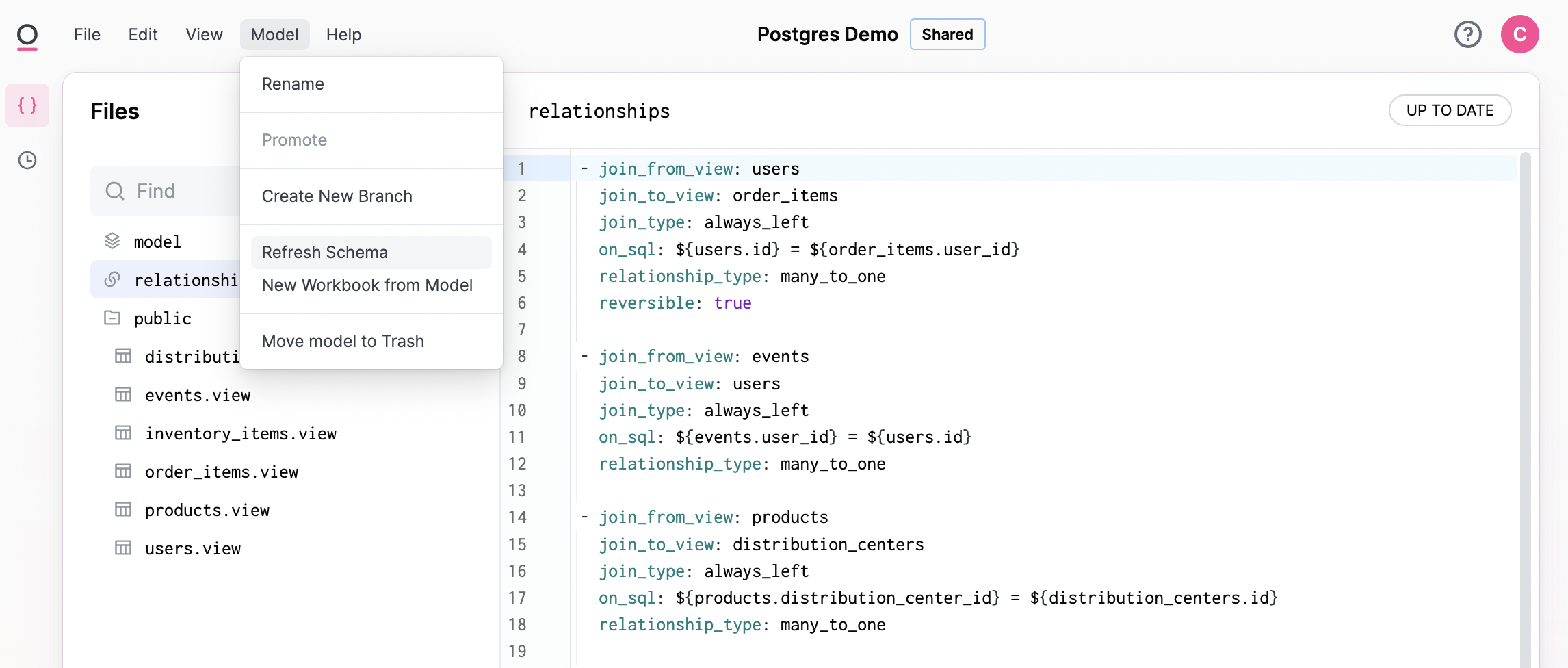 When a model is generated or refreshed, Omni will use a combination of the schema metadata we get from your connected database and heuristics about the names of views and fields to auto-generate join relationships in the relationships model file and primary key designations in each view file.
**Note**: When deleting or ignoring schema fields, they will still be editable in SQL queries by users who have permissions to use SQL.
## Model extension
The model extension is the core user-curated data model in Omni. Fields, joins, and other metadata extend / supplement the schema model.
In addition to entirely new fields and relationships, schema fields can be extended with new metadata - formatting, labels, or deleted by "ignoring" them. Refer to the next section for more information.
### Combined mode
By default, the IDE displays the model in **Combined** mode. In this mode, the layers of the model are combined to create a comprehensive view. Changing the mode to **Model** will display only the model extension.
Changes made while in **Combined** mode will be included in the model extension - that is, visible when you toggle the mode to **Model**.
When a model is generated or refreshed, Omni will use a combination of the schema metadata we get from your connected database and heuristics about the names of views and fields to auto-generate join relationships in the relationships model file and primary key designations in each view file.
**Note**: When deleting or ignoring schema fields, they will still be editable in SQL queries by users who have permissions to use SQL.
## Model extension
The model extension is the core user-curated data model in Omni. Fields, joins, and other metadata extend / supplement the schema model.
In addition to entirely new fields and relationships, schema fields can be extended with new metadata - formatting, labels, or deleted by "ignoring" them. Refer to the next section for more information.
### Combined mode
By default, the IDE displays the model in **Combined** mode. In this mode, the layers of the model are combined to create a comprehensive view. Changing the mode to **Model** will display only the model extension.
Changes made while in **Combined** mode will be included in the model extension - that is, visible when you toggle the mode to **Model**.
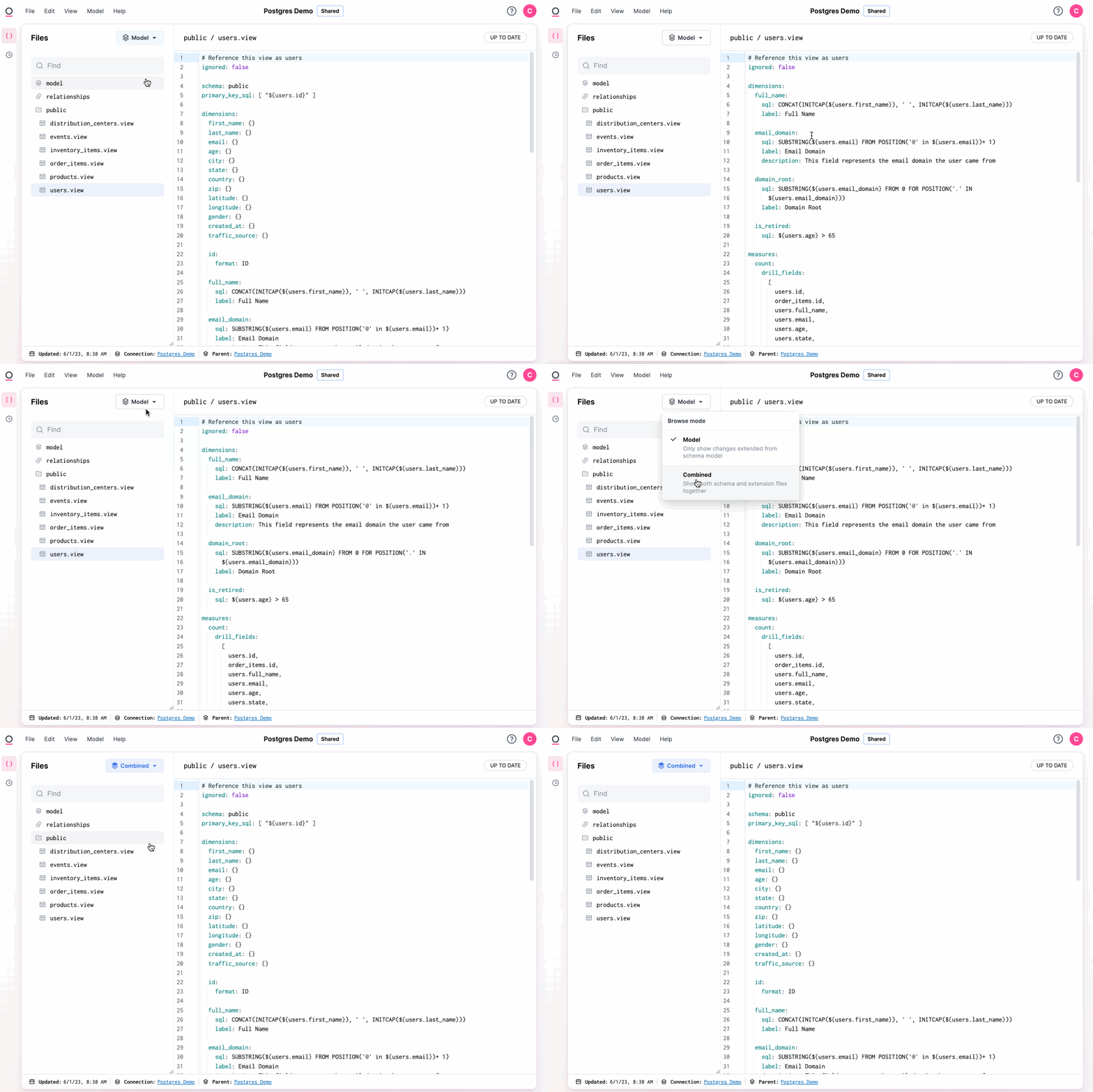 To delete a field or view from the schema model, delete it while in **Combined** mode. When you toggle into **Model** mode, the field or view will be marked as `ignored`.
Conversely, in **Model** mode, you can delete an "ignored" field or view to resurface it from the schema model.
To delete a field or view from the schema model, delete it while in **Combined** mode. When you toggle into **Model** mode, the field or view will be marked as `ignored`.
Conversely, in **Model** mode, you can delete an "ignored" field or view to resurface it from the schema model.