> ## Documentation Index
> Fetch the complete documentation index at: https://docs.omni.co/llms.txt
> Use this file to discover all available pages before exploring further.
# Syncing dbt with Omni
> How Omni schema refreshes and dbt syncing work together to keep your data warehouse, transformation logic, and BI layer in sync.
When you trigger a schema refresh, Omni inspects your connected database to ensure its internal representation matches your actual warehouse structure — pulling in new tables, views, fields, renamed columns, and updated data types. If your connection is integrated with dbt, Omni also runs a `dbt list` command to layer in metadata like descriptions, tags, and constraints on top of those structural changes. This eliminates the need to manually update the Omni model every time something changes in the layer below.
While these terms are often used interchangeably, they perform different functions in Omni:
| **Feature** | **Description** | **Source** |
| :----------------- | :----------------------------------------------------------------------------------------- | :----------------------------------------- |
| **Schema refresh** | Scans the physical database to identify new tables, views, or columns. | Data warehouse (Snowflake, BigQuery, etc.) |
| **dbt Sync** | Runs a `dbt list` command to pull in logic like descriptions, tags, and model definitions. | dbt project (`.yml` files) |
When you trigger a refresh in a dbt-integrated connection, Omni performs both: it identifies structural changes in the warehouse and layers your dbt metadata on top.
If you have only updated a description or tag in dbt without changing the warehouse structure, a dbt sync (soft refresh) is faster than a full schema refresh (hard refresh). See [Syncing dbt without a schema refresh](#sync-only) for how to run one on its own.
## Refreshing schemas in Omni
You should refresh your schema whenever you build a new dbt model or alter an existing one to ensure Omni reflects your source of truth. The steps to trigger a refresh are the same whether or not you're using dbt — see [Schema refreshes](/modeling/develop/schema-refreshes) for instructions.
Syncing dbt without a schema refresh
Syncing requires permission to sync dbt metadata for the connection, and changing the environment or branch requires permission to change dbt dev settings. Without them, the controls are disabled and the reason is shown in place.
When nothing has changed in the warehouse — you edited a description, added a tag, switched to a different dbt branch, or changed an environment's settings — you don't need a full schema refresh. You can sync dbt on its own from the dbt IDE.
A dbt sync regenerates the dbt manifest from the selected environment and git branch, then uses it to locate your dbt models in the warehouse and pull their metadata into the corresponding Omni views. It does **not** scan the database for new tables, views, or columns. If your dbt run created something new in the warehouse, you still need a schema refresh.
1. In Omni, click **Develop** in the left navigation.
2. In the list of models, click the model you want to work with to open the model IDE.
3. In the model IDE, click the **dbt** icon in the left navigation.
4. Click **Sync** at the top of the file list:
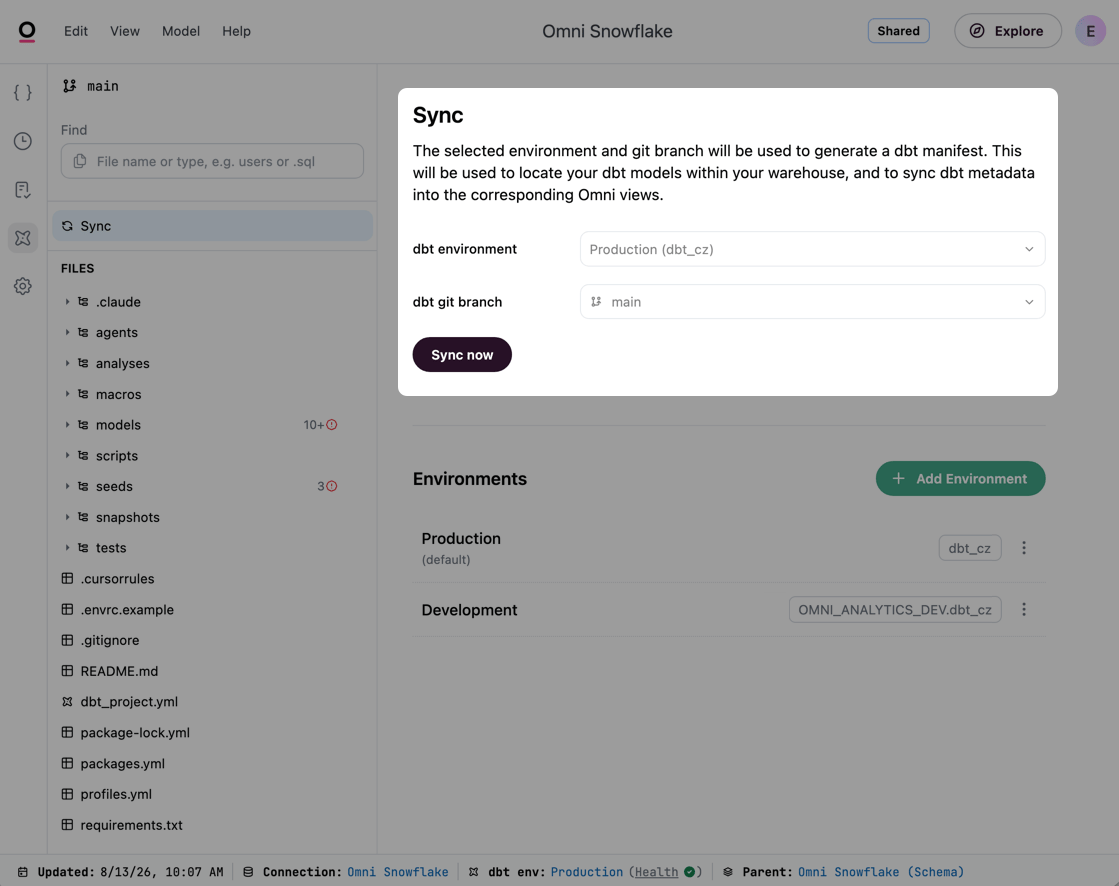 5. Check that **dbt environment** and **dbt git branch** point at the build you want Omni to read.
Both selectors require an active Omni branch. The production environment always uses the repository's default branch, so its branch selector stays disabled.
Unless [Branch-based schema refresh](/modeling/develop/schema-refreshes#requiring-branches-for-schema-refreshes) is enabled, syncing the **production** environment from a branch applies dbt across all models, not just the current branch.
6. Click **Sync now**. If you changed the environment or branch, the button reads **Save and sync** instead and does both.
Omni tells you when a sync is due. If the environment has never been synced, or its settings have changed since the last sync, you'll be prompted by a banner on the **Sync** page.
## Schema refresh using automation and CI/CD
To ensure Omni is always in-sync with your production builds, you can move beyond manual refreshes using automation.
### Scheduled refreshes
In a connection's settings, you can define a cron schedule to automatically trigger refreshes (e.g., every hour or once a day). See [Scheduling refreshes](/modeling/develop/schema-refreshes#on-a-schedule) for more information.
### Triggering through the API (CI/CD)
The most robust approach is to trigger a refresh through the [Omni API](/api/schema-refresh-schedules) as the final step of your orchestration workflow. By default, a schema refresh triggers a direct commit to your integrated Git branch to keep your model files in sync with the database.
* **GitHub Actions** - You can add a few lines of YAML to your GitHub Action to call the Omni API immediately after a successful `dbt run`.
* **Cache control** - You can define cache policies (e.g., 24 hours) and use the API to reset the cache specifically when your warehouse jobs complete.
## Common questions
Beyond column names, Omni pulls in descriptions, dbt tags, and constraints. For example, dbt constraints automatically translate into primary key tags within Omni's semantic layer.
Upon refresh, Omni pulls in the new name automatically. The updated field will be available in your topics, but existing workbook references to the old name will break.
Use the [Content Validator](/modeling/develop/content-validator) to find and bulk-replace broken references across your workbooks. You can open a branch to make these fixes safely, then merge once everything is working as expected — rather than making changes live.
No. Omni uses an additive method for modifying files. If you programmatically update a `view.yaml` with parameters like `ai_context` or `synonyms`, those parameters persist through a refresh.
Omni pulls dbt metadata into its semantic layer in ways that directly improve AI accuracy. Integrated descriptions are used for [AI context](/modeling/develop/ai-optimization), and dbt accepted value tests are pulled in as `sample_values` on a dimension — both of which help blobby generate more accurate queries and save time for end users.
## Troubleshooting
If you notice a discrepancy between your warehouse and Omni, check these areas:
* **dbt sync issues** - In the dbt IDE, click **Sync** to see what the last sync couldn't translate, including dbt models that Omni couldn't match to a view. See [Debugging dbt sync issues](/integrations/dbt/debugging-sync-issues) for how to work through them.
* **Model version history** - Click the icon in the model IDE to see a chronological list of what changed and who triggered the refresh. See [Viewing and restoring model versions in the model IDE](/modeling/develop/history) for more information.
5. Check that **dbt environment** and **dbt git branch** point at the build you want Omni to read.
Both selectors require an active Omni branch. The production environment always uses the repository's default branch, so its branch selector stays disabled.
Unless [Branch-based schema refresh](/modeling/develop/schema-refreshes#requiring-branches-for-schema-refreshes) is enabled, syncing the **production** environment from a branch applies dbt across all models, not just the current branch.
6. Click **Sync now**. If you changed the environment or branch, the button reads **Save and sync** instead and does both.
Omni tells you when a sync is due. If the environment has never been synced, or its settings have changed since the last sync, you'll be prompted by a banner on the **Sync** page.
## Schema refresh using automation and CI/CD
To ensure Omni is always in-sync with your production builds, you can move beyond manual refreshes using automation.
### Scheduled refreshes
In a connection's settings, you can define a cron schedule to automatically trigger refreshes (e.g., every hour or once a day). See [Scheduling refreshes](/modeling/develop/schema-refreshes#on-a-schedule) for more information.
### Triggering through the API (CI/CD)
The most robust approach is to trigger a refresh through the [Omni API](/api/schema-refresh-schedules) as the final step of your orchestration workflow. By default, a schema refresh triggers a direct commit to your integrated Git branch to keep your model files in sync with the database.
* **GitHub Actions** - You can add a few lines of YAML to your GitHub Action to call the Omni API immediately after a successful `dbt run`.
* **Cache control** - You can define cache policies (e.g., 24 hours) and use the API to reset the cache specifically when your warehouse jobs complete.
## Common questions
Beyond column names, Omni pulls in descriptions, dbt tags, and constraints. For example, dbt constraints automatically translate into primary key tags within Omni's semantic layer.
Upon refresh, Omni pulls in the new name automatically. The updated field will be available in your topics, but existing workbook references to the old name will break.
Use the [Content Validator](/modeling/develop/content-validator) to find and bulk-replace broken references across your workbooks. You can open a branch to make these fixes safely, then merge once everything is working as expected — rather than making changes live.
No. Omni uses an additive method for modifying files. If you programmatically update a `view.yaml` with parameters like `ai_context` or `synonyms`, those parameters persist through a refresh.
Omni pulls dbt metadata into its semantic layer in ways that directly improve AI accuracy. Integrated descriptions are used for [AI context](/modeling/develop/ai-optimization), and dbt accepted value tests are pulled in as `sample_values` on a dimension — both of which help blobby generate more accurate queries and save time for end users.
## Troubleshooting
If you notice a discrepancy between your warehouse and Omni, check these areas:
* **dbt sync issues** - In the dbt IDE, click **Sync** to see what the last sync couldn't translate, including dbt models that Omni couldn't match to a view. See [Debugging dbt sync issues](/integrations/dbt/debugging-sync-issues) for how to work through them.
* **Model version history** - Click the icon in the model IDE to see a chronological list of what changed and who triggered the refresh. See [Viewing and restoring model versions in the model IDE](/modeling/develop/history) for more information.