> ## Documentation Index
> Fetch the complete documentation index at: https://docs.omni.co/llms.txt
> Use this file to discover all available pages before exploring further.
# Pushing descriptions to dbt
> Sync field and model descriptions edited in Omni back to your dbt project's schema.yml files.
A [dbt sync](/integrations/dbt/syncing-dbt) reads model and column descriptions from your dbt project into Omni. This works in the other direction too: if you write or edit a description on a view or dimension in Omni, you can push it back into your dbt project's `schema.yml` files, so both layers stay in sync without maintaining descriptions twice.
## Requirements
To follow the steps in this guide, you'll need:
* An Omni connection with a [configured dbt integration](/integrations/dbt/setup)
* The same permissions used to [edit dbt models in Omni](/integrations/dbt/models#editing-dbt-models-in-omni): **Modeler** or **Connection Admin**
* Write access on the deploy key used to connect your [dbt Git repository](/integrations/dbt/setup) to Omni
## What gets pushed
| In Omni | In `schema.yml` |
| ---------------------------------------- | ------------------------------- |
| **Model, seed, or snapshot description** | Model's `description` |
| **Column description** | Matching column's `description` |
## Pushing descriptions to dbt
1. In Omni, click **Develop** to open the list of models in your instance.
2. Click the model you want to work with to open the model IDE.
3. Click **Model > Push to dbt**.
4. In the dialog, check the **Sync descriptions** setting. Omni will update your dbt project's `schema.yml` files with descriptions from Omni.
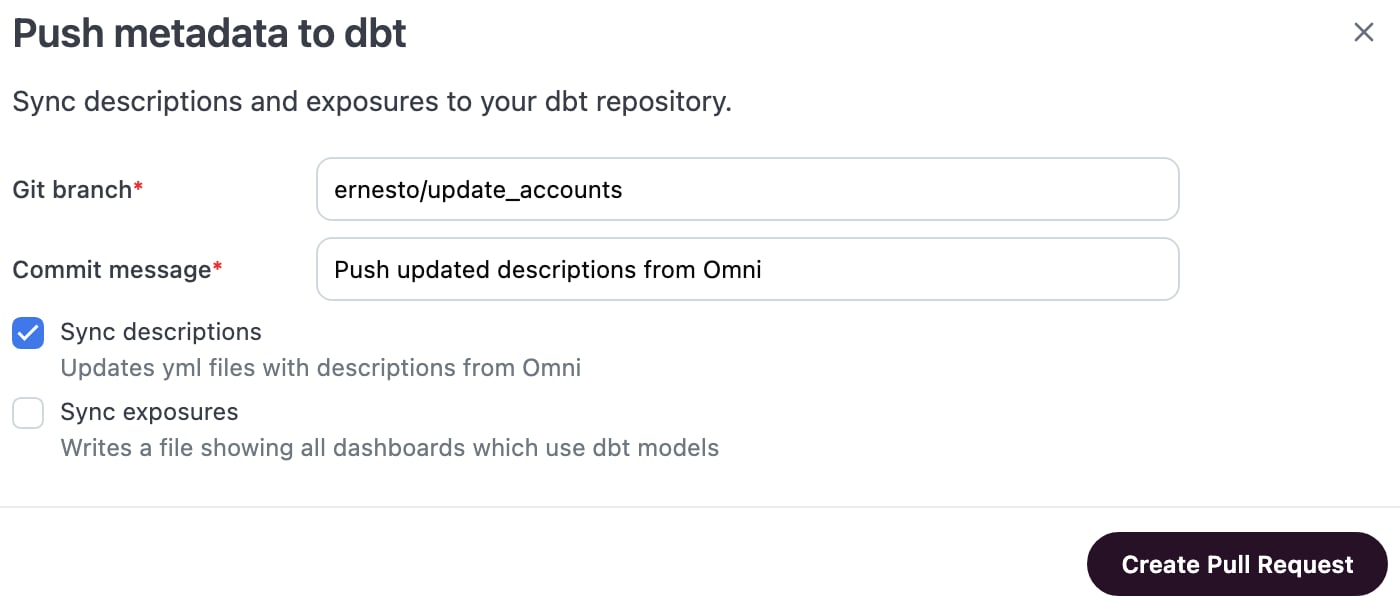 5. Click **Create pull request**.
6. Review and merge the pull request in your Git provider.
If a model doesn't yet have a `schema.yml` file, Omni creates one. The push only touches the `description` keys it manages; other properties you've defined in the file, like tests or `meta`, are left as they are.
## Troubleshooting
The deploy key connecting your dbt Git repository to Omni needs write access to create a branch and open a pull request. Check the key's permissions in your Git provider if the push doesn't produce a PR.
Check whether the field is Omni-only. Custom dimensions or measures built entirely in Omni don't map to a column in your dbt project, so they have nowhere to go in `schema.yml`. Use the diff viewer to confirm which fields are included before confirming the push.
## Common questions
It depends on the direction.
When Omni syncs *from* dbt (a [schema refresh](/integrations/dbt/syncing-dbt)), a description you've edited in Omni is prioritized over dbt's version.
Pushing descriptions *to* dbt, as covered on this page, works the other way: whatever the description reads in Omni at the time you push is written into `schema.yml`.
Yes. Clear the edited description in Omni, and the next schema refresh restores the dbt-sourced value.
No. Pushing descriptions works the same way for dbt Core and dbt Cloud connections. Omni pushes directly to your dbt Git repository either way.
## Next steps
* [Push exposures to dbt](/integrations/dbt/exposures) — Track which dashboards depend on your dbt models, from the same dialog.
* [dbt metadata reference](/integrations/dbt/metadata-reference), the other direction of this same relationship — see everything a dbt sync reads into Omni.
* [Trigger a schema refresh](/modeling/develop/schema-refreshes) — Bring the updated `schema.yml` back into Omni after your pull request merges.
5. Click **Create pull request**.
6. Review and merge the pull request in your Git provider.
If a model doesn't yet have a `schema.yml` file, Omni creates one. The push only touches the `description` keys it manages; other properties you've defined in the file, like tests or `meta`, are left as they are.
## Troubleshooting
The deploy key connecting your dbt Git repository to Omni needs write access to create a branch and open a pull request. Check the key's permissions in your Git provider if the push doesn't produce a PR.
Check whether the field is Omni-only. Custom dimensions or measures built entirely in Omni don't map to a column in your dbt project, so they have nowhere to go in `schema.yml`. Use the diff viewer to confirm which fields are included before confirming the push.
## Common questions
It depends on the direction.
When Omni syncs *from* dbt (a [schema refresh](/integrations/dbt/syncing-dbt)), a description you've edited in Omni is prioritized over dbt's version.
Pushing descriptions *to* dbt, as covered on this page, works the other way: whatever the description reads in Omni at the time you push is written into `schema.yml`.
Yes. Clear the edited description in Omni, and the next schema refresh restores the dbt-sourced value.
No. Pushing descriptions works the same way for dbt Core and dbt Cloud connections. Omni pushes directly to your dbt Git repository either way.
## Next steps
* [Push exposures to dbt](/integrations/dbt/exposures) — Track which dashboards depend on your dbt models, from the same dialog.
* [dbt metadata reference](/integrations/dbt/metadata-reference), the other direction of this same relationship — see everything a dbt sync reads into Omni.
* [Trigger a schema refresh](/modeling/develop/schema-refreshes) — Bring the updated `schema.yml` back into Omni after your pull request merges.