> ## Documentation Index
> Fetch the complete documentation index at: https://docs.omni.co/llms.txt
> Use this file to discover all available pages before exploring further.

# Customizing filter suggestions

> Learn where filter suggestion values come from, and how to change their source, faceting, and caching behavior.

export const RefreshIcon = ({label}) => {
  return <span>
      <svg stroke="currentColor" fill="none" stroke-width="2" viewBox="0 0 24 24" stroke-linecap="round" stroke-linejoin="round" height="1em" width="1em" xmlns="http://www.w3.org/2000/svg" style={{
    display: "inline",
    verticalAlign: "middle"
  }}><path d="M20 11a8.1 8.1 0 0 0 -15.5 -2m-.5 -4v4h4"></path><path d="M4 13a8.1 8.1 0 0 0 15.5 2m.5 4v-4h-4"></path></svg>
    </span>;
};

export const XCircleIcon = ({label}) => {
  return <span>
      <Icon icon="circle-xmark" iconType="solid" color="#ff2465" />
      {label && ` ${label}`}
    </span>;
};

export const CheckIcon = ({label}) => {
  return <span>
      <Icon icon="circle-check" iconType="solid" color="#26bd6c" />
      {label && ` ${label}`}
    </span>;
};

export const categoryIcons = {
  'administration': 'lock',
  'api': 'terminal',
  'connections': 'database',
  'dashboards': 'table-columns',
  'embed': 'code',
  'errors': 'exclamation',
  'migration': 'angles-right',
  'modeling': 'wrench',
  'patterns': 'plus',
  'schedules & alerts': 'envelope',
  'visualizations': 'chart-column',
  'workbooks': 'book'
};

export const GuideSidebar = ({category, relatedLinks, updatedDate}) => {
  const [progress, setProgress] = React.useState(0);
  React.useEffect(() => {
    const sidebar = document.querySelector('.guide-sidebar');
    if (!sidebar) return;
    let container = sidebar.parentElement;
    while (container && !container.querySelector('.guide-header')) {
      container = container.parentElement;
    }
    if (container && !container.classList.contains('guide-page-layout')) {
      container.classList.add('guide-page-layout');
    }
  }, []);
  React.useEffect(() => {
    const handleScroll = () => {
      const scrollTop = window.scrollY;
      const docHeight = document.documentElement.scrollHeight - window.innerHeight;
      const scrollPercent = docHeight > 0 ? scrollTop / docHeight * 100 : 0;
      setProgress(Math.min(100, Math.max(0, scrollPercent)));
    };
    window.addEventListener('scroll', handleScroll, {
      passive: true
    });
    handleScroll();
    return () => window.removeEventListener('scroll', handleScroll);
  }, []);
  const icon = category ? categoryIcons[category.toLowerCase()] || 'book' : 'book';
  return <aside className="guide-sidebar">
      <div className="guide-sidebar-content">
        <a href="/guides" className="guide-sidebar-back">
          <Icon icon="arrow-left" iconType="solid" size={14} />
          <span>All guides</span>
        </a>

        <div className="guide-sidebar-section">
          <div className="guide-sidebar-label">Progress</div>
          <div className="guide-sidebar-progress">
            <div className="guide-mascot">
              <svg viewBox="0 0 688 690" width="48" height="48">
                <defs>
                  <clipPath id="progressClip">
                    <rect x="0" y={0} width="688" height={progress * 6.9} />
                  </clipPath>
                </defs>

                {}
                <path d="M343.67 1.5C542.684 1.5 685.84 149.351 685.84 344.84C685.84 540.328 542.685 688.18 343.67 688.18C144.655 688.18 1.5 540.318 1.5 344.84C1.50007 149.361 144.655 1.50005 343.67 1.5Z" fill="#FCFCF7" stroke="#FF5FA2" strokeWidth="3" />

                {}
                <path d="M343.67 0C143.81 0 0 148.55 0 344.84C0 541.13 143.81 689.68 343.67 689.68C543.53 689.68 687.34 541.14 687.34 344.84C687.34 148.54 543.53 0 343.67 0Z" fill="#FF5FA2" clipPath="url(#progressClip)" />

                {}
                <path d="M337.89 319.29C337.89 336.75 322.49 350.14 302.81 349.83C286.18 349.57 273.89 337.29 274.37 321.45C274.88 304.82 290.91 290.88 309.98 290.44C325.69 290.09 337.88 302.69 337.88 319.29H337.89Z" fill="#4D122C" />
                <path d="M566.17 319.29C566.17 336.75 550.77 350.14 531.09 349.83C514.46 349.57 502.17 337.29 502.65 321.45C503.16 304.82 519.19 290.88 538.26 290.44C553.97 290.09 566.16 302.69 566.16 319.29H566.17Z" fill="#4D122C" />
                <path d="M367.74 342.07C360.22 346.32 359.4 354.9 370.62 366.4C381.85 377.9 399.76 389.56 420.81 389.18C441.88 389.1 460.67 377.72 472.47 363.53C473.83 361.93 478.84 356.88 478.51 351.07C478.32 348.35 476.17 341.19 467.83 341.38C463.46 341.44 461.21 343.68 456.69 347.36C445.2 356.14 432.7 361.21 420.56 361.27C408.43 361.43 395.68 356.17 385.39 347.22C380.32 342.81 375.25 337.82 367.74 342.07Z" fill="#4D122C" />
              </svg>
            </div>
            <span className="guide-sidebar-progress-text">{Math.round(progress)}%</span>
          </div>
        </div>

        {category && <div className="guide-sidebar-section">
            <div className="guide-sidebar-label">Category</div>
            <div className="guide-sidebar-category">
              <Icon icon={icon} iconType="solid" size={14} />
              <span>{category}</span>
            </div>
          </div>}

        {updatedDate && <div className="guide-sidebar-section">
            <div className="guide-sidebar-label">Last updated</div>
            <div className="guide-sidebar-date">{updatedDate}</div>
          </div>}

        {relatedLinks && relatedLinks.length > 0 && <div className="guide-sidebar-section">
            <div className="guide-sidebar-label">Related</div>
            <ul className="guide-sidebar-links">
              {relatedLinks.map((link, index) => <li key={index}>
                  <a href={link.href}>{link.title}</a>
                </li>)}
            </ul>
          </div>}
      </div>
    </aside>;
};

export const GuideTitle = ({title}) => {
  return <div className="guide-header">
      <h1 className="guide-title">{title}</h1>
    </div>;
};

<GuideSidebar
  categoryIcons={categoryIcons}
  category="modeling"
  updatedDate="August 2026"
  relatedLinks={[
{ title: "suggest_from_field", href: "/modeling/dimensions/parameters/suggest-from-field" },
{ title: "suggest_from_topic", href: "/modeling/dimensions/parameters/suggest-from-topic" },
{ title: "suggestion_list", href: "/modeling/dimensions/parameters/suggestion-list" },
{ title: "faceting", href: "/modeling/dimensions/parameters/faceting" }
]}
/>

<GuideTitle title="Customizing filter suggestions" />

When you filter on a field in Omni, you get a list of suggested values to pick from. That list isn't a static lookup — it's a query Omni runs against your warehouse, which is why suggestions can load slowly, include values that don't fit the rest of your query, or go stale.

This guide covers where those values come from and the model parameters that change that behavior: where suggestions are sourced from, whether they narrow in response to other filters, and how long they're cached.

## How suggestions are sourced

By default, Omni populates up to 2,000 suggestions (not configurable) by querying the field's distinct values in the context of the topic the field belongs to:

```sql theme={null}
  SELECT field_filter_is_based_on
    FROM table
GROUP BY 1
   LIMIT 2000
```

Depending on the specifics of the model — for example, if the field is in a view other than the topic's base view — you may also see the relevant `JOIN` or `WHERE` clauses in the suggestion query.

## Changing the suggestion source

Three dimension parameters override the default query. Setting any of them means suggestions no longer come from the field's own distinct values.

<table className="endpoint-table">
  <thead>
    <tr>
      <th>Parameter</th>
      <th>Description</th>
      <th>Available on measures?</th>
    </tr>
  </thead>

  <tbody>
    <tr>
      <td>[`suggest_from_field`](/modeling/dimensions/parameters/suggest-from-field)</td>
      <td>Pulls suggestions from a different field, usually one that queries faster</td>
      <td><CheckIcon /> [Yes](/modeling/measures/parameters/suggest-from-field)</td>
    </tr>

    <tr>
      <td>[`suggest_from_topic`](/modeling/dimensions/parameters/suggest-from-topic)</td>
      <td>Routes the suggestion query to a different topic</td>
      <td><XCircleIcon /> No</td>
    </tr>

    <tr>
      <td>[`suggestion_list`](/modeling/dimensions/parameters/suggestion-list)</td>
      <td>Sets the list of options explicitly, bypassing the query. Also allows you to set a display label separate from the underlying value, which is helpful when the stored value isn't intuitive.</td>
      <td><CheckIcon /> [Yes](/modeling/measures/parameters/suggestion-list)</td>
    </tr>
  </tbody>
</table>

<Note>
  `suggest_from_field` and `suggest_from_topic` can't be used with [`faceting`](/modeling/dimensions/parameters/faceting) on the same dimension.
</Note>

## How other filters affect suggestions

When faceting is enabled, selecting values in one filter narrows the suggestions shown in other filters to values that exist alongside your current selections.

### Customizing per-dimension suggestion behavior

The [`faceting`](/modeling/dimensions/parameters/faceting) parameter lets you customize how suggestions behave on a per-dimension basis.

<Tabs>
  <Tab title="Independent of selections" id="independent-suggestions">
    To make suggestions independent of all other filter selections, add `depends_on: []` as a child to `faceting`. In this example, `gender` suggestions will be available regardless of other filter selections:

    ```yaml wrap highlight={4,5} Suggestions are independent of other filter selections theme={null}
    dimensions:
      gender:
        sql: ${users.gender}
        faceting:
          depends_on: []
    ```

    **Note**: `depends_on` cannot be used with `exclude`.
  </Tab>

  <Tab title="Depend on specified fields" id="dependent-suggestions">
    To make a dimension's suggestions dependent only on specific fields, specify a field list in `depends_on`. In this example, `city` suggestions should only be filtered by `country` and `state` selections, ignoring all other active filters:

    ```yaml wrap highlight={4-7} Suggestions are filtered only by specified fields theme={null}
    dimensions:
      city:
        sql: ${users.city}
        faceting:
          depends_on:
            - country
            - state

      country:
        sql: ${users.country}

      state:
        sql: ${users.state}
    ```

    **Note**: `depends_on` cannot be used with `exclude`.
  </Tab>

  <Tab title="Exclude specified fields" id="exclusive-suggestions">
    You can also configure a list of fields that will not affect suggestions using `exclude`. In this example, `first_name` suggestions should be filtered by all fields except `state`:

    ```yaml wrap highlight={4-6} Suggestions are filtered by all fields except those excluded theme={null}
    dimensions:
      first_name:
        sql: ${users.first_name}
        faceting:
          exclude:
            - state
    ```

    **Note**: `exclude` cannot be used with `depends_on`.
  </Tab>
</Tabs>

### Enabling faceting across the workbook

[`facet_workbook_filters`](/modeling/models/facet-workbook-filters) is disabled by default. Set it to `true` to turn faceting on for every filter in the workbook. When enabled, all filter suggestions in the workbook will be faceted based on the current filter selection.

<Warning>
  Enabling this setting can make suggestion queries more complex and less cacheable, so they may run slower or return nothing where suggestions were expected.
</Warning>

## Caching and refreshing

Filter suggestions are retained for 30 days, independent of the model's [cache policy](/modeling/models/cache-policies). To make them obey the policy's `max_cache_age` instead, set [`filter_suggestions_must_obey_policy`](/modeling/models/cache-policies#param-filter-suggestions-must-obey-policy) to `true` on the cache policy:

```yaml wrap Obey cache policy & retain for 24 hours theme={null}
cache_policies:
  cache_for_a_day:
    max_cache_age: 24 hours
    filter_suggestions_must_obey_policy: true
```

<Warning>
  Once `filter_suggestions_must_obey_policy` is set, it can't be removed, though its value can be changed.
</Warning>

### Refreshing stale filter suggestions

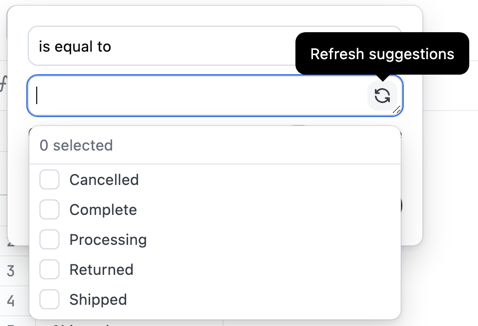
In rare circumstances, suggestions may be cached in a stale state. To enable the refresh option for a specific query:

* **Mac** - Hold `Command + Shift`
* **Windows** - Hold `Control + Shift`

A <RefreshIcon /> icon will appear. Click it to refresh the filter suggestions.

This will refresh suggestions for the current query. If other queries have stale suggestions, you will need to repeat these steps on that query's filter.

<Frame caption="The filter suggestion menu with the refresh option enabled">
  <img src="https://mintcdn.com/omni-e7402367/tEEXCvkm6gwGODB-/guides/modeling/images/refresh-filter-suggestions.png?fit=max&auto=format&n=tEEXCvkm6gwGODB-&q=85&s=496f2e42259adb37f0b41496b0afe301" style={{width: "450px", height: "auto"}} alt="The filter suggestion menu with the refresh option enabled" width="478" height="326" data-path="guides/modeling/images/refresh-filter-suggestions.png" />
</Frame>

## Next steps

* Adding and configuring [filters](/analyze-explore/queries/filters) on workbook queries
* [Troubleshooting filters](https://community.omni.co/t/why-doesnt-my-filter-show-all-possible-values-as-suggestions/54) not showing all expected values