> ## Documentation Index
> Fetch the complete documentation index at: https://docs.omni.co/llms.txt
> Use this file to discover all available pages before exploring further.
# Deploying Omni: Multiple instances across multiple regions
> Manage a full DEV/STAGE/PROD deployment across multiple geographic regions using git follower mode — for enterprise teams with data residency requirements or globally distributed operations
export const categoryIcons = {
'administration': 'lock',
'api': 'terminal',
'connections': 'database',
'dashboards': 'table-columns',
'embed': 'code',
'errors': 'exclamation',
'migration': 'angles-right',
'modeling': 'wrench',
'patterns': 'plus',
'schedules & alerts': 'envelope',
'visualizations': 'chart-column',
'workbooks': 'book'
};
export const GuideSidebar = ({category, relatedLinks, updatedDate}) => {
const [progress, setProgress] = React.useState(0);
React.useEffect(() => {
const sidebar = document.querySelector('.guide-sidebar');
if (!sidebar) return;
let container = sidebar.parentElement;
while (container && !container.querySelector('.guide-header')) {
container = container.parentElement;
}
if (container && !container.classList.contains('guide-page-layout')) {
container.classList.add('guide-page-layout');
}
}, []);
React.useEffect(() => {
const handleScroll = () => {
const scrollTop = window.scrollY;
const docHeight = document.documentElement.scrollHeight - window.innerHeight;
const scrollPercent = docHeight > 0 ? scrollTop / docHeight * 100 : 0;
setProgress(Math.min(100, Math.max(0, scrollPercent)));
};
window.addEventListener('scroll', handleScroll, {
passive: true
});
handleScroll();
return () => window.removeEventListener('scroll', handleScroll);
}, []);
const icon = category ? categoryIcons[category.toLowerCase()] || 'book' : 'book';
return ;
};
export const GuideTitle = ({title}) => {
return
{title}
;
};
This guide covers the most complex Omni deployment pattern: multiple environments (DEV, STAGE, PROD) across multiple geographic regions, where each environment/region combination is a separate Omni instance.
[Git follower mode](/integrations/git/follower-mode/index) keeps all instances in each environment synchronized, and deliberate git-based promotions move changes between environments.
This architecture is appropriate when:
* Data residency regulations require Omni to run in specific geographic regions (e.g., US, EU, Canada)
* You manage a globally distributed user base where each region requires its own Omni organization
* You need three-tier environment isolation (DEV → STAGE → PROD) across all regions
## Architecture overview
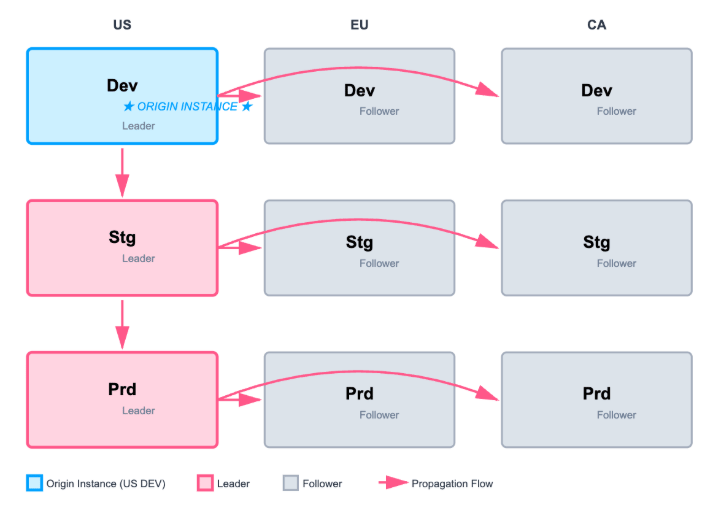
A three-region, three-environment deployment has nine logical instances. One region (typically your primary region, e.g., US) designates one development instance as the *origin* — the single source of all development activity.
Each environment tier tracks a different git branch:
| Environment | Git base branch | Instances |
| ----------- | --------------- | -------------------------------------------------------------- |
| DEV | `dev` | US DEV (origin / leader), EU DEV (follower), CA DEV (follower) |
| STAGE | `stage` | US STAGE (leader), EU STAGE (follower), CA STAGE (follower) |
| PROD | `main` | US PROD (leader), EU PROD (follower), CA PROD (follower) |
Each Omni organization is hosted in a single geographic region. To operate across multiple regions, you must maintain a separate Omni organization account per region. Contact your Omni account team to provision additional regional organizations.
This architecture can be simplified if your use case does not have the hard requirement of DEV and STAGE in each region. Additionally, multiple git repositories can be used.
Promotions between environments happen through pull requests in git:
* **DEV → STAGE**: PR from `dev` branch into `stage` branch
* **STAGE → PROD**: PR from `stage` branch into `main` branch
When a PR merges into an environment's base branch, the follower instances in that environment automatically receive the model update. Content is not promoted automatically; it must be migrated separately (see [Git follower mode](#git-follower-mode) below).
## Git follower mode
[Git follower mode](/integrations/git/follower-mode/setup) designates one Omni model as the *leader* and others as read-only *followers* that automatically update when changes merge from the leader's base branch into the follower's base branch through a pull request. See [git follower mode](/integrations/git/follower-mode/index) for the full mechanism.
This guide outlines the process for a single git repository; the configuration is similar if regional git repositories are required. The origin DEV, STAGE, and PROD Omni instances hold the leader models.
Development branches are opened from DEV and STAGE, their changes are tested, and PRs target the respective branch (`dev` or `stage`). When you're ready to promote to production, create a release branch in git that carries the changes from `stage` into production's base branch (e.g., `main`). The follower models automatically detect the new branch from the origin (leader) production instance and create a matching branch, which is validated before merging.
Git follower mode promotes model changes only. Content (workbooks and dashboards) must be migrated separately using the Content Migration APIs, [agent skills](/developers/agent-skills), or [Omni CLI](/developers/cli).
## Requirements
Before you begin:
* Nine Omni instances across three regions and three environments (or the subset your team needs)
* **Organization Admin** permissions on all instances
* **Connection Admin** permissions on each instance's model connections
* A single git repository in GitHub, GitLab, or Azure DevOps shared across all instances
* Three base branches in that repository: `dev`, `stage`, and `main`
* Permissions in your git provider to add webhooks and deploy/SSH keys (nine sets — one per instance)
* Structurally identical schemas across all databases in all regions and environments
## Initial setup
* In this configuration, there are nine logical instances (three regions × three environments).
* One region's development instance acts as the origin for all development, with all other regions configured with [git follower](/integrations/git/follower-mode/setup).
* Each SDLC stage points to a different branch in git: `dev`, `stage`, and `main` (for prod).
This guide uses the US region as the origin for illustrative purposes.
## Development workflow - US DEV (origin)
All development happens on the **US DEV origin instance**. Other instances in the DEV environment automatically stay in-sync.
From the **DEV** model IDE, create a new branch. Make model and content changes on this branch.
Run the [Content Validator](/modeling/develop/content-validator) on your branch to surface any broken references before promoting.
## Deployment workflow - US DEV (origin)
Merge your changes to the **DEV** (the origin instance) shared model:
* **With pull requests required** (recommended):
* Open a PR to `dev` and merge after review. This publishes attached content **on the US DEV origin instance only**.
* **Without pull requests**: Merge the branch directly from the model IDE.
When changes merge to `dev`, the EU DEV and CA DEV follower instances automatically receive the model update.
Content changes (published workbooks and dashboards) are **not** automatically propagated to EU DEV and CA DEV via [git follower.](/integrations/git/follower-mode/index) Git follower syncs **model changes only**. To replicate content across regional DEV instances, use the Content Migration APIs.
As git follower only promotes model changes, and if content is required to be deployed to DEV followers, use the content migration APIs, the [agent skills](/developers/agent-skills) or [Omni CLI](/developers/cli) to promote content across instances prior to promoting model changes.
It's a best practice to consider your folder structures and their mapping between environments. This can be accomplished with Content, Folders, and Documents APIs.
Use the [get-document-state](/api/documents-v2/get-document-state) endpoint to create a copy of the content. Use [create-document](/api/documents-v2/create-document) endpoint to create a new document on the target environment that will also be published.
You may also consider using the [get-draft-state](/api/documents-v2/get-draft-state) endpoint when migrating a draft. Viewing data, ownership, schedules and history will NOT transfer to the copy and will need to be updated separately.
If the document already exists, use [create-draft-and-patch-document](/api/documents-v2/create-draft-and-patch-document) to create the draft of the published version and then the [publish-draft](/api/documents-v2/publish-draft) endpoint to publish it. You may also consider [patch-draft](/api/documents-v2/patch-draft) for further patch iterations on a draft.
Migrate content after the model promotion is confirmed in the target environment. This ensures the target's model is in the correct state before any content references it.
### Promotion workflow - US DEV to US STAGE
Because git follower is being used and **US DEV** is leader to followers **EU DEV** and **CA DEV**, all dev model changes propagate to EU DEV and CA DEV. Promoting dev to stage requires moving those changes from `dev` to `stage` via pull request.
* In git repository
* Create a new branch off of the base branch(`dev`) (e.g. `release-to-stage-YYYYMMDD`)
* Create a pull request that merge your changes into the follower’s base branch (`stage`in git)
Make sure the **Always create branches** setting is enabled in Omni, as it will create a branch in Omni with the same name.
If content needs to be deployed to the US STAGE instance, follow the same directions outlined in step #2 (**Deploy content to EU DEV and CA DEV**) of the **Deployment workflow - US DEV (origin)** section above, making sure to update to staging targets.
* In the Omni STAGE instance
* Open the model
* Open the `release-to-stage-YYYYMMDD` branch
* Test the changes by reviewing the [Content Validator](/modeling/develop/content-validator#content-validator-basics) for any issues
* In git repository:
* Merge the pull request in git to merge the release branch changes into the base branch (e.g. `stage`)
Because git follower is enabled between `dev` and `stage`, the follower regions (EU STAGE and CA STAGE) will receive the update
* At this point, your model changes are live in the staging instance
If content needs to be deployed to STAGE followers, follow the same directions outlined in step #2 (**Deploy content to EU DEV and CA DEV**) of the **Deployment workflow - US DEV (origin)** section above, making sure to update to staging targets.
## Promote from US STAGE to US PROD
Because git follower is being used, and **US STAGE** is leader to followers **EU STAGE** and **CA STAGE**, all stage model changes propagate to EU STAGE and CA STAGE. Promoting stage to prod requires moving those changes from `stage` to `prod` through a pull request.
* In git repository
* Create a branch off of the base branch `stage` (e.g. `release-to-prod-YYYYMMDD`)
* Create a pull request that merges your changes into the follower's base branch (`main` or `prod` in git)
Make sure the “Always create branches” setting is enabled in Omni as it will create a branch in Omni with the same name
If content needs to be deployed to US PROD, follow the same directions outlined in step #2 (**Migrate content from US DEV to US STAGE instance**) of the **Promote from US DEV to US STAGE** section above, making sure to update to production targets.
* In the Omni PROD instance
* Open the model
* Open the `release-to-prod-YYYYMMDD` branch
* Test the changes by reviewing the [Content Validator](/modeling/develop/content-validator#content-validator-basics) for any issues
* In git repository:
* Merge the pull request in git to merge the release branch changes into the base branch (likely `main` or `prod` in git)
Because git follower is enabled between `stage` and `prod`, the follower regions (EU PROD and CA PROD) will receive the update
* At this point, your model changes are live in the production instance
If content needs to be deployed to PROD followers, follow the same directions outlined in step #2 (**Deploy content to EU DEV and CA DEV**) of the **Deployment workflow - US DEV (origin)** section above, making sure to update to production targets.
## Schema refreshes across instances
When your source databases change, each instance needs a schema refresh to incorporate the updates. In a nine-instance setup, this requires nine separate refresh operations (or [API-triggered refreshes](/api/models/refresh-schema)).
Coordinate schema changes across regions carefully. All databases should receive schema updates before any schema refreshes are triggered in Omni, so that model state across instances stays consistent.
## Permissions model
| Instance type | Developer access | Content consumer access |
| ------------------------- | ---------------------------- | ----------------------- |
| **US DEV** (origin) | Full branch and model access | Test / internal only |
| **Regional DEV** (EU, CA) | Read-only or limited | Test / internal only |
| **STAGE** (all regions) | Read-only | QA / preview |
| **PROD** (all regions) | No direct access | Primary audience |
## Best practices
### Treat the origin instance as the single source of truth
All model development, all branch work, and all PR activity targeting `dev` should happen on the US DEV origin instance. Working directly on regional DEV follower instances creates drift and model conflicts.
### Keep all nine schemas structurally identical
The shared model definition flows across all nine instances. Schema differences between regions or environments will cause modeling errors when a promotion reaches an instance with a divergent schema. Coordinate schema migrations across all databases before triggering Omni promotions.
### Use a consistent release branch naming convention
A format like `release-to-stage-YYYYMMDD` or `release-to-prod-YYYYMMDD` makes promotions traceable and rollbacks straightforward.
### Plan content migration per release
Content migration to nine instances is operationally significant. Build it into your release process with a clear checklist of which content needs to move, to which instance, and in what order. Automate where possible using the Content Migration APIs.
## Next steps
* [git follower mode setup](/integrations/git/follower-mode/setup) — Detailed reference for configuring git follower
* [git follower mode best practices](/integrations/git/follower-mode/best-practices) — Managing follower workflows at scale
* [Migrating dashboards](/visualize-present/dashboards/migrate) — Migrating content across instances and regions
* [Content Validator](/modeling/develop/content-validator) — Validating content before and after promotions
{/* - [Multiple instance deployment with git follower (PROD/STAGE)](/guides/deployment/multi-instance-prod-stage) — The simpler two-instance variant of this pattern */}