> ## Documentation Index
> Fetch the complete documentation index at: https://docs.omni.co/llms.txt
> Use this file to discover all available pages before exploring further.
# Troubleshooting user permissions
> Troubleshoot the most common permission issues.
Omni offers a powerful set of user roles and the permissions to control your users' experience, but sometimes understanding all the nuances of permissions can cause confusion.
If there's a troubleshooting question or scenario you want to see here, reach out to Omni support.
Restricted Queriers and Viewers see **Can't display chart** errors when viewing a dashboard.
This is typically due to Omni enforcing [connection roles](/administration/users/permissions) when content in a dashboard is built outside of a [topic](/modeling/topics).
In this video, we explain what's happening and how to resolve it using Omni's [AccessBoost](/share#boosting-permissions-with-accessboost) feature.
Viewers don't have the option to view a workbook in a document.
By default, the workbooks are not accessible to [Viewers](/administration/users/permissions). Omni does this because Viewers don't have the ability to build in workbooks.
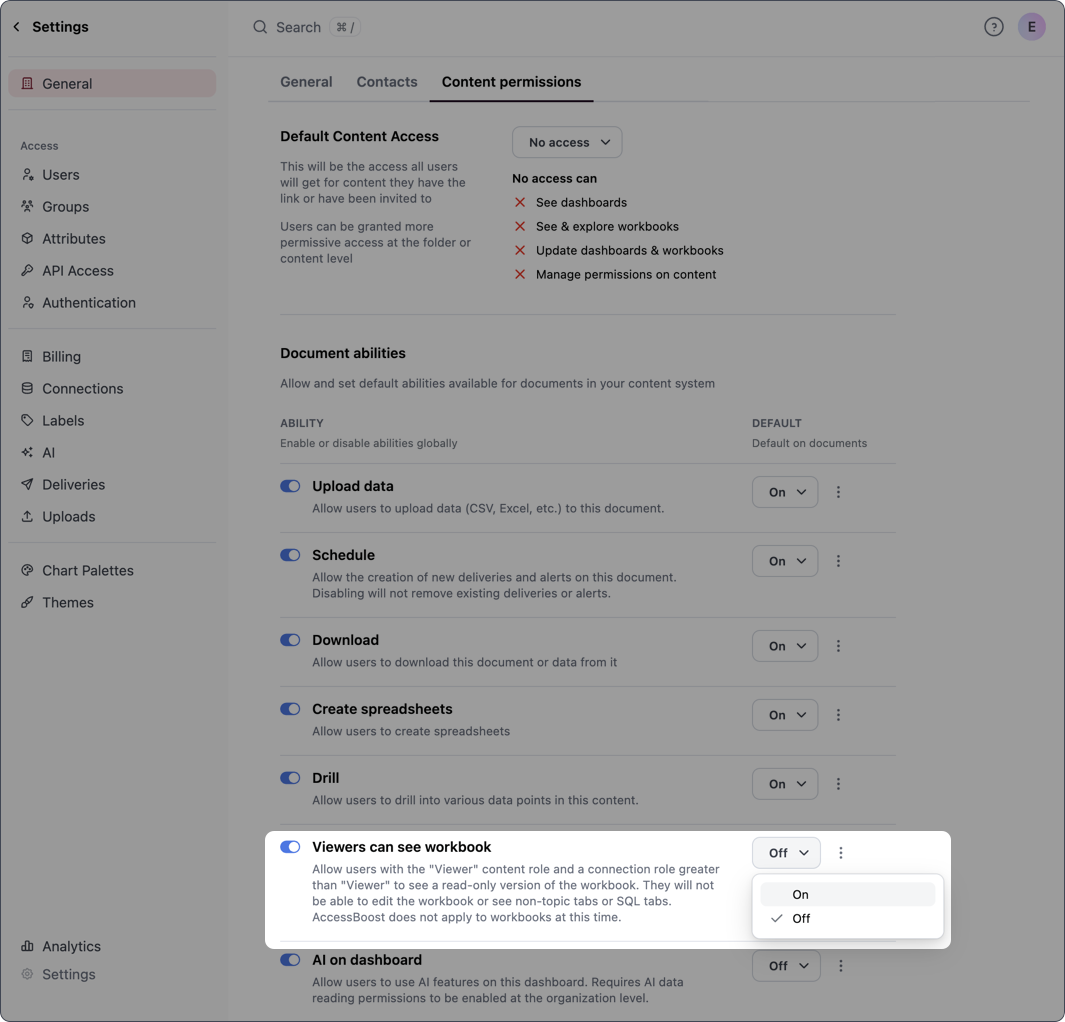
Organization Admins can change this default behavior in **Settings > General > Content permissions** with the **Viewers can see workbook** setting. Click the toggle in the **Ability** column:
* Enabling the **Ability** toggle allows the setting to be enabled or disabled on individual documents
* **Optional**: Changing the **Default** option to **On** enables the setting by default on documents
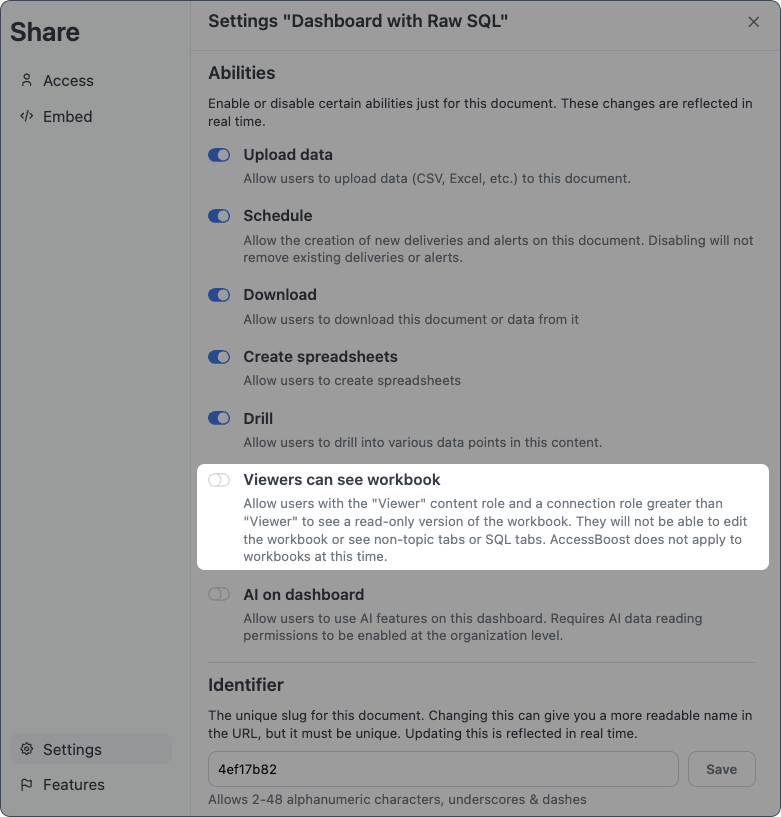
 Workbook access for Viewers can also be enabled on individual documents in **Share > Settings** and enabling **Viewers can see workbook**.
**Note**: This requires the [organization-level version of this setting](/administration/content-permissions) to be enabled.
Workbook access for Viewers can also be enabled on individual documents in **Share > Settings** and enabling **Viewers can see workbook**.
**Note**: This requires the [organization-level version of this setting](/administration/content-permissions) to be enabled.
 Users see **You don't have access to this tab** messages when viewing a workbook tab:
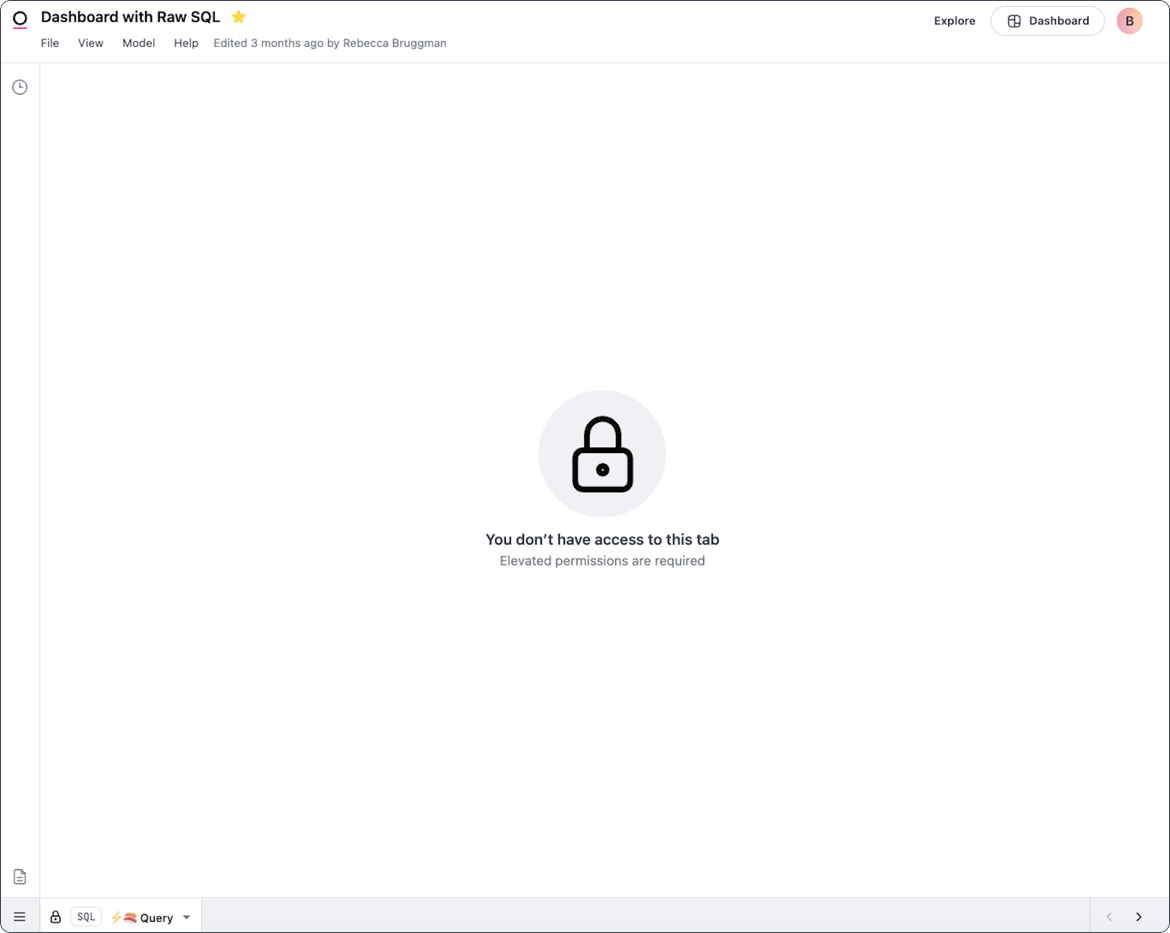 Similar to not being able to see data on a dashboard, this happens when one of the workbook tabs:
* Is built outside of a [topic](/modeling/topics), and
* A user has [permissions](/administration/users/permissions) of Viewer or Restricted Querier, which are only allowed to see tabs in a workbook or tiles in a dashboard built with topics
To resolve the error, the query associated with the tab must be rebuilt using a topic.
Omni's [AccessBoost](/share#boosting-permissions-with-accessboost) feature can be enabled, which would ignore data permissions usually enforced by [connection roles](/administration/users/permissions), but this would only show the data on the dashboard not the query in the workbook.
User is unable to view a specific topic.
[Topic](/modeling/topics) visibility is primarily controlled by [access grants](/modeling/models/access-grants), which are a permissions systems configured in the [model file](/modeling/models) and then called as a [`required_access_grant`](/modeling/topics/parameters/required-access-grants) within a topic to enforce which users are able to see a given topic.
Access grants can be built to evaluate [user attributes](/administration/users/attributes) or [user groups](/administration/users/groups) to determine which users will return a true value for the access grant.
Access grants and user groups are defined within Omni Settings and often set for a given user as part of a login process in Omni.
While in a workbook, a Restricted Querier is denied access to adding joins to a topic.
[Restricted Queriers](/administration/users/permissions) are only able to build in a workbook using [topics](/modeling/topics), which scopes their access to the data available in the database to the joins, filters and permissions configured in topics.
Adding another table into a topic would effectively be bringing net new data into a topic, which is outside of the permissions scope for a Restricted Querier.
If you want a user to be able to add joins to a topic, elevate their permissions to **Querier** or higher.
A user is no longer the owner of a document after moving the document to a shared folder.
At a high level, the parent folder dictates the inherited permissions of the folders and dashboards contained in the parent folder. This means that each child folder or dashboard can have the same or higher permissions as the parent folder.
Additionally, when documents are moved to a shared folder or subfolder, their ownership will change to the user who owns the folder.
Refer to the [Access inheritance guide](/share#inheriting-access-roles) for more information.
To retain ownership of a document, users should:
* Keep the document in their personal folders, or
* Move the document only to shared folders that they own
Viewers or Embed users are unable to change filters on a dashboard.
Often when a dashboard has a filter applied, a locked filter is the result of an [access filters](/modeling/topics/parameters/access-filters) being enforced.
Access filters are used to enforce row-level security - for example, in an [embedded](/embed) Omni instance that is built on a multi-tenant database.
Access filters are created in a [topic file](/modeling/topics) by defining a field to be filtered and then reading the value of a specified [user attribute](/administration/users/attributes). All values except the one specified in the access grant will be filtered out - think of this as a SQL `WHERE` clause that can't be removed.
* Remove the access filter, or
* Add a `value_for_unfiltered` parameter to the access filter. Users with the specified user attribute will not have the filter applied, **allowing them to see all data for the field**.
Similar to not being able to see data on a dashboard, this happens when one of the workbook tabs:
* Is built outside of a [topic](/modeling/topics), and
* A user has [permissions](/administration/users/permissions) of Viewer or Restricted Querier, which are only allowed to see tabs in a workbook or tiles in a dashboard built with topics
To resolve the error, the query associated with the tab must be rebuilt using a topic.
Omni's [AccessBoost](/share#boosting-permissions-with-accessboost) feature can be enabled, which would ignore data permissions usually enforced by [connection roles](/administration/users/permissions), but this would only show the data on the dashboard not the query in the workbook.
User is unable to view a specific topic.
[Topic](/modeling/topics) visibility is primarily controlled by [access grants](/modeling/models/access-grants), which are a permissions systems configured in the [model file](/modeling/models) and then called as a [`required_access_grant`](/modeling/topics/parameters/required-access-grants) within a topic to enforce which users are able to see a given topic.
Access grants can be built to evaluate [user attributes](/administration/users/attributes) or [user groups](/administration/users/groups) to determine which users will return a true value for the access grant.
Access grants and user groups are defined within Omni Settings and often set for a given user as part of a login process in Omni.
While in a workbook, a Restricted Querier is denied access to adding joins to a topic.
[Restricted Queriers](/administration/users/permissions) are only able to build in a workbook using [topics](/modeling/topics), which scopes their access to the data available in the database to the joins, filters and permissions configured in topics.
Adding another table into a topic would effectively be bringing net new data into a topic, which is outside of the permissions scope for a Restricted Querier.
If you want a user to be able to add joins to a topic, elevate their permissions to **Querier** or higher.
A user is no longer the owner of a document after moving the document to a shared folder.
At a high level, the parent folder dictates the inherited permissions of the folders and dashboards contained in the parent folder. This means that each child folder or dashboard can have the same or higher permissions as the parent folder.
Additionally, when documents are moved to a shared folder or subfolder, their ownership will change to the user who owns the folder.
Refer to the [Access inheritance guide](/share#inheriting-access-roles) for more information.
To retain ownership of a document, users should:
* Keep the document in their personal folders, or
* Move the document only to shared folders that they own
Viewers or Embed users are unable to change filters on a dashboard.
Often when a dashboard has a filter applied, a locked filter is the result of an [access filters](/modeling/topics/parameters/access-filters) being enforced.
Access filters are used to enforce row-level security - for example, in an [embedded](/embed) Omni instance that is built on a multi-tenant database.
Access filters are created in a [topic file](/modeling/topics) by defining a field to be filtered and then reading the value of a specified [user attribute](/administration/users/attributes). All values except the one specified in the access grant will be filtered out - think of this as a SQL `WHERE` clause that can't be removed.
* Remove the access filter, or
* Add a `value_for_unfiltered` parameter to the access filter. Users with the specified user attribute will not have the filter applied, **allowing them to see all data for the field**.