> ## Documentation Index
> Fetch the complete documentation index at: https://docs.omni.co/llms.txt
> Use this file to discover all available pages before exploring further.
# Email-only users
> Learn how email-only users work in Omni, including how they're created, managed, and used with deliveries and embedded analytics.
**Organization Admin** permissions are required to manage email-only users.
An email-only user is a delivery recipient who doesn't have an Omni account. Unlike [Standard or Embed users](/administration/users), email-only users can't log in to Omni — they only receive scheduled [email deliveries](/share/deliveries/email).
## Creating email-only users
Omni automatically creates an email-only user when an [email delivery](/share/deliveries/email) recipient has an email that can't be matched to an existing Omni user. When the delivery is saved, Omni creates an account for the recipient to track delivery usage and related metadata.
Email-only users can also be created programmatically using the [manage email-only user API](/api/schedule-recipients/manage-email-only-user) or the [bulk manage API](/api/schedule-recipients/bulk-manage-email-only-users).
Email-only users aren't counted towards any [licenses](/administration/users/permissions#license-types).
## Managing email-only users
To view and manage email-only users, navigate to **Settings > Users** and click the **Email-Only** tab. This tab only appears if there is at least one email-only user in your organization.
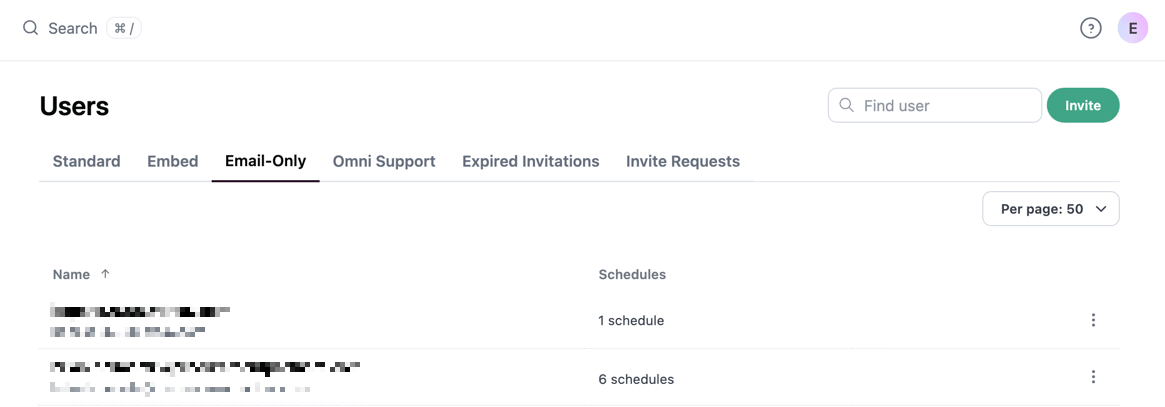 The tab displays each user's **Name** and the number of **Schedules** they are included in.
### Inviting email-only users to your organization
Email-only users can be invited to join your organization as a [standard user](/administration/users/invite). The email-only user's user attributes will be retained and they will remain recipients of schedules.
1. In the **Settings > Users > Email-only tab**, locate the user you want to work with.
2. Click the in the same row as the user.
3. Click **Invite to Standard User**.
Omni will move the user to the **Standard** tab and display an Invited next to their display name.
### Deleting email-only users
**Heads up!** Deleting an email-only user removes their email from all deliveries where they are a recipient.
1. In the **Settings > Users > Email-only tab**, locate the user you want to work with.
2. Click the in the same row as the user.
3. Click **Remove Scheduler User**.
### Assigning user attributes
You can assign [user attribute](/administration/users/attributes) values to email-only users. This is useful when you want to personalize the content of a delivery for each recipient using the **Personalize delivery with recipient user attributes** option in the [email delivery settings](/share/deliveries/email).
For example, you could assign a `region` attribute to each email-only user and deliver a dashboard that filters to only their region's data.
If an attribute is used in an [access filter](/modeling/topics/parameters/access-filters) or [`default_topic_access_filters`](/modeling/models/default-topic-access-filters), do not set a default value for that attribute. Email-only users are created automatically and immediately inherit default attribute values. If the default matches a `values_for_unfiltered` value, these users will receive unfiltered data in every delivery they are included in. Use the [manage email-only user API](/api/schedule-recipients/manage-email-only-user) or [bulk manage API](/api/schedule-recipients/bulk-manage-email-only-users) to set correct attribute values before the delivery runs. Refer to the [default value warning](/administration/users/attributes#creating-user-attributes) on the User attributes page for details.
### Provision email-only users with correct attributes before scheduling
If a recipient doesn't have an Omni account, Omni auto-creates an email-only user when the delivery is saved. You must set that user's attributes before the delivery runs — otherwise they will inherit the default attribute value, which may return error or no rows.
Use the [manage email-only user API](/api/schedule-recipients/manage-email-only-user) to set attributes for a single user, or the [bulk manage API](/api/schedule-recipients/bulk-manage-email-only-users) to update up to 20 users at once.
### How Omni resolves a delivery recipient by email
When a recipient email is added to a delivery, Omni checks for a matching user in the following order: standard/external/embed SSO user (or pending invite) → embed user via the `email` URL parameter → email-only user. The first match wins, and when **Personalize delivery with recipient user attributes** is enabled, the matched user's attributes are what get applied.
Omni first looks for an active **standard user**, **external user**, or **embed SSO user** whose account email matches the recipient email. Users with a **pending invitation** at that email are also included here.
If no standard account email matches, Omni looks for an **embed user** associated with the recipient email through the `email`[ URL parameter](/embed/setup/url-parameters/email). This is the typical case for non-SSO embed users whose work email is passed in at embed time.
If no embed association is found, Omni falls back to an **email-only user** with that email — either an existing one or a new placeholder created when the delivery is saved.
For the full resolution order and embed-specific guidance, see the [Personalize delivery](/share/deliveries/email#email-settings) section of the email deliveries documentation.
The tab displays each user's **Name** and the number of **Schedules** they are included in.
### Inviting email-only users to your organization
Email-only users can be invited to join your organization as a [standard user](/administration/users/invite). The email-only user's user attributes will be retained and they will remain recipients of schedules.
1. In the **Settings > Users > Email-only tab**, locate the user you want to work with.
2. Click the in the same row as the user.
3. Click **Invite to Standard User**.
Omni will move the user to the **Standard** tab and display an Invited next to their display name.
### Deleting email-only users
**Heads up!** Deleting an email-only user removes their email from all deliveries where they are a recipient.
1. In the **Settings > Users > Email-only tab**, locate the user you want to work with.
2. Click the in the same row as the user.
3. Click **Remove Scheduler User**.
### Assigning user attributes
You can assign [user attribute](/administration/users/attributes) values to email-only users. This is useful when you want to personalize the content of a delivery for each recipient using the **Personalize delivery with recipient user attributes** option in the [email delivery settings](/share/deliveries/email).
For example, you could assign a `region` attribute to each email-only user and deliver a dashboard that filters to only their region's data.
If an attribute is used in an [access filter](/modeling/topics/parameters/access-filters) or [`default_topic_access_filters`](/modeling/models/default-topic-access-filters), do not set a default value for that attribute. Email-only users are created automatically and immediately inherit default attribute values. If the default matches a `values_for_unfiltered` value, these users will receive unfiltered data in every delivery they are included in. Use the [manage email-only user API](/api/schedule-recipients/manage-email-only-user) or [bulk manage API](/api/schedule-recipients/bulk-manage-email-only-users) to set correct attribute values before the delivery runs. Refer to the [default value warning](/administration/users/attributes#creating-user-attributes) on the User attributes page for details.
### Provision email-only users with correct attributes before scheduling
If a recipient doesn't have an Omni account, Omni auto-creates an email-only user when the delivery is saved. You must set that user's attributes before the delivery runs — otherwise they will inherit the default attribute value, which may return error or no rows.
Use the [manage email-only user API](/api/schedule-recipients/manage-email-only-user) to set attributes for a single user, or the [bulk manage API](/api/schedule-recipients/bulk-manage-email-only-users) to update up to 20 users at once.
### How Omni resolves a delivery recipient by email
When a recipient email is added to a delivery, Omni checks for a matching user in the following order: standard/external/embed SSO user (or pending invite) → embed user via the `email` URL parameter → email-only user. The first match wins, and when **Personalize delivery with recipient user attributes** is enabled, the matched user's attributes are what get applied.
Omni first looks for an active **standard user**, **external user**, or **embed SSO user** whose account email matches the recipient email. Users with a **pending invitation** at that email are also included here.
If no standard account email matches, Omni looks for an **embed user** associated with the recipient email through the `email`[ URL parameter](/embed/setup/url-parameters/email). This is the typical case for non-SSO embed users whose work email is passed in at embed time.
If no embed association is found, Omni falls back to an **email-only user** with that email — either an existing one or a new placeholder created when the delivery is saved.
For the full resolution order and embed-specific guidance, see the [Personalize delivery](/share/deliveries/email#email-settings) section of the email deliveries documentation.